
Participating Frequently
November 28, 2017
Answered

CC 2018 upgrade issues?

  • November 28, 2017
  • 1 reply
  • 435 views

Hello
I'm still have significant problems after the CC2018 update.  Currently running Win10.  PS version 19.0  (Just heard 19.01 was released but did not show in my CC Installer)


Main issues are Keyboard shortcuts for Tools are not working consistently.
An example is if I select the Brush tool, it sometimes will not change.
If it does change, and I try to change the Brush size with Bracket keys it reverts back to the previous Tool....or it will change to the Pencil tool.  It's not consistent in how it fails.
And it's not consistent from log in to log in. ie, it goes beyond Keyboard Tool selection issues.
Today, I added a text layer, and selected out of the Text highlight.
And the text displayed in the Layer stack. All normal.  I then wanted to reposition the text with the Move tool.  I pressed the V key and the Move tool selected...but the layer selection moved down a layer, so the entire underlaying Layer moved when I used the tool.
Other issues include Dodge and Burn tool.  Once it does select the DBTool, when I press the Alt key to change from D to B (or vise versa), it changes to a different tool.

As well as the Pen Tool.  When I press the space bar to reposition the image...it sometimes changes away from the Pen tool to some random tool.

As I write this, it dawns on me that maybe I should re-install?  I've not done that yet. And I'm not reading complaints from others with these same issues. 

Any advice is appreciated.  I've already follow instructions on resetting the tool preset.  Did not work. 

Thanks everyone.
P
    This topic has been closed for replies.
    Correct answer gener7

    The "About" screen won't tell you but Help > System Info should read:

    Adobe Photoshop Version: 19.0 20171103.r.190 2017/11/03: 1143799  x64

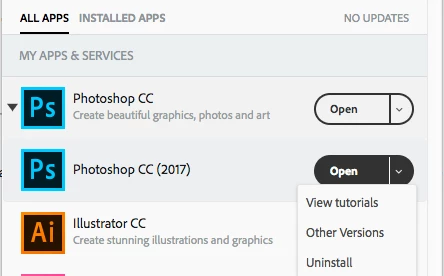
    Try a reinstall. It won't take too long. Use the Desktop App to Uninstall and Reinstall. You will see uninstall under the Open button dropdown menu as shown in the example below. The reinstall will have the latest updates. Use the Advanced option when you install and uncheck Remove Previous Versions if you want to keep them.

    1 reply

    gener7
    Community Expert
    gener7Community ExpertCorrect answer
    Community Expert
    November 28, 2017

    The "About" screen won't tell you but Help > System Info should read:

    Adobe Photoshop Version: 19.0 20171103.r.190 2017/11/03: 1143799  x64

    Try a reinstall. It won't take too long. Use the Desktop App to Uninstall and Reinstall. You will see uninstall under the Open button dropdown menu as shown in the example below. The reinstall will have the latest updates. Use the Advanced option when you install and uncheck Remove Previous Versions if you want to keep them.

    Participating Frequently
    November 28, 2017

    Thankyou gener7!  I'll give it a try tonight.  Thankyou for the advice to go thru Desktop App for both Un and Re-Install.

    gener7
    Community Expert
    Community Expert
    November 28, 2017

    Ok. I'm usually around. So let me know how it went. I had a problem with CC 2018 crashing and a reinstall worked.