Jim Kinney AEL
Known Participant
January 15, 2018
Answered

Issue with "Selected Layers" Tweening option

  • January 15, 2018
  • 1 reply
  • 2597 views

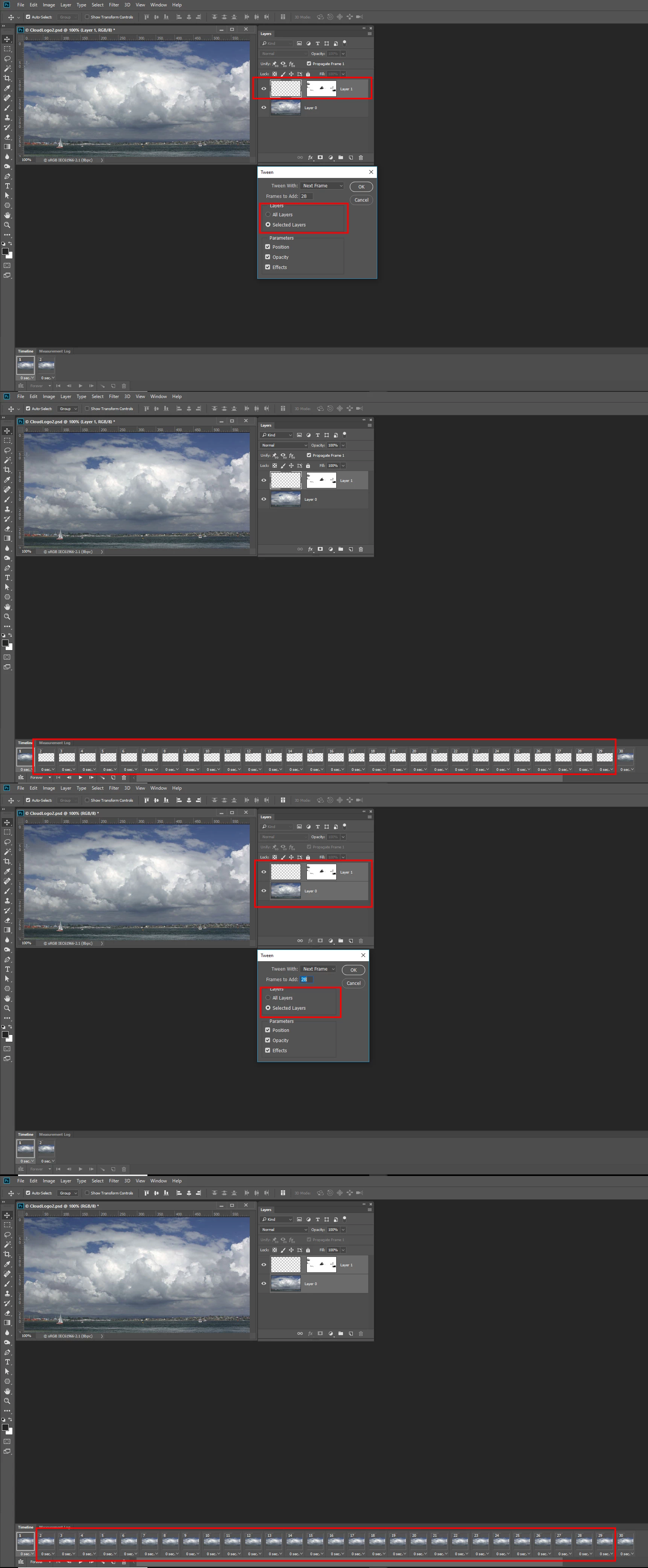
Using the Photoshop CC 2017 Frame Animation Timeline for tweening an object's position using the "Selected Layers" option generates empty frames despite the fact that the beginning and ending keyframes are from the same layer and that layer is selected. I repeated the process using "All Layers" and it works fine; however, it should work using the "Selected Layers" option given the fact that the tweening object emanates from a single layer and is used for both start and end positions.

I have attached a link to a silent video to demonstrate the issue.

Photoshop CC 2017 Issue with "Selected Layers" tweening option - YouTube

This issue was initially flagged by Jeffrey Tranberry Sr. Product Manager. JeffreyTranberry
This topic has been closed for replies.
Correct answer JJMack

I do not know why Adobe Implemented Tween the way they did.  To me it seems that intuitive way to do it would be to use the layers that are visible in the two frames used ]In the tween animation process.  Not have that all layers visible or selected layer option used in the tween process.  I believe Tween is working as designed.  I just do not understand why Adobe implemented tween the way they did.  My Animation has two layers and I created two Frames with both layers visible in the two Frames I created.    Tween will not generated the frames between the way I want unless I select the Layer to use in the layer palette or use the All Layer visible option.  If I only select one layer in the layers palette only that layer is animated in the frames between.

1 reply

JJMack
Community Expert
JJMackCommunity ExpertCorrect answer
Community Expert
January 15, 2018

I do not know why Adobe Implemented Tween the way they did.  To me it seems that intuitive way to do it would be to use the layers that are visible in the two frames used ]In the tween animation process.  Not have that all layers visible or selected layer option used in the tween process.  I believe Tween is working as designed.  I just do not understand why Adobe implemented tween the way they did.  My Animation has two layers and I created two Frames with both layers visible in the two Frames I created.    Tween will not generated the frames between the way I want unless I select the Layer to use in the layer palette or use the All Layer visible option.  If I only select one layer in the layers palette only that layer is animated in the frames between.

JJMack
Jim Kinney AEL
Known Participant
January 16, 2018

The fact that you had to select all layers, including the background which does not animate is confusing. I will try with all layers selected although I felt that "Selected Layers" meant that you could tween things within a single layer that was selected. Clarity required in the naming of functions and in the official documentation.

Jim Kinney AEL
Known Participant
January 16, 2018

Thanks JJ!