
Participating Frequently
January 30, 2019
Answered

Select and mask freezes

  • January 30, 2019
  • 4 replies
  • 9587 views

When I use select and mask, at a certain point the screen freezes. It is not possible to switch between +and -  or OK/cancel the mask.

I tried reinstalling photoshop, updating nvadia drivers, disconnecting gpu, switching from 16 to 8 bits - nothing works. I can go back to save the image, have to quit photoshop completely and start again losing all my work.

Please help to resolve!
    This topic has been closed for replies.
    Correct answer

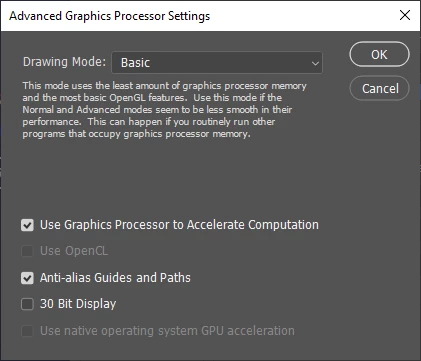
    actually i can't even select/deselect openCL in the settings...


    Hi

    Take a look here, especially section 7

    Troubleshoot Photoshop graphics processor (GPU) and graphics driver issues

    4 replies

    Participant
    May 19, 2024

    I have updated all drivers and latest version of beta (25.1 release) and this bug persists. Closing select and mask and relauching it sometimes helps. Before it's suggested, I have plenty of RAM and scratch disk space. This bug is significantly impeding my work this week and last week. Fix it!

    Inspiring
    May 26, 2020

    Hello Katjav,


    I have a similar problem ,where my Mac freezes, and I have to unplug the plug to start it up again.

    I had a different problem with Topaz Mask, and was told that I didn't have enough GB on my graphics card. I needed to have at least 8 GB.  My RAM is 24 GB (OK), and my computer is a 2013, but my graphics card is 2 GB.


    If you check out the data for your graphics card (Mac or PC) by searching for your specific graphics card and specifications, I'm quite sure it's your graphics card, or perhaps the CPU (depends how old your computer is).

    Participant
    March 9, 2019

    As it turned out for me, if I used my Wacom pen zoomed in...crash every time. Use mouse....no crash. Its a known issue.

    When working in Photoshop with a Microsoft Surface Pen or a Wacom device with pen/stylus, the following issues may occur:

    • The Select and Mask workspace freezes while making a selection or painting on an image while zoomed in.
    • The Content-Aware Fill workspace freezes on releasing a pen stroke.

    Workaround: Switching to a mouse resolves these issues in some cases.

    Participating Frequently
    December 31, 2019

    Same problem here with a Wacom tablet, seriously, that's the solution? 


    What year is this?!

    D Fosse
    Community Expert
    Community Expert
    December 31, 2019

    Select and Mask uses OpenCL, executed in the GPU. So it's a video driver problem. Update or roll back, or wait for a driver version that works.

    davescm
    Community Expert
    Community Expert
    January 31, 2019

    Hi

    Select and Mask issues are often associated with the GPU . In order to try and help you, can you go to Help >System info and click copy. Then paste the info here.

    Dave

    Trevor.Dennis
    Community Expert
    Community Expert
    January 31, 2019

    I've found that low spec hardware is also prone to freeze with Select & Mask.  My Cintiq Companion 2 for instance, that has an i5 CPU, and a less than stellar GPU, and tends toward jerky performance, and an unsatisfactory Photoshop experience.