
Participant
June 9, 2012
Answered

Photoshop CS6 clone tool not working

  • June 9, 2012
  • 3 replies
  • 39212 views

My son banged on my keyboard while I was in the middle of editing a photo using the clone tool. Now the tool is looks as though it's working when I'm sampling an area but when I go to change the designated area it isn't doing anything. And it's got a bright white spot in the circle. Help please!
    This topic has been closed for replies.
    Correct answer Jeff Arola

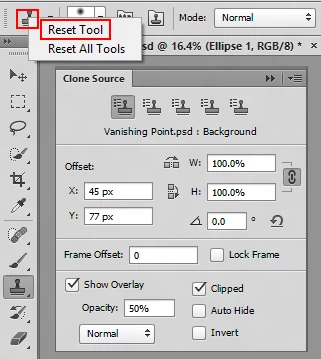
    I'd try resetting the clone stamp tool by right clicking on the clone stamp icon in the tool options bar and choosing Reset Tool

    and also check your options in the clone source panel. (Window>Clone Source)

    3 replies

    Participant
    September 6, 2024

    I have Elements 15 with the same issue, my fix was the "Mode:" dropdown on the Clone Stamp option page somehow got set to "Saturate", I set it back to "Normal" and it worked.

    Thanks to everybody that has posted!

    Participant
    May 25, 2016

    Solution: click "Q" on the keyboard to exit Quick Mask Mode.

    I came across this post because I had the exact same problem. The suggestions weren't fixing it, and I also wasn't able to copy and paste with a selection tool. By luck I noticed that my file said "Quick Mask" next to the title tab. Exiting quick mask (typing Q) restored editing abilities.

    Participant
    October 1, 2019
    Thank you! Such a quick and simple fix! Works fine now.
    Jeff Arola
    Community Expert
    Jeff ArolaCommunity ExpertCorrect answer
    Community Expert
    June 9, 2012

    I'd try resetting the clone stamp tool by right clicking on the clone stamp icon in the tool options bar and choosing Reset Tool

    and also check your options in the clone source panel. (Window>Clone Source)

    Participating Frequently
    February 3, 2014

    The clone tool suddenly stopped working today.  I read all the posts and did everything mentioned.  I went back to CS5 and it works fine. I did notice in PS CC the clone tool sets the brush in TRANSFER to pen pressure.  I can turn that off and lock it, but it will immediately turn it back on when I use the clone tool.  It was working fine one second then stopped.  It is working VERY lightly even though set to 100%. I discovered this by creating a new document with black and white and cloning there. 

    What happened?

    I did have a CC update just before this happened.  I did reset everything, turn everything on and off, turn off the Graphics Processor, turn off every other application, updated the driver for the waccom tablet... all to no avail.

    Any solutions?  I shall have to go back to CS5.  Don't want to.  HELP!

    Participant
    February 21, 2014

    My clone tool stopped working, and I fixed it by switching the Sample dropdown in the control panel from Current Layer to All Layers. Not sure if you're having the same problem, but that did the trick for me.