
craignotfamous
Known Participant
March 29, 2019
Answered

Does content affect file size a LOT when exporting .pngs ?

  • March 29, 2019
  • 6 replies
  • 1788 views

I've been messing about trying to export a print ready png of some line art
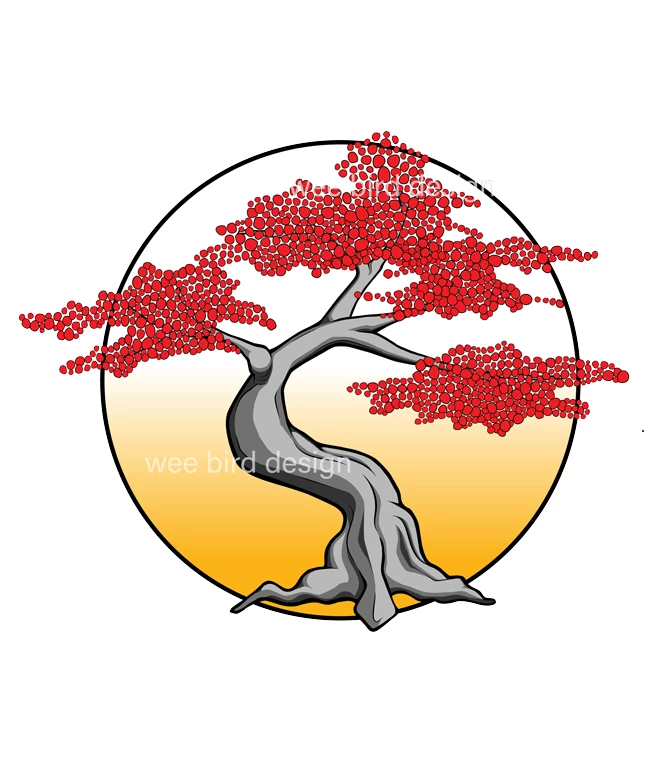
I've been on the forum previously and was informed that the correct way to export png and jpeg for print is using the "save as" option rather than the save for web, so that is what I've done in this case.

When I export this as full res as  a jpeg it comes in around 8mb, when I do so as a png it's much smaller at 2.5mb, which is a bit confusing as I thought pngs are lossless and therefore bigger. I compared the 2 file visually at 100% in PS and they looked nearly identical. I am wondering if the content being very simple affects the file size to this extent. To test this idea I imported a large landscape photo into PS and went through the same process, saving as jpeg and png, the png came out much larger file size than the jpeg in this case.

This would seem to confirm to me that content affects filesize a great deal with png format, am I wrong or missing something?

Many thanks,

Craig

This topic has been closed for replies.
Correct answer Michael Bullo

Hi Craig,

You are correct. The content can dramatically alter the file size.

JPEG

Generally speaking, this format is best for photos with potentially a wide range of colour.

PNG

Generally speaking, this format is best for images with large areas of solid colour.

Yes your image does include a gradient but the bulk of it is made up of large blocks of solid colour. As mentioned earlier this is perfect for PNG files and produces a smaller file as you've already discovered.

A good thing to know if you don't already is that PNG files can support transparency but JPEG can not.

6 replies

Legend
March 29, 2019

You know, I read my reply and realise I wrote “a strong reason to use JPEG” when I meant “a strong reason NOT to use JPEG”... but I think we’re on the same page.

Legend
March 29, 2019

There's another strong reason to use JPEG for this particular kind of work. JPEG is designed for photographic work. That's what the P in JPEG stands for. It gets images small by a deep understanding of how we see real-world photos. We tolerate small changes in colour well, in brightness less well, and so on. So JPEG changes colour (the "lossy" part). Where it gets interesting is in using JPEG for things that aren't photos.

JPEG used on solid colour and solid edges is often very poor, you can often see damage and fuzziness even at high qualities. It's bad for line art and a disaster for text. PNG is ideal for all these usages, even if it isn't smaller.

craignotfamous
Known Participant
March 29, 2019

Hey thanks test screen. You know I had noticed there's a difference in the way larger pngs load on screen of my phone screen to the way jpegs do, it kind of loads in blocks as the resolution becomes clearer, difficult to explain what I mean, but it makes sense to me what you are saying about solid colour and edges being better on pngs, there's definitely an appreciable difference.

craignotfamous
Known Participant
March 29, 2019

Thanks for the info everyone. Very helpful and allays my fears that I might have exported incorrectly. Looks like I'll be using png to save on file size as well as for transparency.

Thanks agin.

Craig

Trevor.Dennis
Community Expert
Community Expert
March 29, 2019

I don't know how PNG compression works, but content makes a HUGE difference to file size when saving out to JPG.  If you create a document and fill with a single colour, and save to a max quality JPG, and then fill the layer with noise and save to a different file name, then the difference in file size might surprise you

This was a 1000 pixel square, one filled with red, and the other with the noise in this screen shot.

I guess I should repeat this with PNG.  I went with medium quality.

So JPG had size ratio of 61, and PNG 143.

If you really want to get into some serious pixel peeping, then Wikipedia has excellent pages on both formats

JPEG - Wikipedia

Portable Network Graphics - Wikipedia

I read the JPG entry some years ago, but I am more than happy to take a black box approach to these things.  It's on a par with enjoying watching your big screen TV, without needing to know more than the very basics of what goes on inside it.

Legend
March 29, 2019

PNG compression is basically ZIP compression, with some clever tricks to make it more effective. It's always lossless. Because ZIP is looking for repeated patterns, blocks of the same colour compress to virtually nothing.

Clever tricks including changing what is compressed so it is the difference between pixels, rather than the pixels themselves. This is amazingly effective for a gradient, where all the colours are different, but each colour has an identical difference; gradients may also  compress to virtually nothing.

Michael Bullo
Community Expert
Michael BulloCommunity ExpertCorrect answer
Community Expert
March 29, 2019

Hi Craig,

You are correct. The content can dramatically alter the file size.

JPEG

Generally speaking, this format is best for photos with potentially a wide range of colour.

PNG

Generally speaking, this format is best for images with large areas of solid colour.

Yes your image does include a gradient but the bulk of it is made up of large blocks of solid colour. As mentioned earlier this is perfect for PNG files and produces a smaller file as you've already discovered.

A good thing to know if you don't already is that PNG files can support transparency but JPEG can not.

JJMack
Community Expert
Community Expert
March 29, 2019

Most image  File formats use data compression to store pixels information to reduce space required for storage.  How small  a image compresses depends on how much detail you have in the image.  Image content play a big part in the process.  A panted white wall has little to no detail its white with little texture.  A red brick wall has a lot more detail.   An image that has a 8MP canvas size may compress to a few K or several MB. Pixel data is the bulk of the data in and image file.  Metadata normally is a small amount of data.

Save for web does not save  large image. It save image for web for use on web devices.  The is no reason Save for web needs to save giga pixel images in fact it can not.  Save As is more approbate for high resolution print images.  Most Print size image are too large for web use.  However you can transport print size image over the web.  A Web browser cal also scale a print size image down in size and displays it on your display.  But who wants the wait a minute or two for the image  to transfer across the web.

JJMack