Inspiring
April 19, 2021
Answered

Straighten tool as good as Apple's Photos?

  • April 19, 2021
  • 2 replies
  • 1588 views

Apple's Photos, there is   straighten tool with a  turning wheel that just blows away the straighten tool I've been using for years in PS and ACR? (where you click a ruler, and draw a straight line).   Is this as of yet in PS or ACR, maybe I'm not aware of it?

This topic has been closed for replies.
Correct answer c.pfaffenbichler

Ok trying the rotate in PS, not bad, anyway to not get the annoying super drid to cover jpegs?  Also , unlike Apple, it's forcing another save, asking quality. Anyway to not get that. Apple just does crop and don't get overlay grid or have to degrade quality with new save.


»Apple just does crop and don't get overlay grid or have to degrade quality with new save.«

You think the image does not get compressed anew after being rotated in the Apple application?

How would that work? 


»Anyway to not get that.«

Resaving jpg is a bad idea to begin with and whether the dialog appears depends on the settings YOU chose for the crop Tool (if the image is still just a Background Layer, that is)! 

You should save as a non-lossy format. 


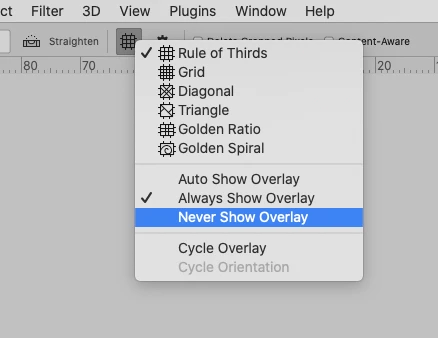
»anyway to not get the annoying super drid to cover jpegs«

Do you mean the Grid? »Never Show Overlay« … 
2 replies

Michael Bullo
Community Expert
Community Expert
April 19, 2021

With the Crop tool active, look in the Options bar running along the top of Photoshop for the Straighten option. When active, you draw a line on the canvas for Photoshop to align to. Deactivate the Delete Cropped Pixels option to avoid losing pixels (although they may be hidden off the edge of the canvas).

c.pfaffenbichler
Community Expert
Community Expert
April 19, 2021

One can also rotate with the Crop Tool without the Ruler Tool. 

Michael Bullo
Community Expert
Community Expert
April 19, 2021

Nice

c.pfaffenbichler
Community Expert
Community Expert
April 19, 2021

Please demonstrate what you are talking about and post meaningful screenshots.
