Hi Dwayne,
No Photoshop will not remain up to date via a desktop shortcut. There are two ways to keep it current. In the Adobe Desktop App click the gear wheel and select 'Check for updates' or in Photoshop under the Help menu click on 'Updates' They are virtually the same thing as the latter simply launches the desktop app.
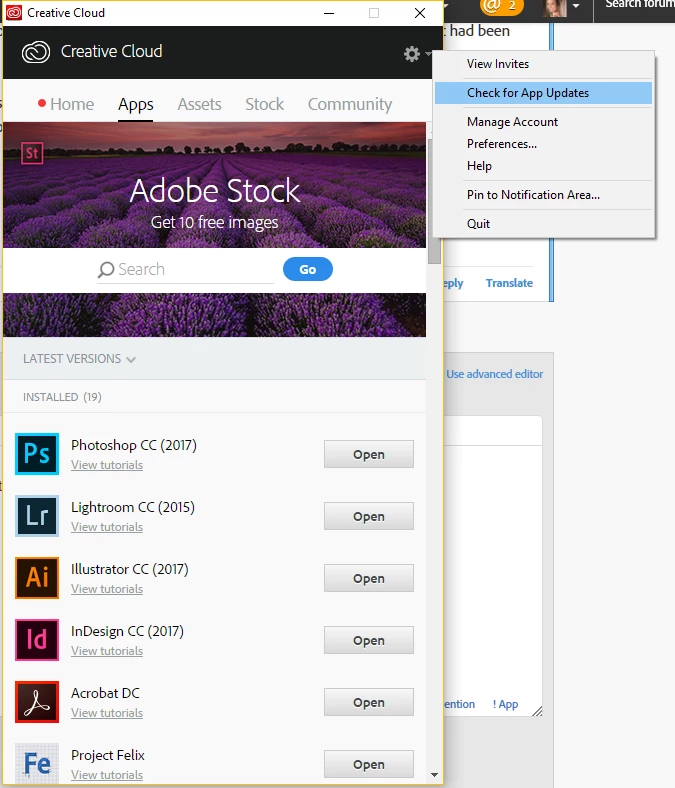
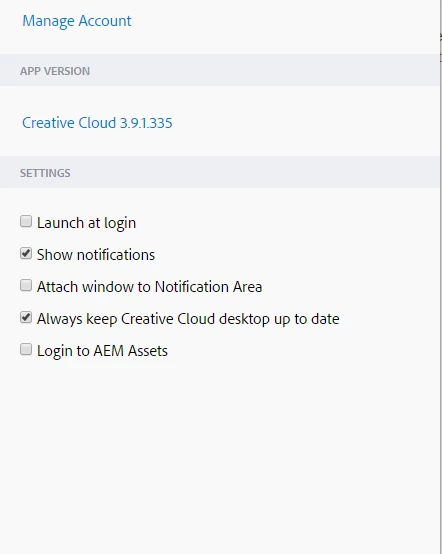
If you have the desktop app launching every time the computer starts you can set it to keep the Creative Cloud Desktop up to date and automatically check for updates. When an update is available the open button says 'Update'. You can check your settings by clicking the gear wheel and selecting 'preferences'. You can see from my settings below I don't have the app running all the time as it really isn't necessary, providing you start it manually every few days to check on things. It might be an idea to check your Creative Cloud version is 3.9.1.335 also


 AdChoices