Jayne B
Participant
March 9, 2025
Answered

Brushes in PS. I have created some brushes on my PC PShop but how to get to my laptop?

  • March 9, 2025
  • 3 replies
  • 326 views

PShop Brushes:  I have created some brushes on my PC at home copy of Photoshop, but how do I get them on to my laptop copy of Photoshop?  I have CC on both machines.


Correct answer Trevor.Dennis

Reading your post again, I think we need to expand on what we have told you.


  1. I have some new brush presets that I have made and placed in a new folder.  As things stand, I will lose those presets unless I export them.
  2. I need to rename them first, to give them meaningful names.  It is difficult renaming presets they have been exported.  e.g. you can rename them, but if you delete the group from the mail panel and later reload it, the presets will have reverted to their original names.  Note: You can absolutely rename the groups with are the .abr files on your drive.  This is a good idea because you can make them list in alphabetical order by category — very useful if you have a lot of groups to scroll through.
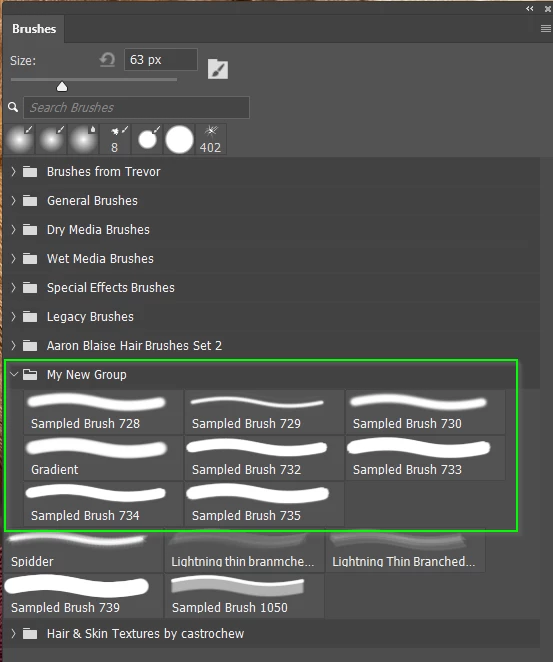
3. Select all of the presets in your group (not the group) and Export them.

Job done.
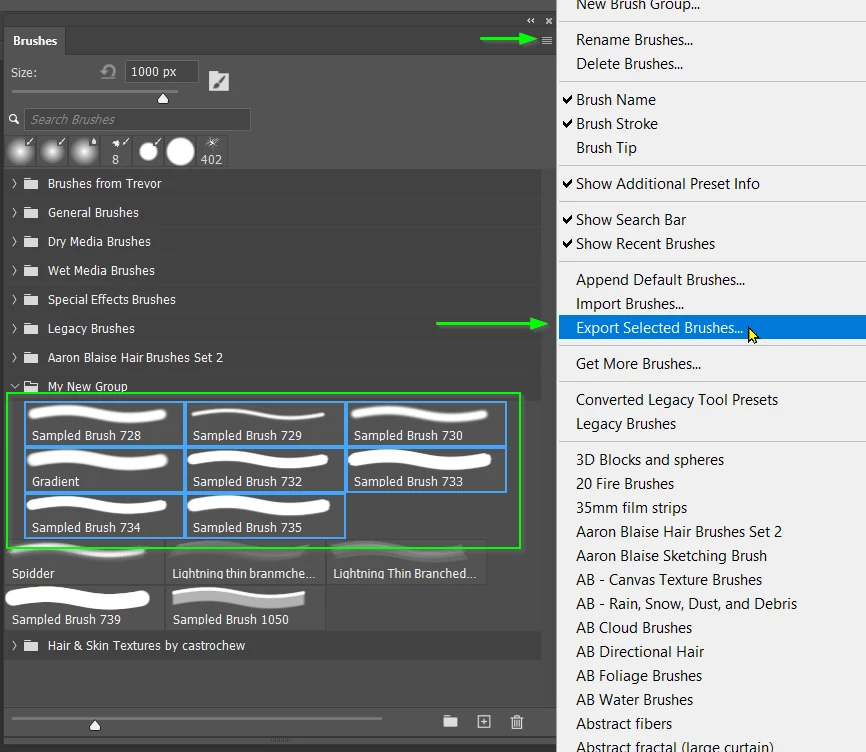
3 replies

Trevor.Dennis
Community Expert
Trevor.DennisCommunity ExpertCorrect answer
Community Expert
March 9, 2025

Reading your post again, I think we need to expand on what we have told you.


  1. I have some new brush presets that I have made and placed in a new folder.  As things stand, I will lose those presets unless I export them.
  2. I need to rename them first, to give them meaningful names.  It is difficult renaming presets they have been exported.  e.g. you can rename them, but if you delete the group from the mail panel and later reload it, the presets will have reverted to their original names.  Note: You can absolutely rename the groups with are the .abr files on your drive.  This is a good idea because you can make them list in alphabetical order by category — very useful if you have a lot of groups to scroll through.

3. Select all of the presets in your group (not the group) and Export them.

Job done.

Trevor.Dennis
Community Expert
Community Expert
March 9, 2025

You are using Windows, so:


C:\Users\[Your User Name]\AppData\Roaming\Adobe\Adobe Photoshop 2025\Presets\Brushes


This will be full of .abr files, each one representing a brush group.  Do as @D Fosse suggested, and copy them to wherever you need them.  It is safest to place them in something like a My Documents folder so you know they will be safe with the next major version update.


I do this and place a shortcut to that folder in the Presets folder. This makes it easy to share the same presets with the current Release version, the Beta version if you are using it, and any previous versions you still have installed. (Like 22.2 if you keep it for Lighting Effects and 3D.)  Blimey!  I just checked and I have 1.5GB of brush presets, so I am also saving 3GB of drive space.


D Fosse
Community Expert
Community Expert
March 9, 2025

Save them out, put them on a USB stick and load on the other machine. It's in the brush panel menu.