MahaB82A
August 6, 2025
Answered

Layer in question

  • August 6, 2025
  • 3 replies
  • 572 views

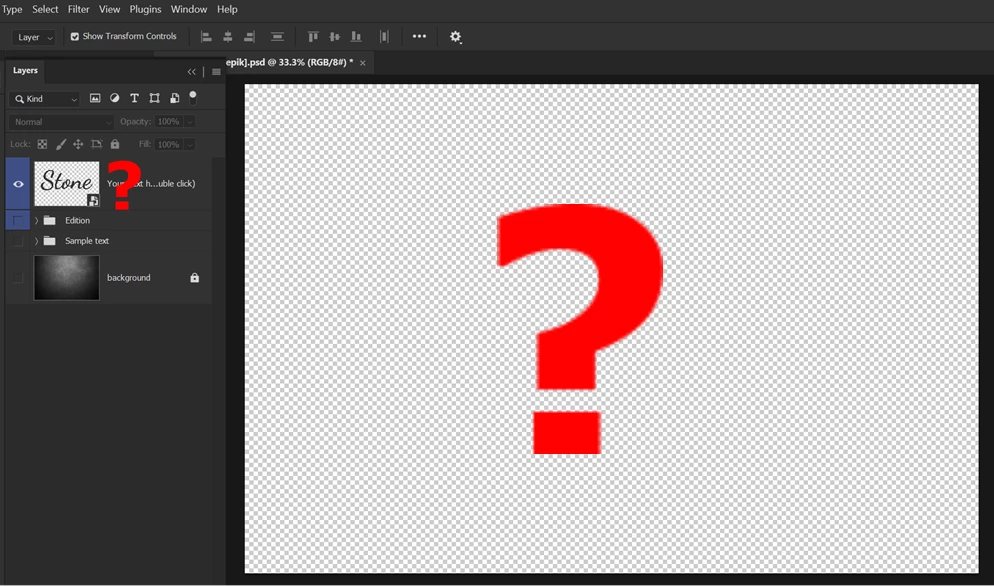
This file was downloaded from freepik. What is the purpose of the top layer? Without this layer file will remain the same. 


[Shift+Double click on this layer icon] open a new window of this layer in grphic area . File is uploaded as well.
Stone Folder


Correct answer Stephen Marsh
quote

@Aleke

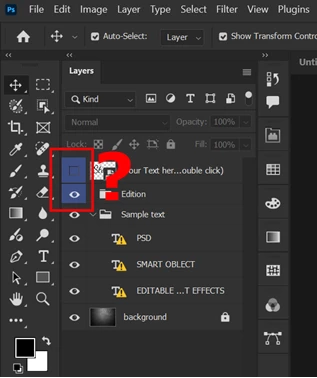
What is the reason these 2 layers are highlighted in blue color.


By @MahaB82A


To identify them, usually visually (perhaps without grouping them into a folder group)... This can be used to filter the layer panel content based on color, or a script can automate processing a layer with a specific colour label.

3 replies

MahaB82A
MahaB82AAuthor
August 8, 2025

@Aleke

What is the reason these 2 layers are highlighted in blue color.


Stephen Marsh
Community Expert
Stephen MarshCommunity ExpertCorrect answer
Community Expert
August 8, 2025
quote

@Aleke

What is the reason these 2 layers are highlighted in blue color.


By @MahaB82A


To identify them, usually visually (perhaps without grouping them into a folder group)... This can be used to filter the layer panel content based on color, or a script can automate processing a layer with a specific colour label.

MahaB82A
MahaB82AAuthor
August 9, 2025

@Stephen Marsh

Thanks for the explanation & link as well.

Inspiring
August 7, 2025

[Abuse removed by moderator]


Community Manager
August 6, 2025

Hi @MahaB82A, thanks so much for reaching out!


That layer is a Smart Object, which means you can double-click it to open and edit it. Any changes you make will automatically update across all instances in the original document once saved. If you take a look inside the folders, you’ll see multiple copies of the same Smart Object, they’re all linked, so editing one updates them all.


As for the top layer with the 0% opacity Stone text, I think it’s just there as an easy way to access the Smart Object. Otherwise, you'd have to dig through all the folders to find the Smart Object and edit it from there.

Hope that clears things up!

Alek

*(If you mention me with an @, like @Aleke, I’ll get a notification and can respond faster.)*
Inspiring
August 7, 2025

Just for reference, Smart Objects in the layers panel are identified with this little icon in the corner of the thumbnail (circled in blue). 

.