It's because some of the text was deliberately typed in all caps in the source document (such typing with the Shift Key pessed down in MS Word), other parts used the Caps/Lowercase icon in the ribbon bar to make it caps.
Capital characters are different glyphs than lowercase letters: see this basic Unicode character chart https://www.unicode.org/charts/PDF/U0000.pdf Capital A = codepoint 0041, and lowercase a = codepoint 0061.
Some word processing programs retain the originally created CAPS / lowercase letters as they were typed, but change their appearance (not the actual character) with the "case toggle" icon.
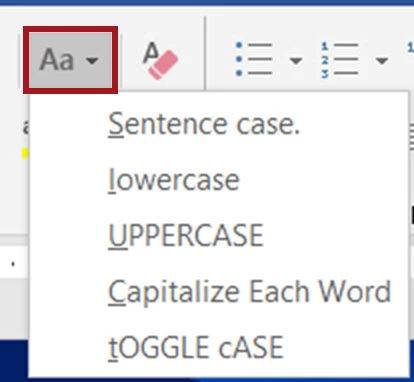
When the PDF is exported, it retains the original case and the rendered appearance in the PDF.
And when you later extract the content from the PDF, the original case and appearance is also retained.
In your sample, it's clear that the original author was not consistent in how they typed the actual letters, and that was masked by the case toggle icon, so that all the letters appeared as CAPS, but in reality weren't.
Bottom line: that's how the content was originally typed, and it was carried through all of the file variations.
| Bevi Chagnon | Designer, Trainer, & Technologist for Accessible Documents || PubCom | Classes & Books for Accessible InDesign, PDFs & MS Office |




 AdChoices