


Participant
October 8, 2019
Question

エクスプローラーの右クリックメニューからPDF編集・結合ができない

  • October 8, 2019
  • 2 replies
  • 32320 views

Adobe Acrobat 2017 Pro (17.011.30148) を
Windows10 1903(18362.356)で使用しています。


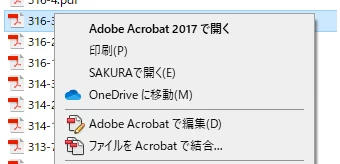
エクスプローラ上でPDFを右クリックすると
・Adobe Acrobat で編集
・ファイルを Acrobat で結合
というメニューがありますが、いずれをクリックしてもAcrobatが起動後「ホーム」が開くだけで選択されているファイルの操作画面にならないという現象が発生し、困っております(インストール当初から)。


以前のバージョンでは、選択したファイルの結合や編集をする画面になったのですが…

仕様変更というわけではないですよね?


また、「ファイルを結合」のドラッグ&ドロップも何故か効きません。原因は同じではないかと疑っています。
「ファイルを追加」ボタンからの追加はできますし、PDFの結合自体はエラーなどなくできます。


Acrobatを入れるよりも先にReaderを入れていたので、何か関係があるかもしれないと思い、Readerを削除してから再インストールなども試してみましたが駄目でした。

ヘルプ→インストールの修復も試行済みです。


考えられる原因などがあれば挙げていただければ幸いです。
よろしくお願いいたします。
 

    This topic has been closed for replies.

    2 replies

    inoino92Author
    Participant
    October 16, 2019

    自己解決しましたのでご報告します。


    C:\Program Files (x86)\Adobe\Acrobat 2017\Acrobat\Acrobat.exe

    のプロパティを開き、「管理者としてこのプログラムを実行する」のチェックを外します


    私はこれで正常に動作するようになりました。

    通常のインストールでは管理者権限にならないものなのでしょうか?


    管理者権限がないとできないことはいろいろありますが、管理者権限のせいで出来ないことがあるとは思わなかったので、解決に時間がかかりました。


    また、ユーザーアカウント制御のレベル設定問題が関係しており、管理者権限を変えなくても解決するというような情報もあります(こちらは未確認です)。


    同様の症状にてお困りの方は一度exeの管理者権限やユーザーアカウント制御の設定を確認し、変えて試してみると良いかもしれません。

    管理者権限を外したことにより何か不都合が生じた際は、またこちらに投稿します。


    Amal.
    Community Manager
    Community Manager
    October 16, 2019

    Hi

    Thank you for sharing the workaround. it will be helpful for other users as well facing the similar issue.


    Do let us know if you need any assistance in the future.


    Regards

    Amal

    Amal.
    Community Manager
    Community Manager
    October 8, 2019

    Hi Inoino,


    Thanks for reaching out. As described above, you cannot edit / combine PDF from Explorer's right-click menu, correct?


    Are you able to edit and combine the PDF files when opened with Adobe Acrobat 2017 pro? 


    Please check for any necessary and recommended updates for windows and reboot the computer and try again.


    Since you have already tried Repair Installation from the Help menu, without any success. Please try the steps below:


    Do you have the serial key/ Product key handy with you? If you do, you may try removing the application using the Adobe Acrobat Cleaner Tool - https://labs.adobe.com/downloads/acrobatcleaner.html , Reboot the computer and reinstall the application using the product key.


    Note: Never share your product key with anyone as the spammers may contact you asking for the same.


    Let us know how it goes


    Regards

    Amal

    inoino92Author
    Participant
    October 11, 2019

    回答ありがとうございます。

    Cleaner Toolを使用後、PCを再起動してから再度インストールしましたが、改善しませんでした。