


Participant
Sep 1, 2025 6:39 AM UTC
Answered

Adobe Firefly のGPTイメージで画像生成しようとすると

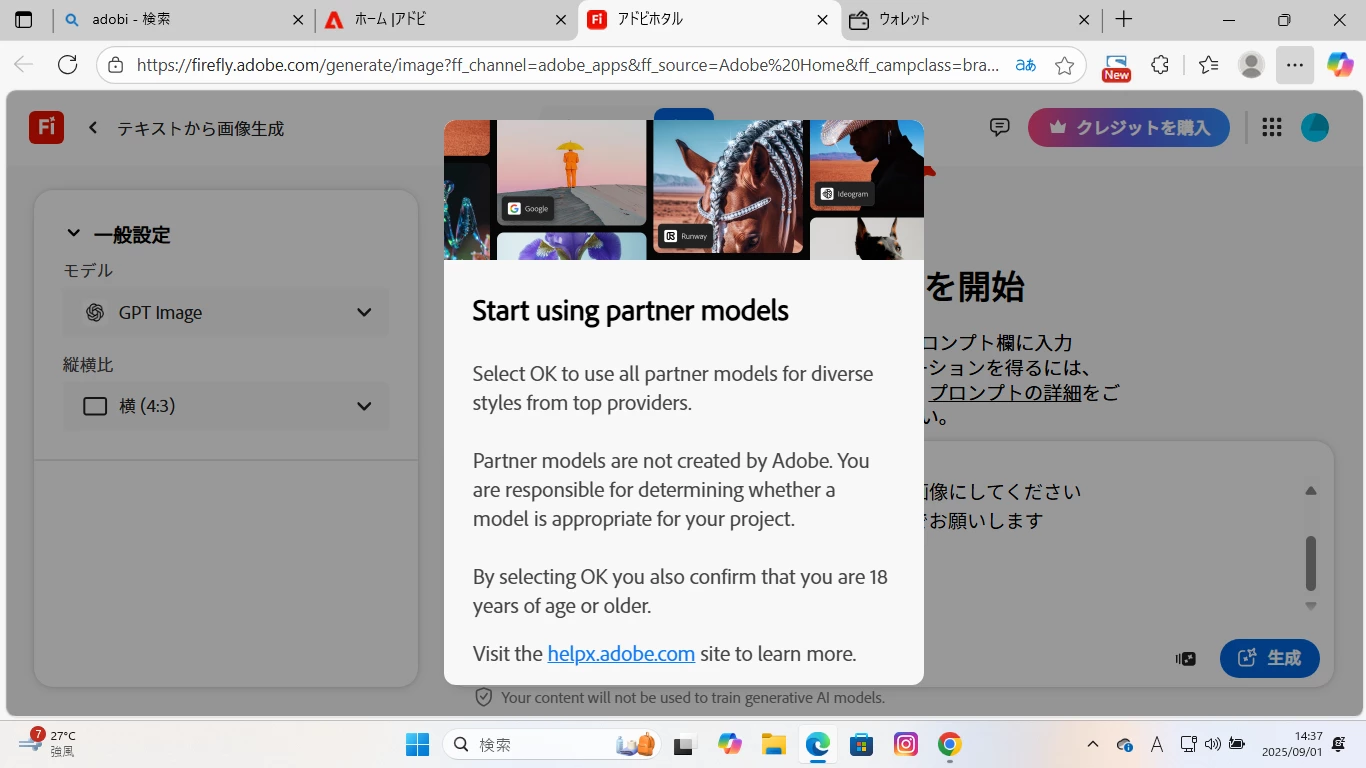
Adobe Firefly のGPTイメージで画像生成しようとすると以下のポップアップが出で「パートナーモデルの使用を開始する」…「OK」を選択すると、18歳以上であることを確認したことになります。とありますが、OKボタンが見当たりません。画像生成のために課金しているようなものなので使用できないのは困ってしまいます。解決方法はありますか?別のブラウザを使用したり、PC再起動したり、ログインし直したりしましたが、ダメでした。
Participant
Sep 2, 2025 2:16 PM UTC

モバイルでアプリをダウンロードして試したら、OKボタンが出て

押したら、パソコンでも使用できるようになったので一応解決です。

メッセージありがとうございます。

5 replies

Ten A
Community Expert
Community Expert
Sep 1, 2025 11:27 PM UTC

そのウインドウの中、スクロールしたりしません?

Translate
Participant
Sep 2, 2025 2:15 PM UTC

スクロールしません。

モバイルでアプリをダウンロードして試したら、OKボタンが出て

押したら、パソコンでも使用できるようになったので一応解決です。

メッセージありがとうございます。

Translate
Inspiring
Sep 1, 2025 2:56 PM UTC

Hi @whispering_happiness9471, 


I am sorry for the issue, This is weird as it does not give me the same prompt. Can you let us know what happens when you press "enter", or  "Esc"? 
Could you try any other model and see if you still get the prompt. Please also check your age in the Adobe account? 

We are here to help. 

Translate
^Sam
whispering_happiness9471AuthorCorrect answer
Participant
Sep 2, 2025 2:16 PM UTC

モバイルでアプリをダウンロードして試したら、OKボタンが出て

押したら、パソコンでも使用できるようになったので一応解決です。

メッセージありがとうございます。

Translate
Inspiring
Sep 3, 2025 12:15 PM UTC

Hi @whispering_happiness9471, 


I am glad the issue is resolved. let us know if you need additional help. 

Thanks.

Translate
^Sam