


Participant
May 14, 2018
Answered

일러스트 프로그램 시작시 구성오류16

  • May 14, 2018
  • 1 reply
  • 980 views

Adobe Creative Cloud 또는 Adobe Creative Suite의 구성 오류

윈도우10 사용자입니다. 여기에서 알려준 해결방법대로 진행을 하였습니다.

사용 권한 설정을 완료 하였음에도 불구하고 일러스트 파일이 실행되지않았습니다.

잘못된것이 있을 수도 있으니 다시한번 더블체크를 하려는 와중에
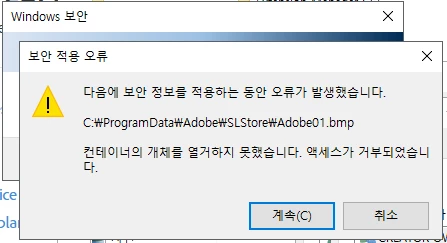
이런창이 뜨고, 여전히 일러스트는 작동이되지않고있습니다.

이제 어떻게 진행하면 될까요?

    This topic has been closed for replies.
    Correct answer kglad

    uninstall everything cc including preferences, https://helpx.adobe.com/creative-cloud/help/uninstall-remove-app.html

    then uninstall the cc desktop app, https://helpx.adobe.com/creative-cloud/help/uninstall-creative-cloud-desktop-app.html

    clean your computer of cc files per http://www.adobe.com/support/contact/cscleanertool.html

    restart your computer (don't skip this)

    reinstall the cc desktop app, https://creative.adobe.com/products/creative-cloud.

    if you're unable to install the cc desktop app at this stage, use an administrator account (solution 4 here, https://helpx.adobe.com/creative-cloud/kb/creative-cloud-missing-damaged.html)

    use the desktop app to install your cc programs/trials

    1 reply

    kglad
    Community Expert
    kgladCommunity ExpertCorrect answer
    Community Expert
    May 14, 2018

    uninstall everything cc including preferences, https://helpx.adobe.com/creative-cloud/help/uninstall-remove-app.html

    then uninstall the cc desktop app, https://helpx.adobe.com/creative-cloud/help/uninstall-creative-cloud-desktop-app.html

    clean your computer of cc files per http://www.adobe.com/support/contact/cscleanertool.html

    restart your computer (don't skip this)

    reinstall the cc desktop app, https://creative.adobe.com/products/creative-cloud.

    if you're unable to install the cc desktop app at this stage, use an administrator account (solution 4 here, https://helpx.adobe.com/creative-cloud/kb/creative-cloud-missing-damaged.html)

    use the desktop app to install your cc programs/trials