Answered
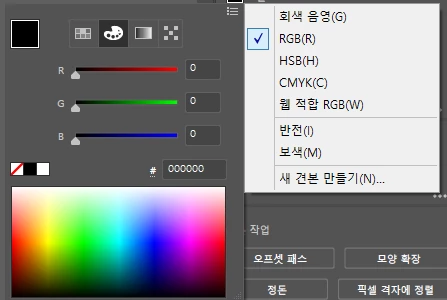
Appearance 에서 cmyk를 rgb로 바꾸기
원래 도형 색 채우기 들어가면
(Fill 색상 클릭하면)
RGB 모드에서
색 선택하게끔 되어있었는데
갑자기 cmyk 모드에서 색 고르도록 되어있네요
파일 자체는 rgb가 맞는데...
왜 fill이나 stroke 누르면 cmyk색상 모드가 뜰까요..ㅜㅜ
다시 rgb에서 고를 수 있게 하려면 어떻게 해야하죠??

원래 도형 색 채우기 들어가면
(Fill 색상 클릭하면)
RGB 모드에서
색 선택하게끔 되어있었는데
갑자기 cmyk 모드에서 색 고르도록 되어있네요
파일 자체는 rgb가 맞는데...
왜 fill이나 stroke 누르면 cmyk색상 모드가 뜰까요..ㅜㅜ
다시 rgb에서 고를 수 있게 하려면 어떻게 해야하죠??
Already have an account? Login
Enter your E-mail address. We'll send you an e-mail with instructions to reset your password.
 AdChoices