name20651540
Participant
July 31, 2017
Answered

영문판

  • July 31, 2017
  • 1 reply
  • 3652 views

월별플랜

어도비 일러스트를 다운받았는데 한글판입니다

맥북 프로를 사용 중이며 일러스트 프로그램을 영문버전으로 바꾸고 싶어요

    This topic has been closed for replies.
    Correct answer Srishti_Bali

    Hi nam,

    As per your query you need English version of Illustrator. For that please uninstall( Uninstall or remove Creative Cloud apps ) Korean version and follow below mentioned steps:

    • On your computer, open the Creative Cloud desktop app and ensure that you are signed in.
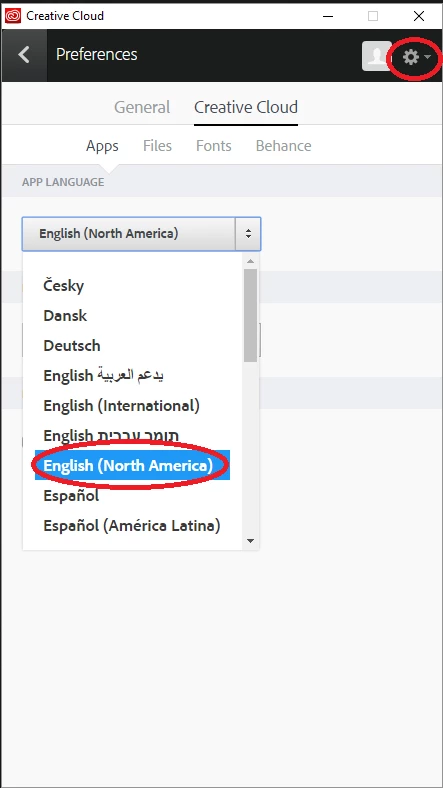
    • In the app, click settings icon ,from the pop-up menu, choose Preferences.
    • In the Preferences dialog box, click Apps, and then click the App Language pop-up menu.
    • From the App Language list, choose English (North America)

    • Close the Preferences dialog box.
    • In the Creative Cloud desktop app, click Apps, and go to the Find New Apps section to view the list of available software.
    • From the list of available software, install Illustrator CC by clicking the Install button.

    Regards

    Srishti

    1 reply

    Srishti_Bali
    Srishti_BaliCorrect answer
    Legend
    July 31, 2017

    Hi nam,

    As per your query you need English version of Illustrator. For that please uninstall( Uninstall or remove Creative Cloud apps ) Korean version and follow below mentioned steps:

    • On your computer, open the Creative Cloud desktop app and ensure that you are signed in.
    • In the app, click settings icon ,from the pop-up menu, choose Preferences.
    • In the Preferences dialog box, click Apps, and then click the App Language pop-up menu.
    • From the App Language list, choose English (North America)

    • Close the Preferences dialog box.
    • In the Creative Cloud desktop app, click Apps, and go to the Find New Apps section to view the list of available software.
    • From the list of available software, install Illustrator CC by clicking the Install button.

    Regards

    Srishti