

Participant
May 17, 2021
Question

저장오류

  • May 17, 2021
  • 1 reply
  • 543 views

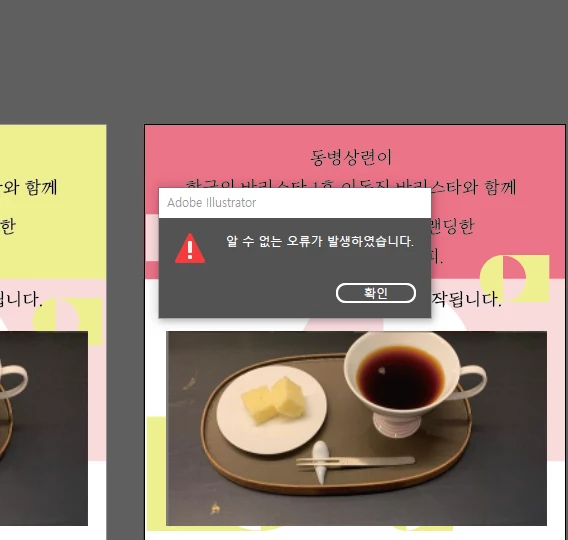
저장을 누르면 첨부사진과 같이 " 알수 없는 오류가 발생하였습니다 " 라는 팝업창이 계속 뜨고, 지금까지 작업한 작업물을 저장을 할 수가 없어 내일 인쇄를 해야하는데 당황스러운 상황입니다. ㅡ 원인파악이 빨리 진행이 되어서 내일 업무에 이상이 없게 조치를 취해 주시기를 부탁드립니다.



    This topic has been closed for replies.

    1 reply

    Monika Gause
    Community Expert
    Community Expert
    May 17, 2021

    Please tell us which version and which system it is.

    Exactly where do you save the file?

    Is a printer connected, turned on and set up as the default printer?

    Participant
    May 18, 2021
    Hi,

    My illustrator version is 2021 and this system is Window x 64-bit process.
    I've tried to save the file in the wallpaper on my desktop. The printer is
    not connected now.
    In one more thing, today I've tried to update the illustrator many times,
    but it's failed constantly. It showed repeatedly a pop-up message was about
    what the update fails.

    Recently I've had uncomfortable experiences very often whenever I was using
    illustrator.

    I can't know what was happened and what is problems in illustrator.
    I could just say now is I panicked about how many time I've failed to save
    the works that I worked for a long time earnestly.
    I hope you could solve my problem rapidly.

    Sincerely,

    Lydia.
    Monika Gause
    Community Expert
    Community Expert
    May 19, 2021

    So you're trying to directly save to a system folder?


    That is often forbidden by the privileges settings. Can you save into different locations?