Participant
February 16, 2023
Answered

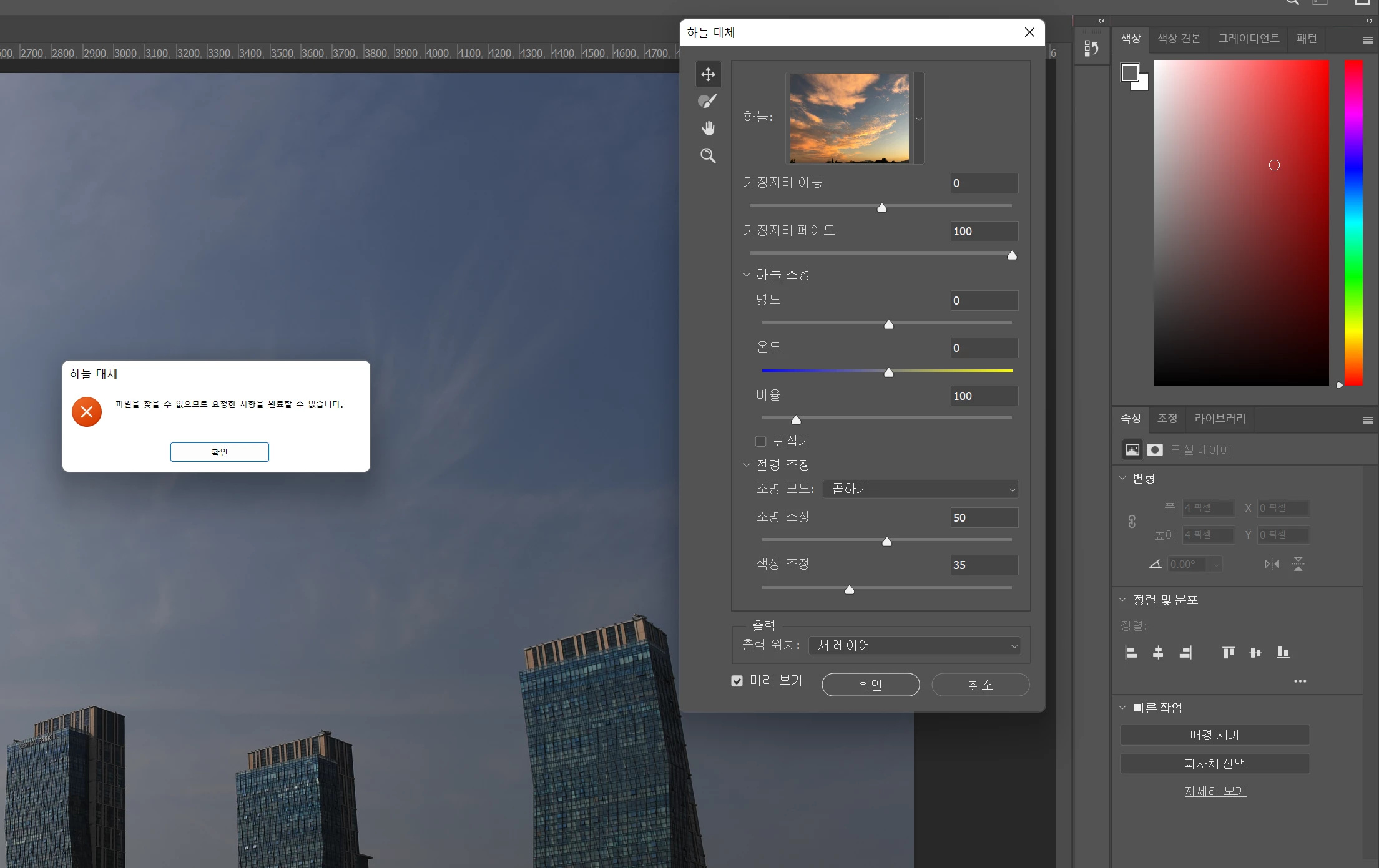
하늘대체 오류

  • February 16, 2023
  • 1 reply
  • 154 views

이렇게 하늘대체를 하면 오류가 뜨는데 해결방법 없을까요?

This topic has been closed for replies.
Correct answer C.Sparrow

말씀해주신 에러는 포토샵에서 지정해준 하늘 이미지들의  defauly folder가 비어 있어 문제가 발생한것으로 보입니다. 

자신이 지정할 곳에 새로운 폴더를 만들어 하늘 이미지들을 저장한 뒤, 그곳으로 가져오기로 해보십시오 
다음부터 해당 폴더를 찾아 이미지가 열릴 겁니다. 

1) Open Sky Replacement, multi-select all the presets and folders, and then delete them. You should see an empty view on the preset panel now. Then close Sky Replacment by clicking "OK".

2) Reopen Sky Replacement. You should see all the default sky presets shown again.

3) If this still does not work, you might have to reset your preferences, and relaunch Photoshop. Then reopen Sky Replacement. You should see all the default sky presets shown again.


▶ 외부 자료 : 포토샵 하늘대체 추가방법  
▶ 동일문제 해결방법 : Default Sky replacement files disappeared? 

감사합니다. 
1 reply

C.SparrowCorrect answer
Inspiring
February 16, 2023

말씀해주신 에러는 포토샵에서 지정해준 하늘 이미지들의  defauly folder가 비어 있어 문제가 발생한것으로 보입니다. 

자신이 지정할 곳에 새로운 폴더를 만들어 하늘 이미지들을 저장한 뒤, 그곳으로 가져오기로 해보십시오 
다음부터 해당 폴더를 찾아 이미지가 열릴 겁니다. 

1) Open Sky Replacement, multi-select all the presets and folders, and then delete them. You should see an empty view on the preset panel now. Then close Sky Replacment by clicking "OK".

2) Reopen Sky Replacement. You should see all the default sky presets shown again.

3) If this still does not work, you might have to reset your preferences, and relaunch Photoshop. Then reopen Sky Replacement. You should see all the default sky presets shown again.


▶ 외부 자료 : 포토샵 하늘대체 추가방법  
▶ 동일문제 해결방법 : Default Sky replacement files disappeared? 

감사합니다.
