
Natsumi Irimura
Participant
May 6, 2015
Question

Adobeの製品版をOn Premiseで利用している場合、Creative Cloudは利用できないのでしょうか?

  • May 6, 2015
  • 5 replies
  • 229 views

過去にAdobeの製品版をOn Premiseでインストールし利用しているのですが、Creative Cloudのほうが便利ではないかと思い、試用版をインストールしたら

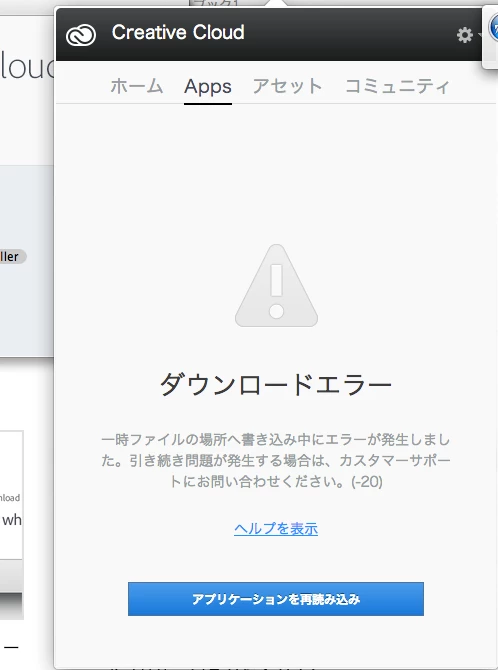
以下のメッセージが表示されました。ダウンロードエラー " 一時ファイルの場所へ書き込み中にエラーが発生しました。" です。-20という数字も表示されています。

しかし、調べたところ、Adobeのお問い合わせページに同じメッセージは見つかりませんでした。https://helpx.adobe.com/jp/x-productkb/global/cpsid_84797.html"

Adobeの製品版をOn Premiseで利用している場合、Creative Cloudは利用できないのでしょうか?
This topic is closed to new replies. Start a new post to keep the conversation going.

5 replies

Govardhan.V
Participating Frequently
May 6, 2015

If it says Reload Applications .

Simply provide full permissions to Adobe folders and try to load Apps list.

It will also avid the issue in future.

Sometimes due to insufficient permissions , the Creative Cloud will not be able to access or update the files hence it will prompt download error issue, renaming or removing might resolve it , but to avoid this issue in future ,  it is necessary to have full permissions to Adobe folders under both user and system library .

Different reasons for Download Error issue :

1)Connectivity issues.

2)Permissions issue.

3)Corrupt cached login info file and updater files.

4)Application Corruption.

You may refer below link :

How to fix download error on Adobe Creative Cloud

Natsumi Irimura
Participant
May 7, 2015

It says there was an error when downloading in the temporary files.  So I tried again after deleting temporary files and copying download folder to  Application folder as advised in Creative Cloud Help | Download Error in Apps tab of Creative Cloud Desktop Application

This is what I got after my action was taken

User firstname.lastname /Volumes/Creative\ Cloud\ Installer\ 1/Creative\ Cloud\ Installer.app/Contents/MacOS/Install ; exit;

Starting Installer...

objc[6383]: Class HTTPHeader is implemented in both /Volumes/Creative Cloud Installer 1/Creative Cloud Installer.app/Contents/MacOS/Install and /tmp/C3B822AF-2462-4262-83B5-BE1A44180E02/CCLBS/AdobePIM.dylib. One of the two will be used. Which one is undefined.

objc[6383]: Class ProxyManager is implemented in both /Volumes/Creative Cloud Installer 1/Creative Cloud Installer.app/Contents/MacOS/Install and /tmp/C3B822AF-2462-4262-83B5-BE1A44180E02/CCLBS/AdobePIM.dylib. One of the two will be used. Which one is undefined.

logout

Govardhan.V
Participating Frequently
May 7, 2015

If possible please post the screenshot.

Rajashree Bhattacharya
Legend
May 6, 2015
Govardhan.V
Participating Frequently
May 6, 2015

In the Blue bar button , does it says :" Download Creative Cloud"  or " Reload Applications:"  ?

Based on that, we have to proceed with troubleshooting steps. there are separate steps for different Download Error issue.