Participant
June 8, 2017
解決済み

预览静态页面,浏览器路径总是显示http://127.0.0.1:58514/preview/app/index.html

  • June 8, 2017
  • 返信数 4.
  • 2566 ビュー

预览静态页面,浏览器路径总是显示http://127.0.0.1:58514/preview/app/index.html

这样很不方便,以至于我都不知道我现在浏览的是哪个页面,而且 右键浏览器,检查代码,元素标签上也会多出很多,不知名的属性,,

这样让我觉得我写的静态页面,看上去很陌生。误导我检查页面的错误!!~~

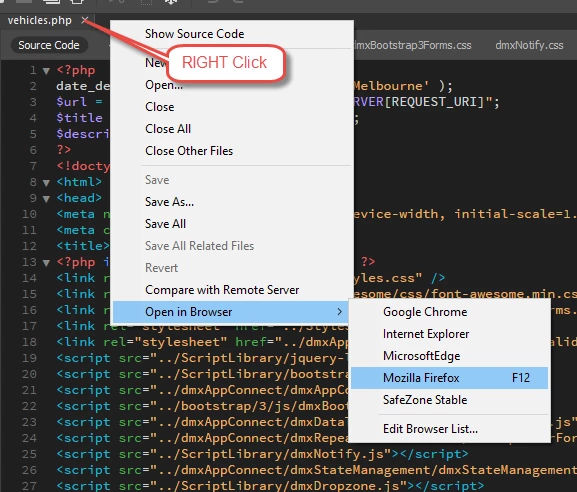
所以我想问的是,应该怎样调整成: 本地路径看页面。比如:桌面/我的第一个页面.html

    このトピックへの返信は締め切られました。
    解決に役立った回答 BenPleysier

    Try

    返信数 4

    Participant
    June 8, 2017

    谢谢,这样确实有效了~~感谢你解答了我的疑惑!~Thank you-.-

    Participant
    June 8, 2017

    预览我会,直接F12就可以预览了。

    我想问的是预览后在  浏览器呈现URL,是本地服务器地址:比如127.0.0.1/index.html

    然而我需要的是 本地路径,比如,c:/桌面/我自定义的页面.html

    Participant
    June 8, 2017

    你这个是教我怎么预览吗

    BenPleysier
    Community Expert
    Community Expert
    June 8, 2017

    Sorry, I though you were having a problem with Live preview, that is why I suggested the old method of viewing in a browser.

    Wappler is the DMXzone-made Dreamweaver replacement and includes the best of their powerful extensions, as well as much more!
    Participant
    August 11, 2017

    我的也有方面的问题,请问这方面怎么解决,只能按照您的方法,查看。

    BenPleysier
    Community Expert
    BenPleysierCommunity Expert解決!
    Community Expert
    June 8, 2017

    Try

    Wappler is the DMXzone-made Dreamweaver replacement and includes the best of their powerful extensions, as well as much more!
    Participant
    June 8, 2017