
Participating Frequently
February 6, 2020
Answered

カスタムシェイプを2020から2019に移行させたい

  • February 6, 2020
  • 1 reply
  • 665 views

photoshop2020の不具合がひどく、バージョンを下げたいのですが、カスタムシェイプの移行方法がわかりません。

ユーザー/ライブラリ/preference/Adobe Photoshop 2020 Settings/customshapes.psp

をコピーして

ユーザー/ライブラリ/preference/Adobe Photoshop cc 2019 Settings/customshapes.psp

にコピーしましたが反映されません。

方法をおしえてもらえますでしょうか。


======================

解決しました!

使用環境:iMac mojave 10.14.6
This topic has been closed for replies.
Correct answer nikunj.m

Hi there,


We are sorry about the experience with Photoshop 2020.


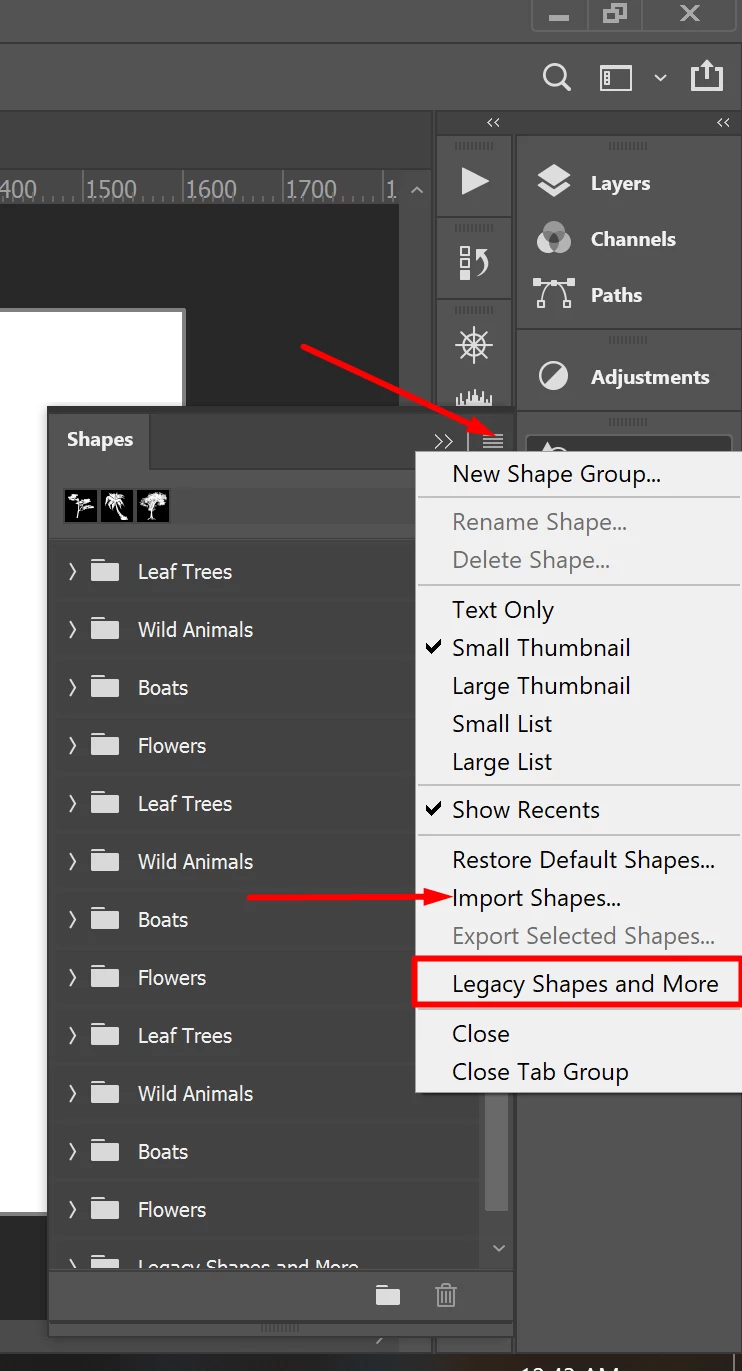
Did you import custom shapes to Photoshop 2019 which you are trying to migrate to Photoshop 2020? If yes, you can go to the "Window" menu, then "Shapes" and select the menu button on the top right of the shapes panel. From the fly out menu, select "Import Shapes" and navigate to the .psp file on your computer. If you wish to restore the old shapes to Photoshop, you can select the option for "Legacy Shapes and More" from the fly out menu. This would give you a new folder in the shapes panel that would contain the legacy shapes.


Let us know if it helps.

Regards,

Nikunj

1 reply

nikunj.m
nikunj.mCorrect answer
Legend
February 10, 2020

Hi there,


We are sorry about the experience with Photoshop 2020.


Did you import custom shapes to Photoshop 2019 which you are trying to migrate to Photoshop 2020? If yes, you can go to the "Window" menu, then "Shapes" and select the menu button on the top right of the shapes panel. From the fly out menu, select "Import Shapes" and navigate to the .psp file on your computer. If you wish to restore the old shapes to Photoshop, you can select the option for "Legacy Shapes and More" from the fly out menu. This would give you a new folder in the shapes panel that would contain the legacy shapes.


Let us know if it helps.

Regards,

Nikunj

Participant
April 22, 2020

こんにちは!ご説明をどうもありがとうございます!

とても便利な機能です!

私は無事に見つけることができました。

どうもありがとうございます!