Participant
Sep 21, 2019 7:11 AM UTC
Answered

フォトショップでのパスの作業時の表示色

フォトショップでパスを引くとき何ですが、表示される線の色がグレーなんです。非常に見にくくてキリヌキが正確にできないところがあります。パスを引くときに表示される色を変更したいんですがどうすればいいですか?

教えてください。


This topic is closed to new replies. Start a new post to keep the conversation going.
davescm
davescmCorrect answer
Community Expert
Sep 21, 2019 11:08 AM UTC

Hi

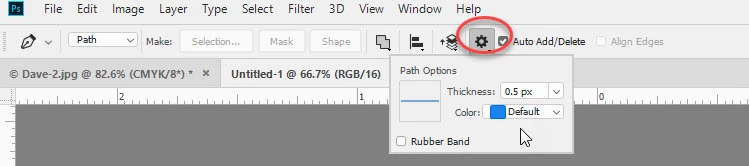
In current versions of Photoshop CC, you can control the path colour and thickness from the options bar.

With the pen tool selected:


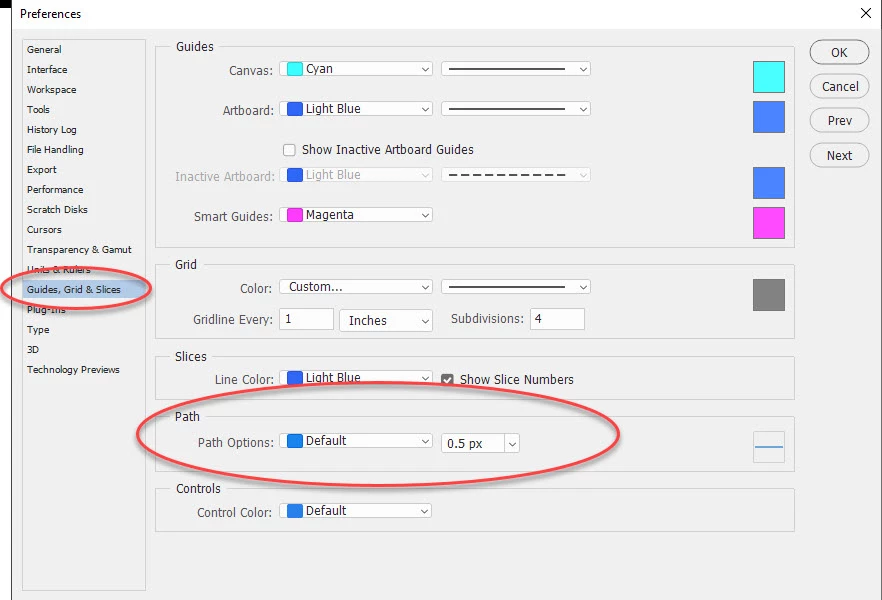
You can also set the default in Preferences > Guides Grids and Slices > Path >Path options


Dave


1 reply

davescm
Community Expert
davescmCommunity ExpertCorrect answer
Community Expert
Sep 21, 2019 11:08 AM UTC

Hi

In current versions of Photoshop CC, you can control the path colour and thickness from the options bar.

With the pen tool selected:


You can also set the default in Preferences > Guides Grids and Slices > Path >Path options


Dave


Translate