Participant
September 11, 2018
Question

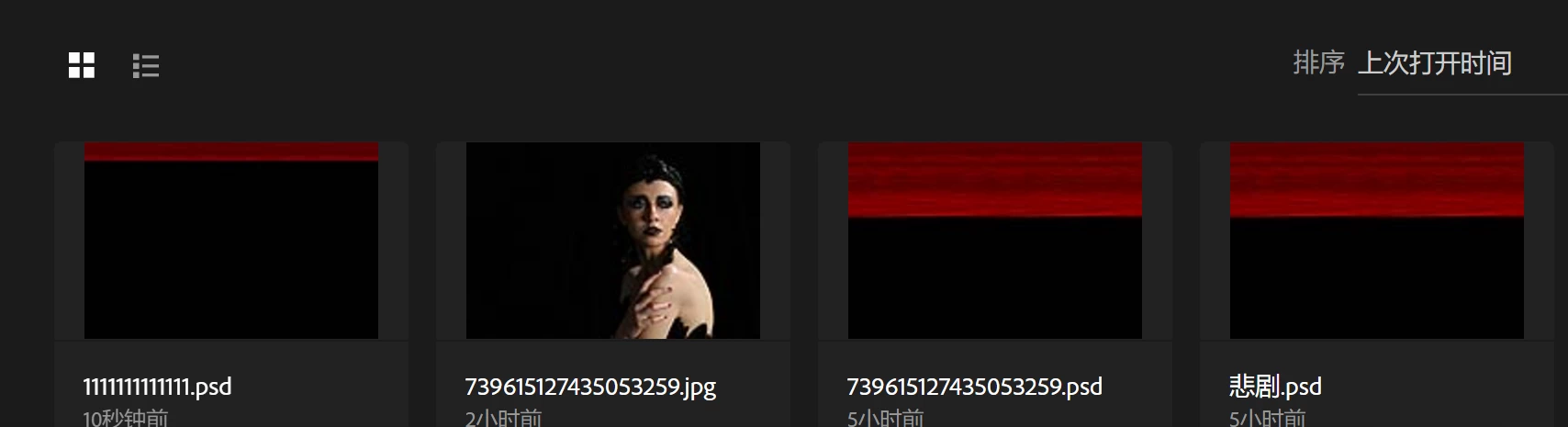
来个人,救命啊!!!下午修了两个小时,电脑强行关闭,打开文件,文件变成红黑,晚上修两个小时,电脑强行关闭,打开文件又变成红黑
  • September 11, 2018
  • 1 reply
  • 773 views

求教,文件有190MB,文件大小正常,多图层,打开文件后图层消失。就只有背景图层,红黑2色

下午修了两个小时,电脑强行关闭,打开文件,文件变成红黑,晚上修两个小时,电脑强行关闭,打开文件又变成红黑

This topic has been closed for replies.

1 reply

Akash Sharma
Legend
September 11, 2018

Hi acbboy,

Sorry that your files are showing up corrupted in Photoshop. Could you please let us know the version of Photoshop you're using?

I suspect that the files were corrupted when your system forcibly shut down. I'd recommend you to check out this article and see if that helps in recovering better version of the images: Troubleshoot file recovery in Photoshop 

Thanks,

Akash

acbboyAuthor
Participant
September 12, 2018

我用的是Photoshop CC 2018,看过文章没解决在发帖的,我在网上搜索出现这种情况很多,也就是目前我的问题还没解决

JJMack
Community Expert
Community Expert
September 12, 2018

If there are crash reports please post their details.  Does Photoshop start? If it does post  its help>System Info.  If you image file became corrupt during a system failure.  The file may not be repairable.  We speak different languages and Google translation and Microsoft translation for you append did not describe what happen to you well.

If you search the web you can fine  programs that try to fix up corrupt PSD files.

Supply pertinent information for quicker answers

  • The more information you supply about your situation, the better equipped other community members will be to answer. Consider including the following in your question:
  • Adobe product and version number
  • Operating system and version number
  • The full text of any error message(s)
  • What you were doing when the problem occurred
  • Screenshots of the problem
  • Computer hardware, such as CPU; GPU; amount of RAM; etc.
JJMack