Participant
Jul 16, 2019 12:14 PM UTC
Answered

鉛筆ツールの四角ブラシが真四角でない件

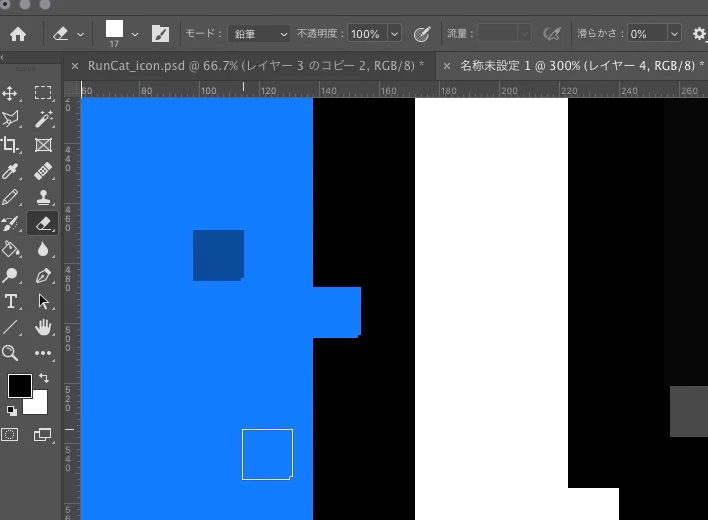
Photoshop CC 2019 にて,鉛筆ツールを使ってドット絵を描こうとしているのですが,四角ブラシを選択しても真四角に描けません.

どうしても右下が欠けた状態になります.消しゴムツールでも同様でした.
This topic is closed to new replies. Start a new post to keep the conversation going.
silk-m
silk-mCorrect answer
Community Expert
Jul 17, 2019 3:19 PM UTC

ブラシセットは何を使っていますか? 自分で定義したブラシでしょうか。

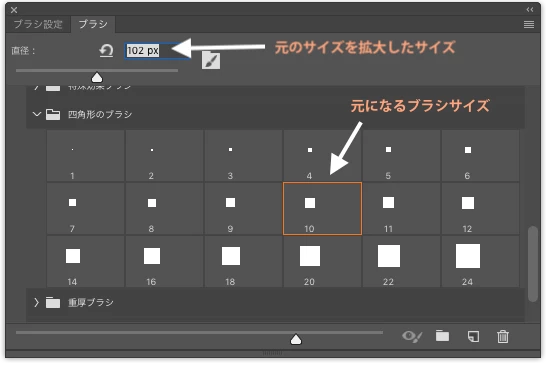
レガシーブラシの四角形のブラシには1〜24までありますが、そのままのサイズから数倍程度の拡大では右下角が欠けたりすることはありませんが、例えば10サイズの四角形のブラシを99以上にしたり、24サイズの四角形のブラシを243以上にしたりすると右下角が欠ける現象が出ます。

ですからレガシーブラシの四角形は拡大率を10倍程度までで使い、拡大率が10倍以上になるときには、大きな四角形のブラシを自分で定義してください。

この現象はCS6などのバージョンでも起こります。(多分全てのバージョンで起こり得る事...)

-- silk-m

--Susumu Iwasaki

4 replies

silk-m
Community Expert
silk-mCommunity ExpertCorrect answer
Community Expert
Jul 17, 2019 3:19 PM UTC

ブラシセットは何を使っていますか? 自分で定義したブラシでしょうか。

レガシーブラシの四角形のブラシには1〜24までありますが、そのままのサイズから数倍程度の拡大では右下角が欠けたりすることはありませんが、例えば10サイズの四角形のブラシを99以上にしたり、24サイズの四角形のブラシを243以上にしたりすると右下角が欠ける現象が出ます。

ですからレガシーブラシの四角形は拡大率を10倍程度までで使い、拡大率が10倍以上になるときには、大きな四角形のブラシを自分で定義してください。

この現象はCS6などのバージョンでも起こります。(多分全てのバージョンで起こり得る事...)

-- silk-m

Translate
--Susumu Iwasaki
Kyome22Author
Participant
Jul 20, 2019 6:24 AM UTC

おっしゃる通り,四角形のブラシの元になるブラシサイズを目的のブラシサイズに合わせることが解決策でした.

自分は直径をいじれば勝手に四角形のブラシ(n px)のnが変わるものだと思っていたのですが,そうではなかったのですね.

結局,確実に思い通りの四角形のブラシを扱いたい場合は,自分でブラシ定義した方が良いとわかりました.

Translate
Bob_Hallam
Legend
Jul 16, 2019 2:04 PM UTC

Make sure Anti Aliasing is turned off and try using a selection instead of a brush.  Then fill that selection.   That may provide the best results

Translate
ICC programmer and developer, Photographer, artist and color management expert, Print standards and process expert.
Akash Sharma
Legend
Jul 16, 2019 1:06 PM UTC

Hi きょめすけ,

That shouldn't be happening as the square brush of the pencil tool is not a true square, that looks strange.

Could you please restore Photoshop app preferences to default and let us know if the issue still persists?

Please refer this article for instructions on how to restore Photoshop preferences:

Preferences in Photoshop

Thanks,

Akash

Translate