


Photoshopのコンテキストタスクバーの一部だけ英語で表示される
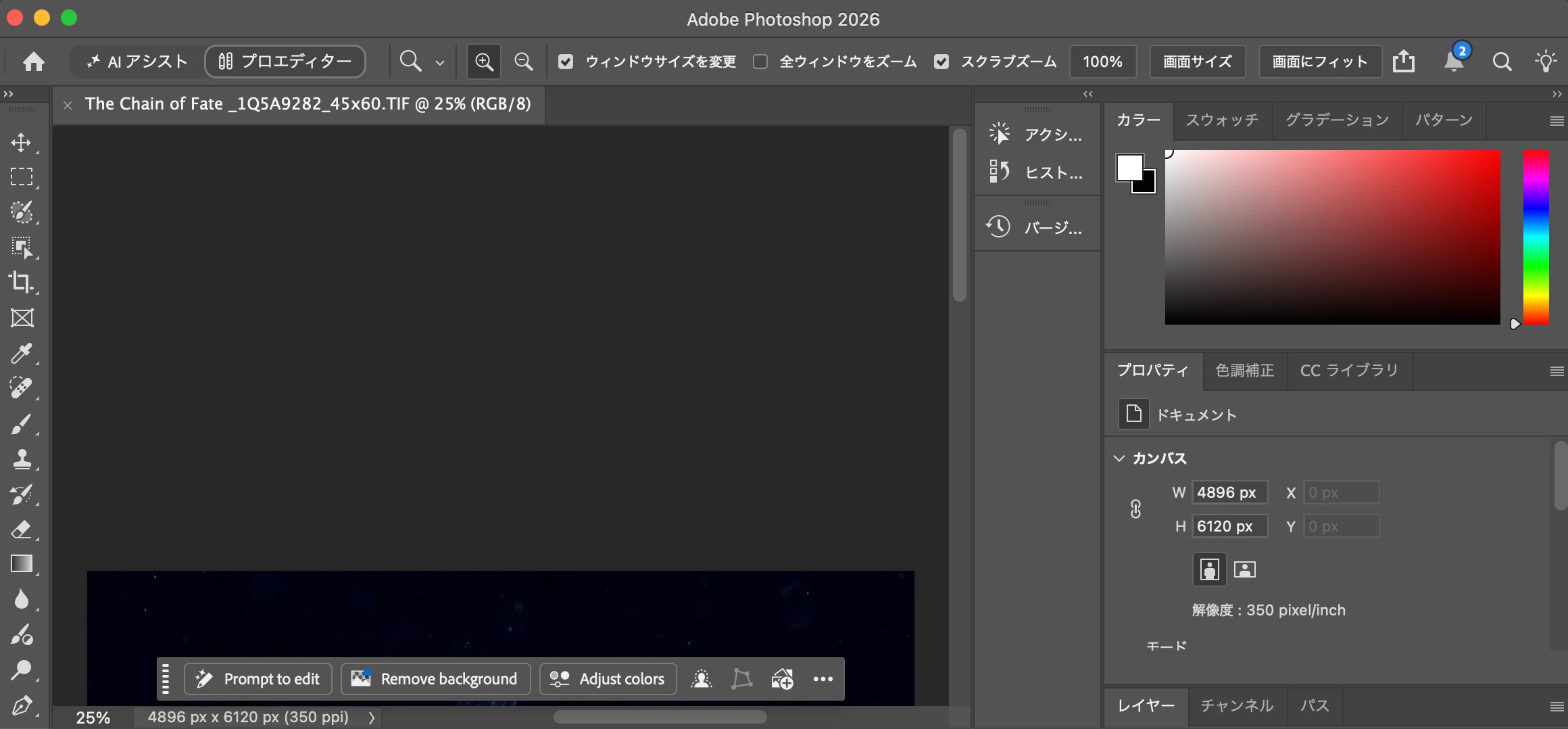
Photoshopを日本語環境で使用していますが、コンテキストタスクバーの一部だけが英語で表示されます。
Photoshopのメニューやその他のUIは日本語で正常に表示されていますが、選択範囲を作成した際に表示されるコンテキストタスクバーでは、以下の項目が英語になります。
・Generative fill
・Remove
・Deselect
本来は「生成塗りつぶし」「削除」「選択を解除」など、日本語で表示されるべき箇所だと思います。
PhotoshopのUI言語は日本語に設定されています。
コンテキストタスクバーのみ翻訳が反映されていないようなので、不具合として確認をお願いいたします。
スクリーンショットを添付します。
Contextual Task Bar is partially displayed in English in the Japanese version of Photoshop
I am using Photoshop with the user interface language set to Japanese.
Most of the Photoshop interface is correctly displayed in Japanese. However, when I make a selection, some buttons in the Contextual Task Bar are displayed in English:
・Generative fill
・Remove
・Deselect
These should normally be displayed in Japanese, such as 「生成塗りつぶし」「削除」「選択を解除」.
The Photoshop UI language is already set to Japanese, and other parts of the interface are displayed correctly.
It appears that localization is not being applied correctly to the Contextual Task Bar.
Please investigate this issue.
I have attached a screenshot showing the problem.
Photoshop version: 27.10.0
macOS version: 26.6.2
UI language: Japanese
[Photoshop デスクトップ/Mobile/web 版へ移動しました:モデレーター]
 AdChoices