toshiharut15479573
Participant
May 15, 2017
Answered

Photoshop CC 2017の自動選択ツールについて

  • May 15, 2017
  • 2 replies
  • 2108 views

2周間ほど前から自動選択ツールのアイコンが変わってしまって使い方が変わってしまいました。

従来は星のステッキのような形で、選択したい部分を自動で選んで簡単にぼかしなどが使えたのですが、変更後はキラキラしたメイク道具のようなアイコンになりました。

選択したい部分を選んでも従来のように簡単に選択ができず困っています。

変更前のアイコンに戻す方法はないでしょうか?

    This topic is closed to new replies. Start a new post to keep the conversation going.
    Correct answer davescm

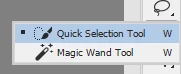
    The icon has not changed - it just shares a position on the toolbar with the quick selection tool. Click and hold on the quick selection tool and you should see the magic wand

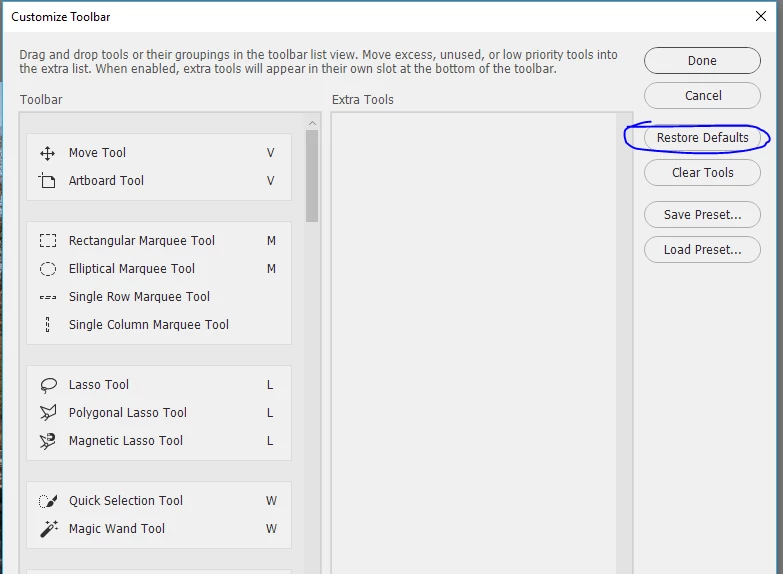
    If you do not see that, click on the three dots (or go to the toolbar menu) and in the dialogue select restore defaults

    Dave

    2 replies

    c.pfaffenbichler
    Community Expert
    Community Expert
    May 15, 2017

    The magic wand tool icon is changed between two laps or so, usage has changed.

    Make-up is traditionally shaped like a star walking stick in the part you want to select, and then choose automatically the easily blur and other sparkly changed icons.

    Choose the part you want to select the choice is not easy, is in trouble.

    There is no way back to the old icon?

    Could you please post a screenshot?

    davescm
    Community Expert
    davescmCommunity ExpertCorrect answer
    Community Expert
    May 15, 2017

    The icon has not changed - it just shares a position on the toolbar with the quick selection tool. Click and hold on the quick selection tool and you should see the magic wand

    If you do not see that, click on the three dots (or go to the toolbar menu) and in the dialogue select restore defaults

    Dave