孙玉鹏孙70031848
Participant
September 1, 2018
解決済み

PSCC油画滤镜禁用

  • September 1, 2018
  • 返信数 2.
  • 659 ビュー

这个怎么办有没有解决的办法

    このトピックへの返信は締め切られました。
    解決に役立った回答 Michael J. Hoffman

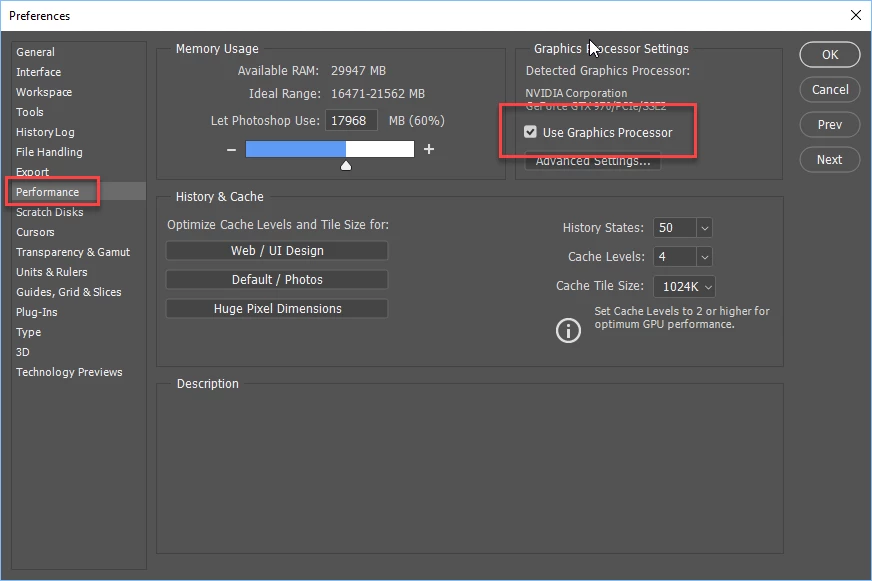
    If the Oil Paint filter is not working, check to make sure the GPU is enabled in Preferences. You must have a compatible graphics card:
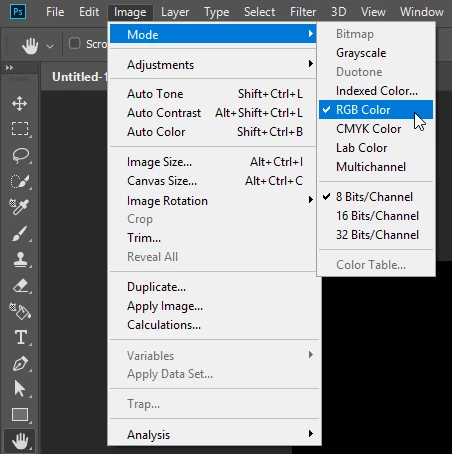
    Make sure your document is RGB:
    See this page for more:

    Oil Paint is grayed out in Photoshop

    返信数 2

    September 1, 2018

    Hi

    Does your PC meet the minimum system requirements

    Photoshop system requirements

    Check in preferences to make sure "Use OpenCL is enabled

    Have you tried installing the latest version of your GPU driver from the manufacturers website, also take a look here

    Troubleshoot Photoshop graphics processor (GPU) and graphics driver issues

    Michael J. Hoffman
    Community Expert
    Community Expert
    September 1, 2018

    If the Oil Paint filter is not working, check to make sure the GPU is enabled in Preferences. You must have a compatible graphics card:

    Make sure your document is RGB:

    See this page for more:

    Oil Paint is grayed out in Photoshop
