Acrobat Pro에서 ‘메모리가 부족합니다’ 오류와 함께 PDF 페이지가 흰색으로 사라지지만 텍스트 선택 영역은 남는 문제 / Acrobat Pro intermittently shows “Out of memory” and renders PDF pages blank/white while text selection areas remain visible
Acrobat Pro에서 ‘메모리가 부족합니다’ 오류와 함께 PDF 페이지가 흰색으로 사라지지만 텍스트 선택 영역은 남는 문제 / Acrobat Pro intermittently shows “Out of memory” and renders PDF pages blank/white while text selection areas remain visible
Windows 10에서 Adobe Acrobat Pro로 여러 PDF를 열어 볼 때 반복적으로 발생하는 페이지 렌더링 문제에 관한 문의입니다.
증상
PDF를 보거나 확대·축소하는 도중 다음 오류가 표시되는 문제입니다.
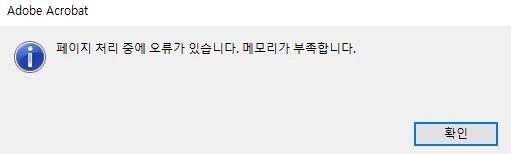
페이지 처리 중에 오류가 있습니다. 메모리가 부족합니다.
오류 발생 후 나타나는 현상은 다음과 같습니다.
PDF 페이지가 완전히 또는 대부분 흰색으로 변하는 현상
텍스트와 그래픽은 사라지지만 텍스트 선택 영역은 남아 있는 상태
보이지 않는 텍스트 위치를 드래그하면 파란색 선택 사각형이 표시되는 상태
확대,축소를 빠르게 하면 가끔 내용이 사라졌다가 다시 나타나는 현상
Acrobat의 메뉴, 우클릭 메뉴 및 인터페이스는 정상적으로 표시되는 상태
특정 PDF 하나가 아니라 서로 관련 없는 여러 PDF에서 발생하는 문제
동일한 PDF는 다른 PDF 렌더링 프로그램에서 정상적으로 표시되는 상태
불특정 페이지가 위 오류로 인해 보이지 않는 현상
시스템 정보
Adobe Acrobat Pro: 26.1.21771.0, 64비트
운영체제: Windows 10 Pro 22H2
OS 빌드: 19045.7548
GPU: NVIDIA GeForce RTX 3060
NVIDIA 드라이버: 32.0.16.1088
드라이버 날짜: 2026년 7월 22일
오류 발생 당시 실제 물리 메모리 사용량은 정상 범위입니다.
이미 진행한 문제 해결 작업
다음은 현재까지 진행한 문제 해결 작업입니다.
Acrobat Pro 완전 제거 및 재설치
Acrobat 사용자 설정과 캐시 전체 초기화
완전히 새로운 Acrobat 설정과 기존 설정을 각각 사용한 테스트
과거 Acrobat에 모듈을 삽입했던 타사 DRM 프로그램 제거
새로운 Acrobat UI와 기존 UI에서 각각 진행한 테스트
2026년 5월 버전인 26.1.21529에서 진행한 테스트
NVIDIA 그래픽 드라이버 업데이트
Windows MPO를 OverlayTestMode=5로 비활성화한 후 재부팅
TeamViewer, Discord 및 모든 Adobe 백그라운드 프로세스 종료
페이지 캐시와 2D 그래픽 가속을 포함한 Acrobat 페이지 표시 옵션 변경
문제가 발생한 PDF의 내부 구조를 다시 작성한 사본으로 테스트
위 작업을 모두 진행한 후에도 동일한 증상이 발생하는 상태입니다.
PDF 자체 검증 결과
문제가 발생하는 PDF 한 개를 Acrobat이 아닌 별도의 PDF 렌더링 엔진으로 검사한 결과입니다.
3개 페이지가 모두 정상적으로 렌더링된 상태입니다.
원본 PDF와 내부 구조를 다시 작성한 PDF의 렌더링 결과가 픽셀 단위로 동일한 결과입니다.
구조를 다시 작성한 PDF도 Acrobat에서는 동일한 문제가 발생하는 상태입니다.
따라서 PDF 내용 자체의 손상보다는 Acrobat 데스크톱의 페이지 렌더링 또는 화면 합성 과정에서 발생하는 문제로 추정되는 상황입니다.
메모리 및 덤프 검사 결과
오류를 여러 차례 재현하면서 Acrobat 프로세스의 메모리를 기록한 결과입니다.
전체 Acrobat 작업 집합 최대치: 약 435MB
Private 메모리: 약 327MB
오류 발생 전 지속적인 메모리 증가 없음
Windows 시스템 리소스 부족 기록 없음
페이지가 흰색으로 표시되고 오류가 발생한 상태에서 생성한 Acrobat 전체 프로세스 덤프도 보유 중입니다.
덤프 검사 결과는 다음과 같습니다.
Commit 메모리 약 760MB
Acrobat이 종료되지 않았기 때문에 충돌 예외가 없는 상태입니다.
Acrobat 렌더링 작업 스레드가 충돌하지 않고 대기 중인 상태입니다.
타사 DRM 모듈이 로드되지 않은 상태입니다.
실제 시스템 메모리가 부족하다는 증거가 없는 상태입니다.
Adobe 개발팀에서 필요로 한다면 전체 .DMP 파일을 제공할 수 있는 상태입니다.
그래픽 드라이버 관련 사항
과거 Windows 이벤트 로그에 기록된 NVIDIA 드라이버 오류는 다음과 같습니다.
Event ID 4101: nvlddmkm 드라이버가 응답을 중지한 후 복구된 기록
NVIDIA Event ID 153
그러나 NVIDIA 드라이버를 업데이트하고 Windows MPO를 비활성화한 이후에도 Acrobat 증상에는 변화가 없는 상태입니다.
유사한 텍스트 소실 현상이 macOS 및 NVIDIA가 아닌 환경에서도 보고된 사례가 있으므로, GPU 드라이버만의 문제보다는 Acrobat 렌더러 문제일 가능성도 있다고 판단하는 상황입니다.
재현 절차
문제가 발생하는 PDF를 Acrobat Pro에서 여는 단계입니다.
페이지를 이동하거나 확대·축소를 빠르게 반복하는 단계입니다.
텍스트 영역을 클릭하거나 드래그하는 단계입니다.
여러 번 반복하면 페이지 내용이 흰색으로 변하거나 사라지는 현상입니다.
실제 글자는 보이지 않지만 파란색 텍스트 선택 사각형은 표시되는 상태입니다.
Acrobat에서 페이지 처리 오류 및 메모리 부족 메시지가 표시되는 경우입니다.
문의 사항
이 문제가 Acrobat의 다음 구성요소와 관련된 알려진 문제인지 확인이 필요한 상황입니다.
페이지 렌더러
페이지 타일 캐시
화면 재그리기
페이지 합성 또는 컴포지터
현재 제공 가능한 자료는 다음과 같습니다.
흰색 페이지와 선택 영역이 남은 상태의 스크린샷
재현 영상
문제가 발생하는 샘플 PDF
Acrobat 전체 프로세스 덤프
Acrobat 메모리 기록
감사합니다.
Hello,
I am experiencing a recurring PDF rendering issue in Adobe Acrobat Pro on Windows 10.
Symptoms
While viewing various PDF files, Acrobat displays the following error:
There was an error processing a page. Out of memory.
After the error occurs:
The PDF page becomes completely or mostly blank/white.
Text and graphics disappear, but text-selection areas remain active.
When I drag across the invisible text, blue selection rectangles appear where the text should be.
Rapidly zooming in/out sometimes makes the content disappear and reappear.
The Acrobat interface and context menus continue to render normally.
The problem occurs with multiple unrelated PDF files, not just one document.
The same PDF files render correctly in other PDF rendering engines.
The error causes pages to become blank intermittently, with no consistent pattern as to which pages are affected.
System information
Adobe Acrobat Pro: 26.1.21771.0, 64-bit
Windows 10 Pro 22H2
OS build: 19045.7548
GPU: NVIDIA GeForce RTX 3060
Current NVIDIA driver: 32.0.16.1088, dated July 22, 2026
Physical memory usage remains normal when the error occurs.
Troubleshooting already performed
I have already tried the following:
Completely uninstalled and reinstalled Acrobat Pro.
Reset the entire Acrobat user profile and cache.
Restored and tested with both fresh and original Acrobat preferences.
Removed third-party DRM software that had previously loaded modules into Acrobat.
Tested both the new and classic Acrobat interfaces.
Tested an older Acrobat build, 26.1.21529, from May 2026.
Updated the NVIDIA graphics driver.
Disabled Windows Multiplane Overlay using OverlayTestMode=5 and rebooted.
Closed TeamViewer, Discord, Creative Cloud, and all Adobe background processes.
Changed Acrobat Page Display rendering options, including page caching and 2D graphics acceleration.
Rewrote the internal structure of one affected PDF and tested the rewritten copy.
None of these steps resolved the issue.
PDF verification
One affected PDF was independently rendered outside Acrobat using another PDF rendering engine. All three pages rendered successfully, and the output from the original and structurally rewritten PDF was pixel-identical.
This suggests that the PDF content itself is valid and that the failure occurs specifically in Acrobat’s desktop page-rendering or page-compositing path.
Memory and dump investigation
During repeated reproduction:
Acrobat’s total working set remained approximately 435 MB.
Private memory remained approximately 327 MB.
There was no continuous memory growth before the error.
Windows did not report system resource exhaustion.
I also captured a full Acrobat process dump while the page was blank and the error was present.
The dump showed:
Approximately 760 MB committed memory
No crash exception, because Acrobat remained responsive
Acrobat rendering workers waiting rather than crashing
No third-party DRM modules loaded
No evidence of actual system-memory exhaustion
A full .DMP file is available if Adobe engineering needs it.
Additional observation
Windows previously recorded an NVIDIA driver timeout event:
Event ID 4101: nvlddmkm stopped responding and recovered
NVIDIA Event ID 153
However, updating the driver and disabling MPO did not change the Acrobat behavior. Similar disappearing-text issues have also previously been reported on non-NVIDIA and macOS systems, so this may be an Acrobat renderer issue rather than a GPU-driver-only problem.
Reproduction steps
Open an affected PDF in Acrobat Pro.
Move between pages or rapidly zoom in and out.
Select or drag across text.
After several repetitions, the page content becomes white or disappears.
Blue text-selection rectangles may remain visible.
Acrobat may display the “Out of memory” page-processing error.
Request
Could Adobe confirm whether this is a known issue in Acrobat’s page renderer, tile cache, or compositor?
I can provide:
Screenshots showing the blank page and surviving selection rectangles



 AdChoices