Participant
July 9, 2024
Question

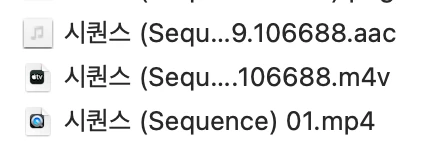
미디어 인코딩 완료 후 3개의 파일로 분리된 경우 / any way to save time when using media encoder?
  • July 9, 2024
  • 1 reply
  • 149 views


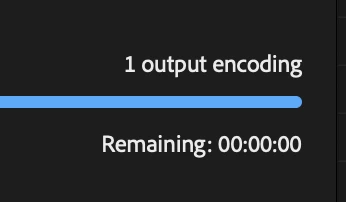
프리미어에서 내보내기로 미디어인코더로 인코딩 한 후 로딩 창에서는 인코딩이 다 끝났지만 파일에서는 3개의 파일로 분리되어 인코딩되어 다시 대기해야합니다.

해당 상황을 줄일 수 있는 방법은 없을까요?

I use Premiee Pro to edit my video then I output using media encoder. When encoding is finished it just needs more time to put 3 seperate files (which are encoded) again in to one file.

Is there anyway that I can shorten this whole process. It almost takes half of my day to put 3 files in to one


    This topic has been closed for replies.

    1 reply

    FormatioIN
    Community Manager
    Community Manager
    July 10, 2024

    1. 시스템 사양을 확인 할 수 없어, 가장 간단하게 시스템 사양부터 확인하여, 부족한 사항은 없는 지 확인해보시길 바랍니다.


    2. Media Encoder 캐시를 제거 해보세요.

    앱 경로 : 환경 설정 - 미디어

    폴더 경로 : C:\Users\%Username%\AppData\Roaming\Adobe\Common


    3. Media Encoder 및 Premiere Pro 앱을 최신 버전으로 업데이트해보세요.

    그리고 두 앱의 버전을 일치화 시켜주세요.

    Ex) 24.4 버전 사용자면 Me,Pr 모두 24.4로 사용, 24.5 사용자인 경우, 두 앱 모두 24.5 버전 사용.


    다이내믹 링크를 지원하는 앱은 같은 버전이 개발이되었다보니, 두 앱 모두 같은 버전으로 이용하시는 걸 권장합니다.