Amitej S
Community Manager
Community Manager
October 14, 2025

Trouble loading Express app, downloading & accessing files and features | October 20-21, 2025

  • October 14, 2025
  • 29 replies
  • 2283 views

Hi Everyone!!

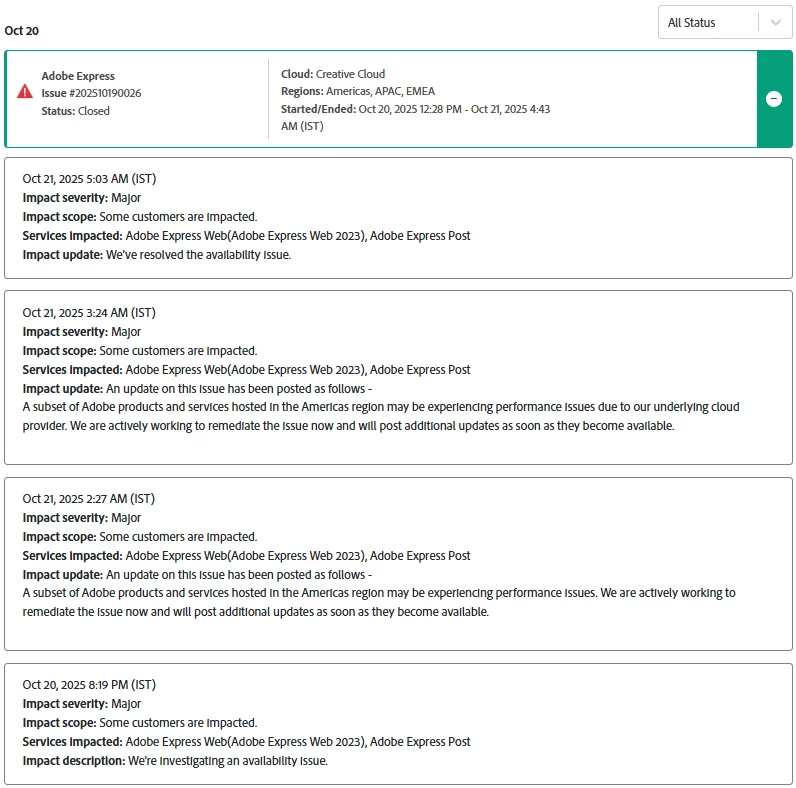
Several users experienced issues with Adobe Express and related Adobe services on October 20, 2025. This included difficulties loading the app, accessing or downloading files, encountering 404/504 errors, crashes, and Quick Action failures. Workflows connected to Adobe Stock and Adobe Fonts were also affected.


This issue was the result of an ongoing incident with our underlying cloud infrastructure provider. Our teams also actively worked to mitigate the impact and restore normal functionality as soon as possible.


We apologize for the frustration and appreciate your patience.


PS: This issue is now resolved for all users.
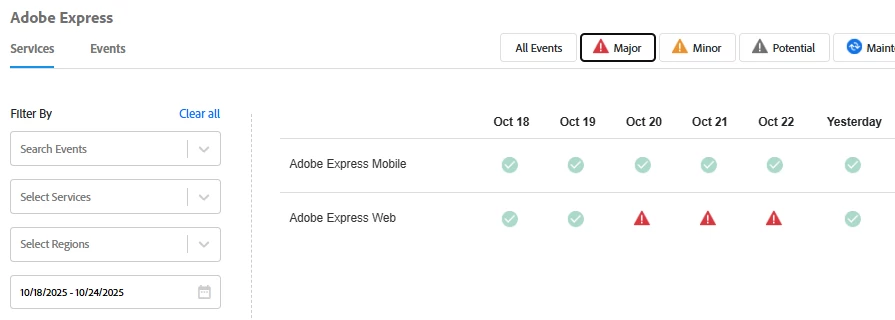


Here are some resources that provide more details on the outage. Feel free to explore them:


    29 replies

    Participant
    November 3, 2025

    Ugh It's November 3rd now and my Adobe express app on my iPhone is still not working. I can not open saved projects or create new ones... I'm a paying customer that can't use the app I'm paying for... 


    Also desktop version doesn't allow copy and paste and is missing buttons like "duplicate" 


    Thus is all making it MUCH harder to get my work done. 

    Amitej S
    Community Manager
    Amitej SCommunity ManagerAuthor
    Community Manager
    November 4, 2025

    Hi @lindsay_0302, can you please share the installed Adobe Express version and the installed iOS? Please share a screen recording of the workflow so we can better understand the issue on the mobile device. 

    Also, when you say you're unable to duplicate, have you tried using Ctrl/Cmd + D or right-clicking on the asset to see if the duplicate option appears for you?  


    Try once after clearing the cache/cookies of the desktop browser, updating the Adobe Express app, and updating iOS on the iPhone to its latest available version. Share your observations.

    We'd need more details to see what issue you might be facing.


    Participant
    October 28, 2025

    Dear Amitej, I still cannot download my videofiles. It still stops at 77% and says download failed 😞

    I send you a direct message with the links to my projects. Would really need some help, cause I need those videos asap.

    thanks! Paula

    Community Manager
    October 28, 2025

    Hi @Paula_Aichwalder1580,


    We’re really sorry for the trouble you’re experiencing 😞. To help us investigate and resolve this issue as quickly as possible, could you please send us the Document ID and your Adobe ID via direct message, along with granted access to your projects?

    Once we have these details, we’ll be able to look into the download issue and assist you promptly.

    Thank you for your patience!


    ^MM

    Participant
    October 23, 2025

    It is currently 10/23/25 Is anyone else STILL having issues after the October 2025 AWS outage. It's 3 days later....... my PULL, DRAG & DROP  is still defunct. It doesnt matter if I use the web version or the app. I'm still having issues. Anyone else?

    Tarun Saini
    Community Manager
    Community Manager
    October 23, 2025

    Hi @pixelspages&_3222,


    We're sorry to hear about the difficulties. Did you try signing out and signing in again to check if that helps? Could you please share the screen recording of the issue? Did you try using the other suggested browsers (Safari, Microsoft Edge, and Google Chrome) or incognito mode to see if it makes a difference? 


    Also, try clearing the browser's cache and cookies, and restarting the browser and try again. For more information on how to clear cache and cookies check this link- https://adobe.ly/4a5ipUF and how to use incognito mode- https://adobe.ly/4a2UzZV 


    Let us know how it goes.


    Regards,

    Tarun


    Participant
    October 23, 2025

    I've been editing short videos in Adobe Express today, and have had serious issues downloading files all day. Wondering if this is a widespread issue?

    Amitej S
    Community Manager
    Amitej SCommunity ManagerAuthor
    Community Manager
    October 23, 2025

    Hi @brigit_7413, Welcome to our Adobe Express community! Thanks for posting here. This issue could possibly be related to the AWS outage. Could you please try again in private/incognito browsing mode and confirm if it works for you now? We received multiple similar user reports, and some users later confirmed that the Adobe Express app is now working fine for them. 

    We'd also like to know if you're able to download any other project type, such as PDF, PNG, or JPG. Additionally, could you please try downloading the project from a mobile device and share your observations with us?


    We are here to help.


    Thanks!

    Participant
    October 21, 2025

    In the middle of working on a project, it stopped working when I went back to the app from a different browser. Not logged in, it's showing me the home page and prompting me to start a free trial. 

    I have a premium subscription with no issues. 

    'please help: need this for work. 

    David__B
    Adobe Employee
    Adobe Employee
    October 21, 2025

    Hi @emily_0200


    Sorry to hear about your difficulties. If you signed in with a different email or in a different way (like through a social media account), that could be an explanation. Is it not working in the original browser too?


    Best,
    Dave

    Participant
    October 21, 2025

    Hi, I am trying to use the app on my device but the app seems to not be working.

    Version - 29.1.1

    Platform and OS Version - IPad 10 26.0.1

    i uninstalled the app and installed it once more but it still does not load properly.

    Participant
    October 22, 2025

    I am having similar issues with logging in! I am unable to log in on any device even though I'm able to access my adobe account on the web, I cannot use adobe express 

    Participating Frequently
    October 22, 2025

    Hello David,

    Thank you for your reply, but none of these solutions solved the problem, so I cannot work with your system, even though it was very expensive. I would like to ask someone for help, because this blunder is more than embarrassing for such a large company.

    Participant
    October 21, 2025

    My Adope Express appears to be gone.  All my old stuff is no longer there.  Can anyone help!

    David__B
    Adobe Employee
    Adobe Employee
    October 21, 2025

    Hi @DarkSiegeROK


    I'm sorry to hear about your difficulties. Do you use Adobe Express on a computer or mobile device? Typically, everything you do in Adobe Express is synced to the cloud as you work. Also, everything is tied to whatever email address you use, so if you signed in with a different email or differently, that could be an explanation.

    Please get back to me when you get the chance,

    Dave

    Participant
    October 21, 2025

    I'm on a mobile device.  I don't sign, I just open the app.  

    ''I'm really confused.  Then above my posts, it appears other are experiencing the same issue. 

    what should I do next?

    Participant
    October 20, 2025

    Hey it's not letting me save nothing on express app does anyone know how to fix it?


    it's going to 100% then just failing?

    also tried duplicating it just not working.

    I'm using the app. 

    Amitej S
    Community Manager
    Amitej SCommunity ManagerAuthor
    Community Manager
    October 23, 2025

    Hi @ariela_333, Welcome to our Adobe Express community! Thanks for posting here.


    This issue could possibly be related to the AWS outage. Could you please try once in private/incognito browsing mode on a desktop and confirm if it works for you now? We received multiple similar user reports, and some users later confirmed that the Adobe Express app is now working fine for them. 


    We'd also like to know if you're able to download any other project type, such as PDF, PNG, or MP4. Additionally, could you please try downloading the project from a mobile device after restarting it once and share your observations with us?


    We are here to help.

    Best!

    Participating Frequently
    October 20, 2025

    Preview photos disappearing as seen in the photo below, and then when I click on one of them and try to get them to load I get the following error message.  Anyone else seeing this?


    Participating Frequently
    October 20, 2025

    And forgot to say that I have:


    1. Cleared cache and browser history
    2. Tried to duplicate various different files only to have the same thing happen to all
    3. Restarted my computer
    4. Tried it in the app and online


    I have followed every step Adobe advises and to be honest just think I have outgrown Express.  It has become a problematic mess on a lot of different fronts.

    Participant
    October 20, 2025

    Bonjour,

    Cela fait maintenant plusieurs heures que j'essaye de télécharger une vidéo sous-titrée par adobe express grâce au sous-titrage automatique mais rien n'y fait. 


    J'ai vraiment besoin d'aide, ça devient urgent. 


    Amitej S
    Community Manager
    Amitej SCommunity ManagerAuthor
    Community Manager
    October 23, 2025

    Hi @nathan_7367, Welcome to our Adobe Express community! Thanks for posting here!


    Due to the massive AWS outage that occurred on October 20th, 2025, a subset of Adobe products and services hosted experienced performance issues. This might be due to the same outage.

    Can you recheck and confirm if the issue is resolved for you?

    Let us know about your observations. We are here to help! 


    Note: You can check for Adobe's system status report here https://adobe.ly/4oyIodl