


Adobe Acrobat Sign Pause And Resume Agreements - Preserve Progress When Authentication Fails
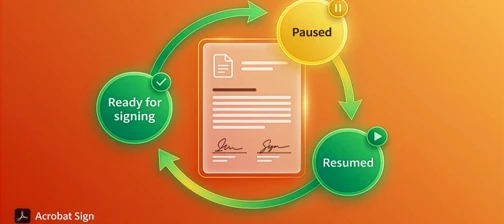
When a signer fails authentication, pause and resume the agreement instead of resending.
A procurement team is close to finishing a supplier agreement. Internal approvals are complete, one supplier representative has signed, and the final signer is ready to finish. Then that signer exhausts the allowed authentication attempts.
Previously, the agreement was cancelled. The sender had to recreate the agreement from scratch, and recipients who had already signed had to authenticate and sign again. One recipient’s difficulty became extra work for everyone.
With Pause and Resume, that no longer happens. When your admin enables this feature, Adobe Acrobat Sign automatically pauses the agreement and notifies the sender. The sender can reset the signer’s authentication method if needed, and resume the same agreement, with all completed signatures and recipient actions preserved.
Preserve completed signatures intact
The main benefit is straightforward: an authentication issue does not have to undo the progress of the entire transaction.
For senders, that means avoiding the effort of recreating an agreement and coordinating another round of signatures. For recipients who have already completed their part, it means no repeat authentication or signing.
This matters most for agreements involving multiple people, such as lending documents, supplier contracts, and employment agreements. The sender can focus on helping the affected recipient rather than asking everyone to start over.
Authentication requirements still apply, and the affected signer must authenticate. The sender can reset the authentication attempts and keep the existing method or change the recipient’s authentication method before resuming.
Pause automatically. Resume when ready.
When a recipient exhausts their authentication attempts, Acrobat Sign pauses the agreement and emails the sender with the reason. On the Manage page, the agreement stays In Progress and shows a Paused status.
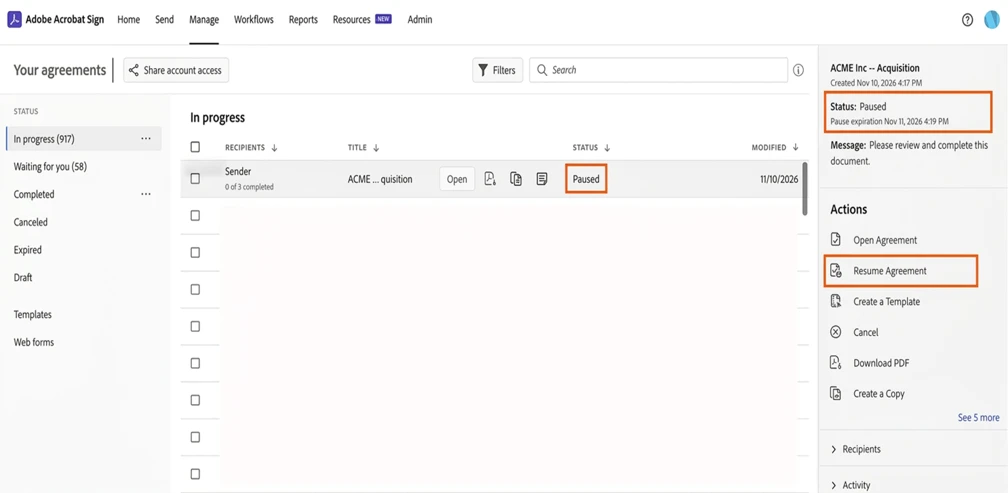
The entire agreement is placed on hold, including agreements with parallel routing and recipient groups. Recipient activity and reminders stop during the pause. A recipient who opens the signing page sees a message that the agreement is paused and tries again when they receive a new request.
To resume:
- Senders open the paused agreement on the Manage page and review the details and recipient’s activity.
- If needed, update the affected recipient’s authentication method.
- Select Resume agreement in the Actions panel
Acrobat Sign resets the recipient’s attempt count and returns the agreement to its signing workflow. The recipient receives a new request to sign so they can authenticate and continue signing. Recipients who have already completed their actions are not asked to sign again.
The sender, or a sharee with the right permissions, can resume the agreement. Both pause and resume events are recorded in the activity log and audit report.
A recovery window your organization controls
Pause & Resume is disabled by default. Administrators can enable it at the account or group level under Account Settings > Send Settings > Pause Resume Agreements.
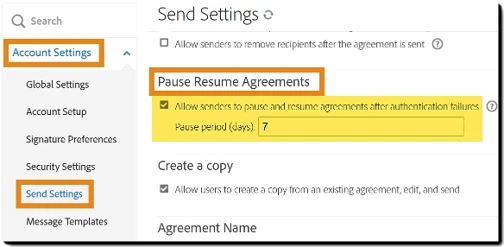
Admins also set the pause period, from 1 to 30 days. The default pause period is 7 days. If the agreement is not resumed within that period, Acrobat Sign automatically cancels it.
Pausing does not extend the signing deadline. The agreement’s expiration date stays in effect and can’t be changed while the agreement is paused.
The feature addresses exhausted authentication attempts; it does not reopen agreements that have already been canceled or expired. Send in Bulk agreements and web forms are not supported.
For integrated workflows, the REST V6 agreement APIs and pause/resume webhook events also allow teams to track and manage recovery through their connected applications.
Get started with Pause and Resume
An authentication setback should not always require a new agreement. Pause & Resume gives senders time to address the issue while retaining the signatures and actions already collected.
The result is less administrative work, fewer repeat requests for recipients, faster completion of agreements that used to stall, and a controlled way to bring an agreement back into its signing workflow.
To try it, ask your admin to turn on Pause and Resume in Send Settings. For more information, see Configure Pause & Resume Agreements and Resume a paused agreement.
Available since early September 2026 in both Commercial and Government Clouds.
 AdChoices