




DIG as Default Authentication Method
Stronger by Default: How DIG as the Default Authentication Method Raises the Bar for Secure Signing
Digital agreements are at the heart of how modern organizations operate -- from onboarding new clients to executing high-value contracts. But as signing workflows scale, one question becomes harder to ignore: how confident are you that the person signing is actually who they say they are?
Identity verification in e-signatures has long been a balancing act. Too much friction and signers abandon the process. Too little rigor and organizations expose themselves to compliance gaps, fraud risk, and legal liability. Adobe Acrobat Sign has always offered robust authentication options -- and now, with the ability to set the Digital Identity Gateway (DIG) as the default authentication method, we are making it easier than ever to enforce strong identity verification without slowing anyone down.
Why Identity Authentication Matters More Than Ever
Not all e-signatures carry the same legal or compliance weight. In regulated industries and high-stakes transactions, a basic email-based identity check simply is not enough. Organizations increasingly need verified identity -- authentication backed by a trusted third-party identity provider -- to meet legal standards, satisfy auditors, and protect against fraud.
The challenge has been operationalizing this at scale. When verification relies on individual senders remembering to configure authentication for each agreement, policy enforcement becomes inconsistent. One sender follows the process; another skips it. That variability is exactly where compliance risk lives.
What Is DIG and How Does It Help?
The Digital Identity Gateway (DIG) is Adobe’s integration layer for third-party identity providers. It connects Acrobat Sign to trusted verification services -- such as government-issued identity systems, bank-issued digital credentials, and national ID platforms -- giving organizations the ability to require verified, third-party-backed authentication for signers.
Instead of relying on passwords, knowledge-based authentication, or simple email verification, DIG enables identity assurance at a level that satisfies demanding compliance requirements. It transforms the act of signing into a verified workflow -- one where the identity behind every signature is confirmed by an authoritative source.
What Is New: DIG as the Default Authentication Method
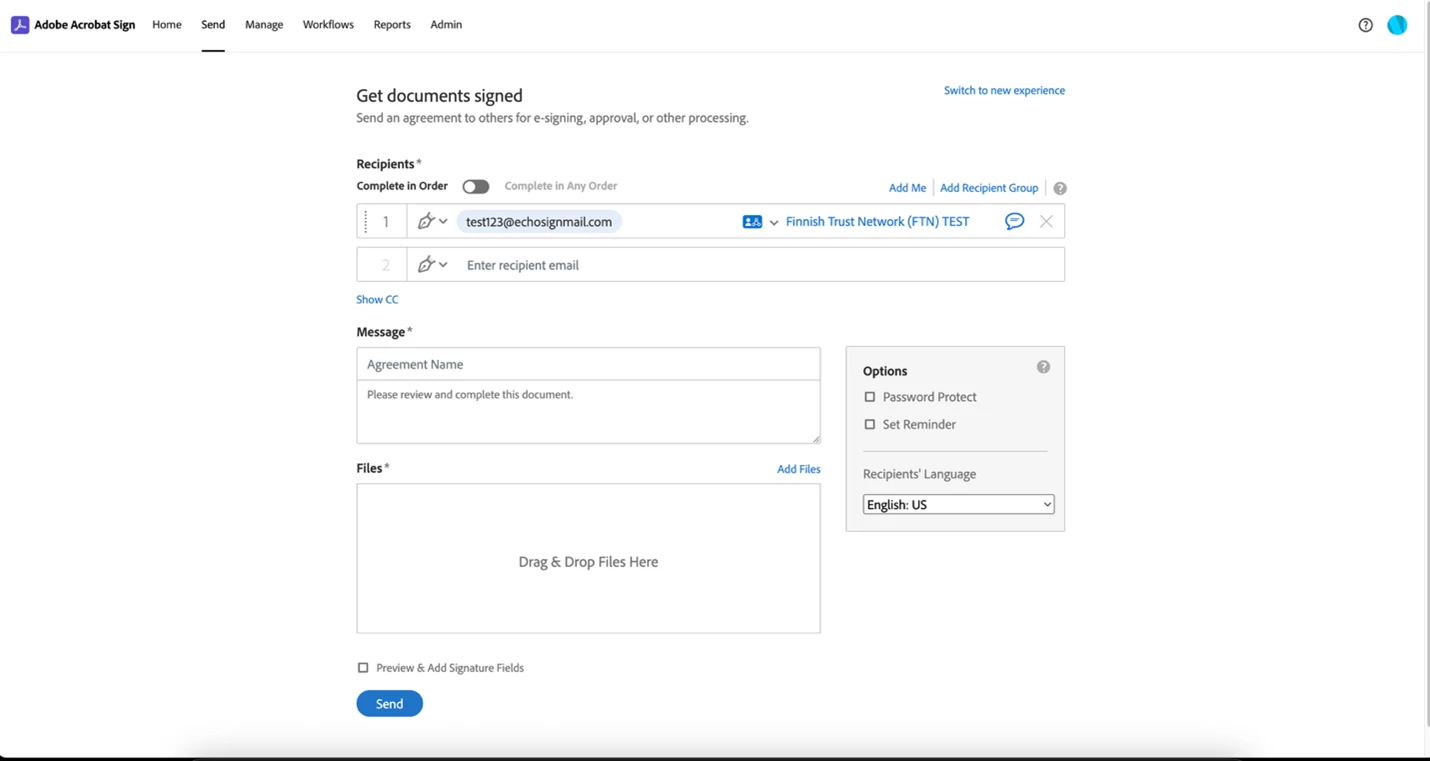
Previously, administrators could set default authentication methods for agreements -- but DIG was only available as a per-recipient selection during agreement composition. That meant every sender had to manually choose the right identity provider for every recipient, every time. For organizations that rely heavily on specific providers, this was a friction point and a compliance risk wrapped into one.
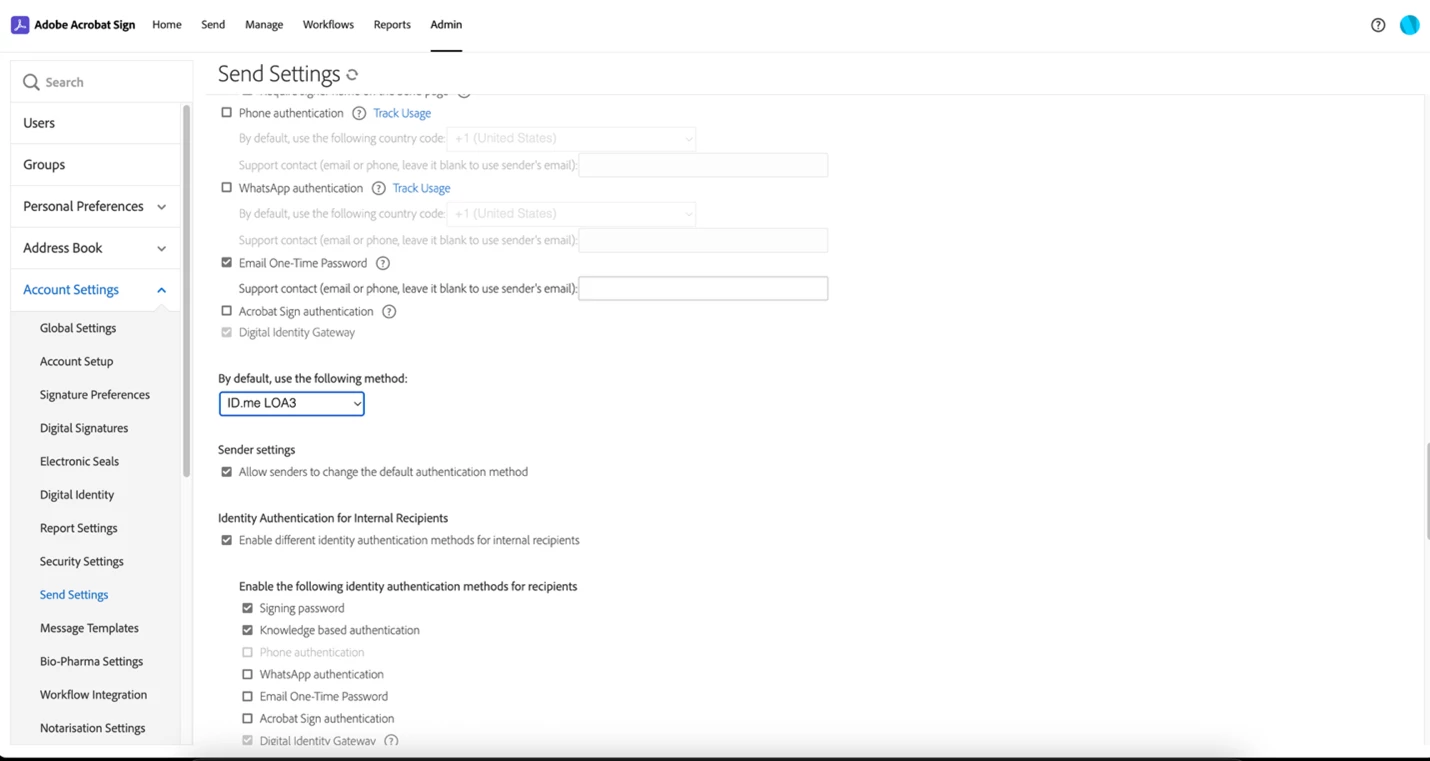
With this update, administrators can now configure DIG identity providers as the default authentication method directly within Send Settings. Separate defaults can be set for internal users -- those within your organization’s email domain -- and external users, such as clients, vendors, or partners. Once configured, the appropriate DIG provider is automatically applied to recipients when a new agreement is created, based on their email domain.
This means policy-driven workflows at scale: the right authentication method is applied by default, not by chance.
Benefits Across the Board
Security and compliance, built in. When identity verification is the default, compliance gaps close. Every agreement automatically starts with the authentication standard your organization requires -- no manual steps, no exceptions slipping through.
Reduced sender friction. Senders no longer need to navigate authentication settings for each recipient. The workflow is pre-configured, streamlined, and consistent -- delivering a streamlined signing experience from the moment an agreement is initiated.
Flexibility for complex organizations. Different recipients often warrant different verification approaches. The ability to configure separate defaults for internal and external recipients gives administrators granular control without adding complexity to the sender experience.
Graceful fallbacks. If a configured provider becomes temporarily unavailable, Acrobat Sign falls back gracefully to standard authentication methods, ensuring business continuity without disrupting signing workflows.
Real-World Impact Across Industries
Financial services firms requiring bank-verified digital identities for loan agreements or account openings can now ensure every signer goes through the appropriate identity provider -- automatically.
Government agencies managing citizen-facing services that require national ID verification can enforce consistent authentication across every agreement type, reducing manual oversight and audit preparation burden.
Healthcare organizations handling patient consents or provider agreements can apply identity-assurance standards that align with regulatory requirements -- consistently, across every workflow.
Global enterprises operating in markets where specific national identity frameworks are mandated (such as BankID in Nordic countries) can configure those providers as defaults for the relevant user segments, ensuring regional compliance without custom workarounds.
A Better Experience for Admins and Senders Alike
For administrators, the change is straightforward: the Send Settings page now includes DIG-enabled identity providers alongside existing authentication options. Selecting a default for internal and external users is a one-time configuration that immediately governs all new agreements.
For senders, the improvement is felt in what they no longer have to do. The authentication is already configured. The right identity provider is already applied. Their job is to focus on the agreement -- not the settings.
For more information, tutorials, and detailed documentation, visit the Adobe Acrobat Sign Help Center.
 AdChoices