




Introducing Dynamic Participations In Acrobat Sign
At Adobe, we are committed to empowering users with tools that make document workflows more flexible, efficient, and tailored to their needs. With the introduction of Dynamic Participation, Acrobat Sign unlocked additional control over agreements — both before and after they've been sent for signature. This feature is designed to adapt to evolving business requirements, ensuring seamless collaboration and streamlined workflows at every stage of the agreement lifecycle.
In this blog we are covering the evolution of Dynamic Participations in Acrobat Sign until Today:
PHASE 1: DYNAMIC PARTICIPATIONS FOR DRAFT AGREEMENTS
What's New?
Draft agreements are agreements in the authoring phase that have not been sent to recipients for signature. Dynamic Participation was introduced to add a comprehensive suite of capabilities, which allows users to “go back” and fully customize the assigned participants, agreement names and any other details of their agreements before initiating the signing process, avoiding the need to start from scratch.
1) Participant Management:
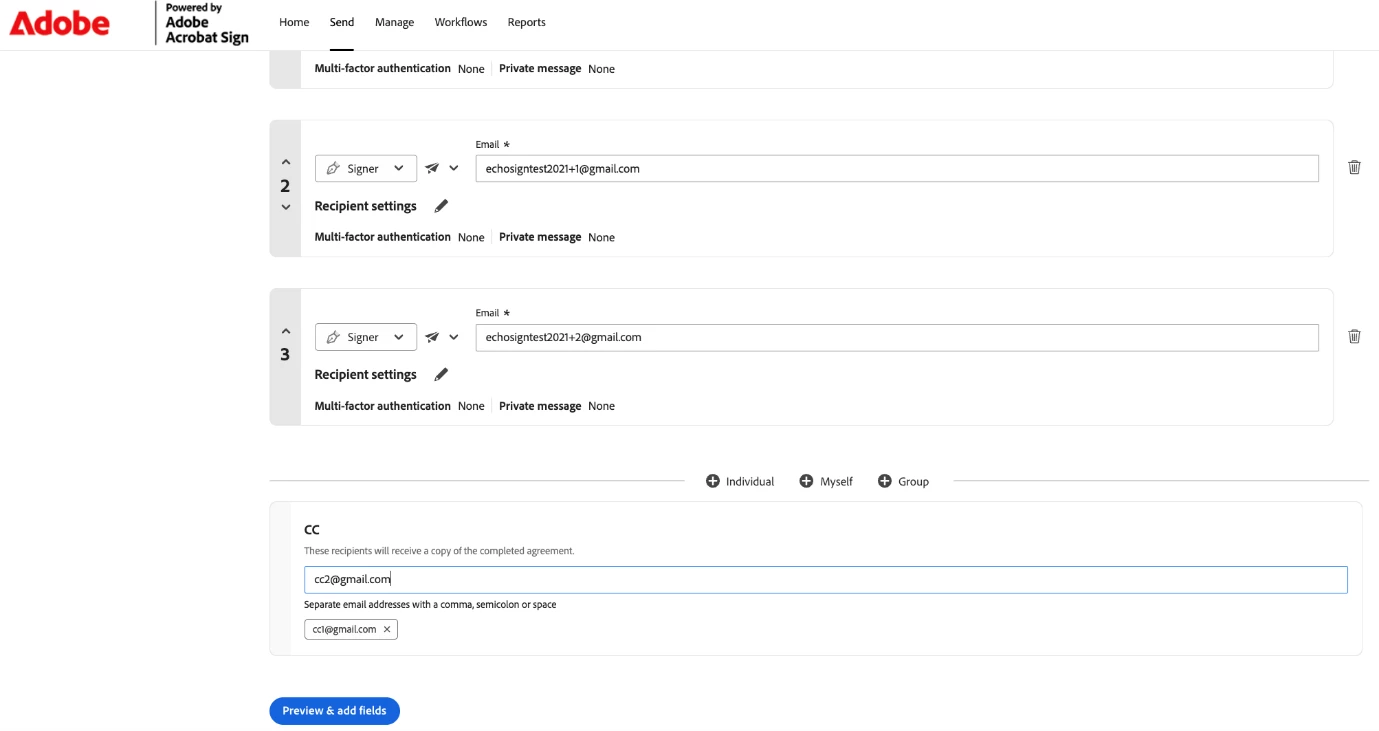
Add, Remove, and Reorder Participants: Easily manage the list of recipients to reflect real-time priorities or organizational needs. Drag and drop participants to change the signing order or remove individuals who are no longer required.
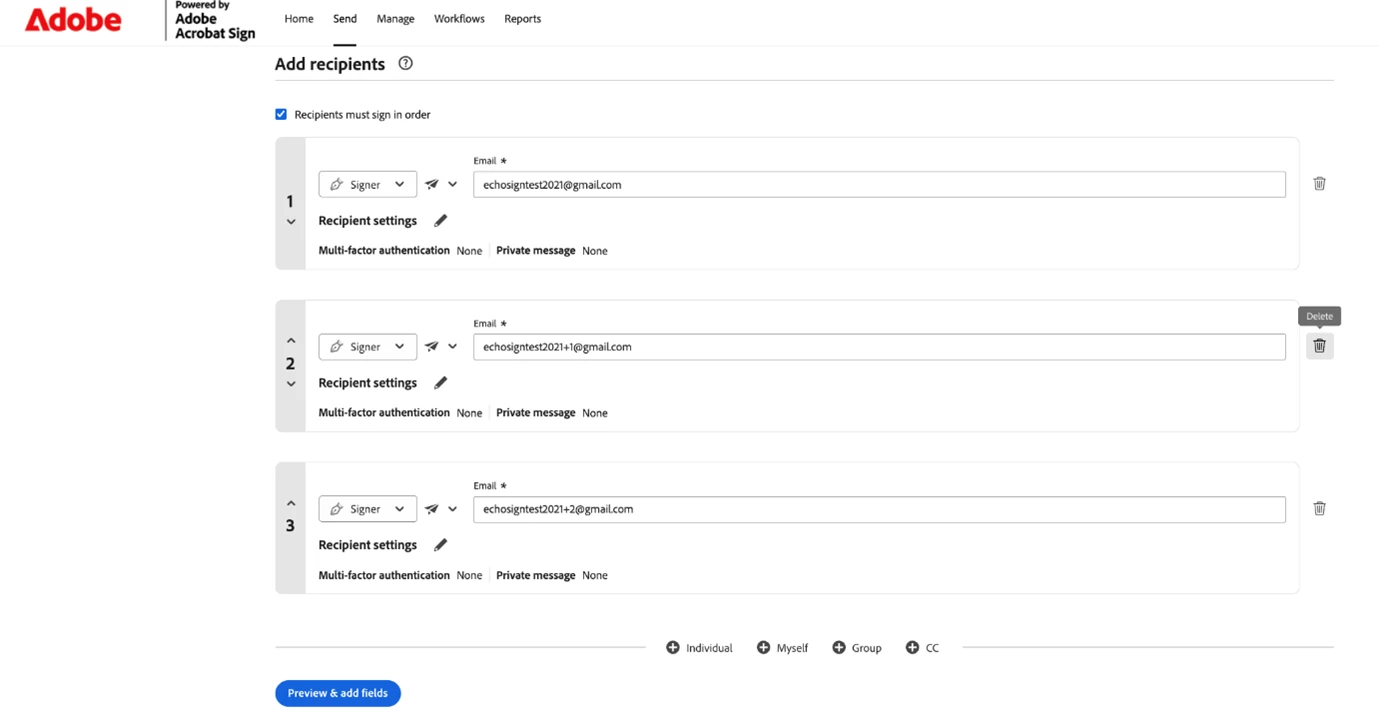
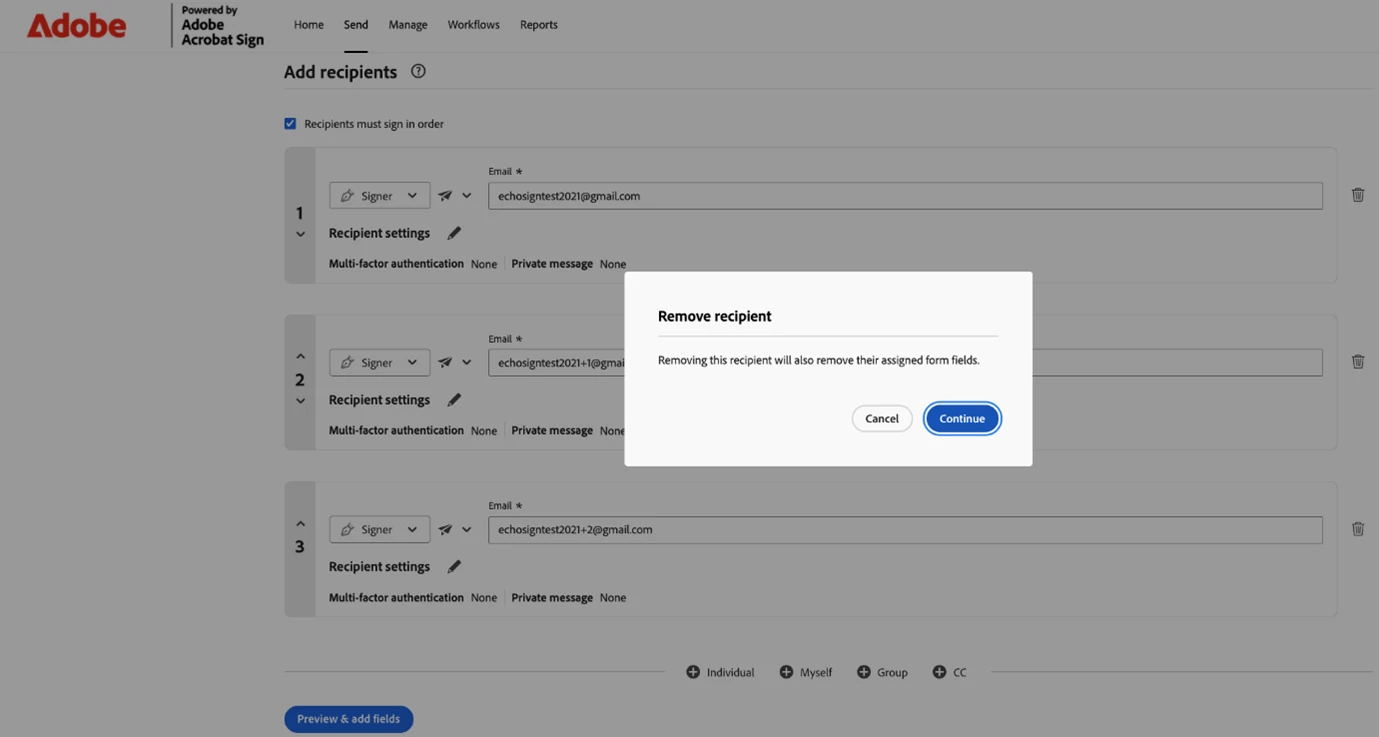
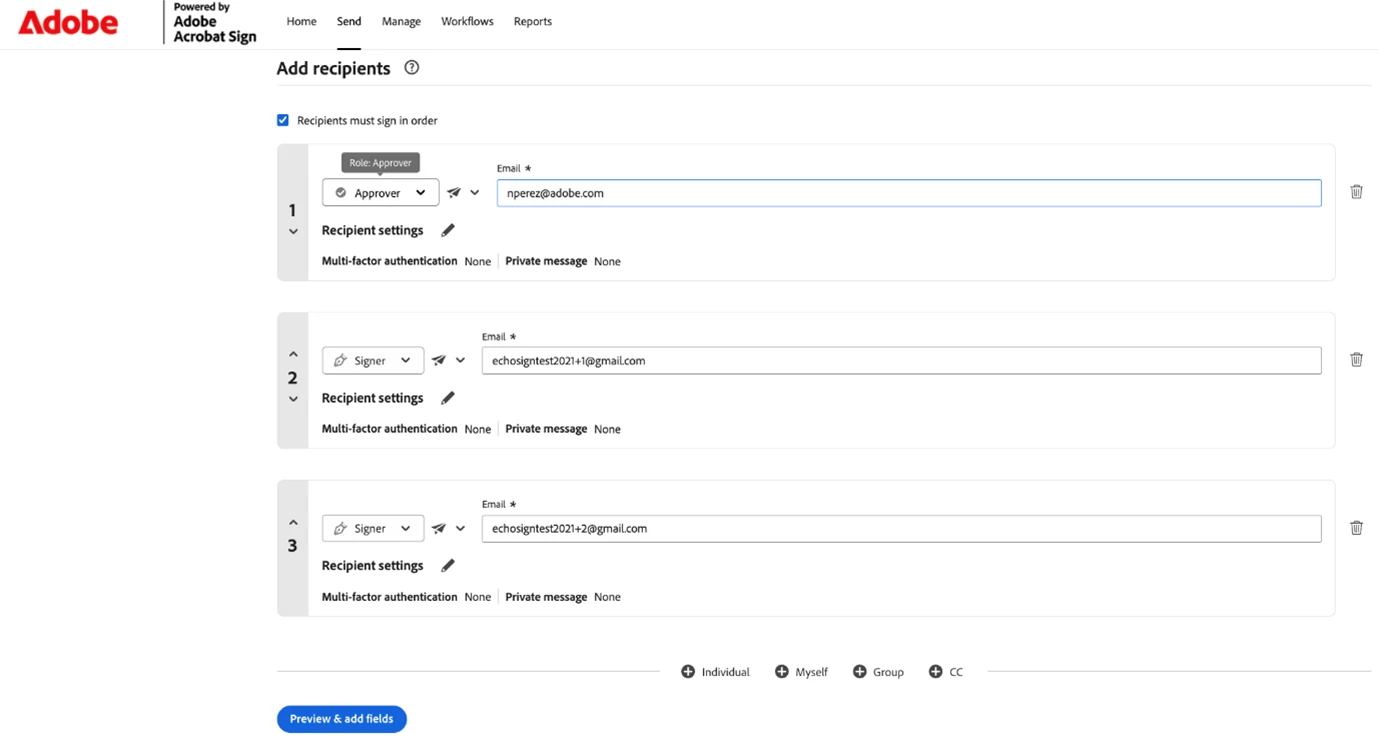
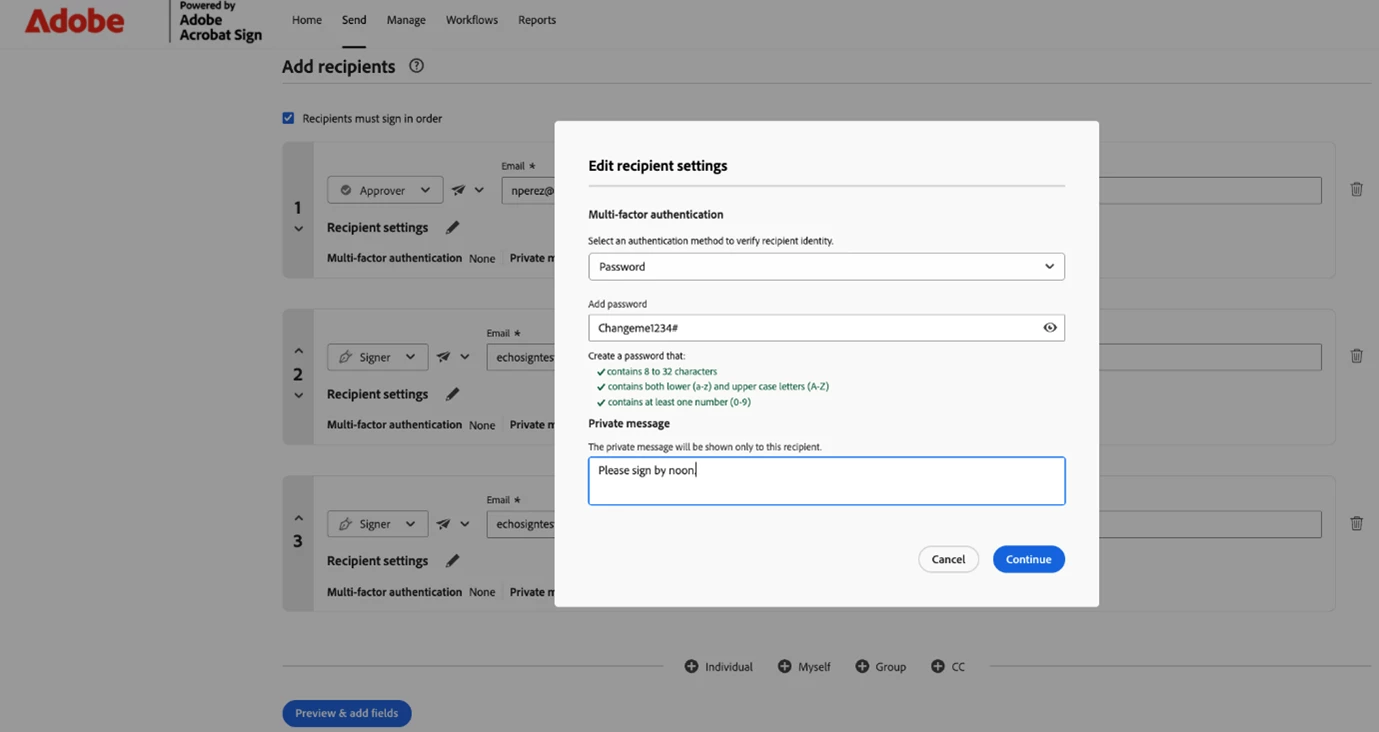
2) Modify Participant Attributes - Update recipient details dynamically, including:
- Name and email address
- Private messages to individual recipients
- Recipient roles (signer, approver, acceptor, form filler, etc.)
- Authentication methods (password, phone authentication, government ID, etc.)
3) CC Management:
Add or Remove CCs: Include or exclude individuals who need to be informed about the agreement without being signers. Manage who stays in the loop as your agreement evolves.
4) Flexible Workflow Navigation:
Seamless Navigation: Move back and forth between the compose page (where participants are defined) and the authoring page (where fields are placed) effortlessly. Make changes to your participant list, preview how fields are assigned, and return to adjust recipients—all without losing your progress.
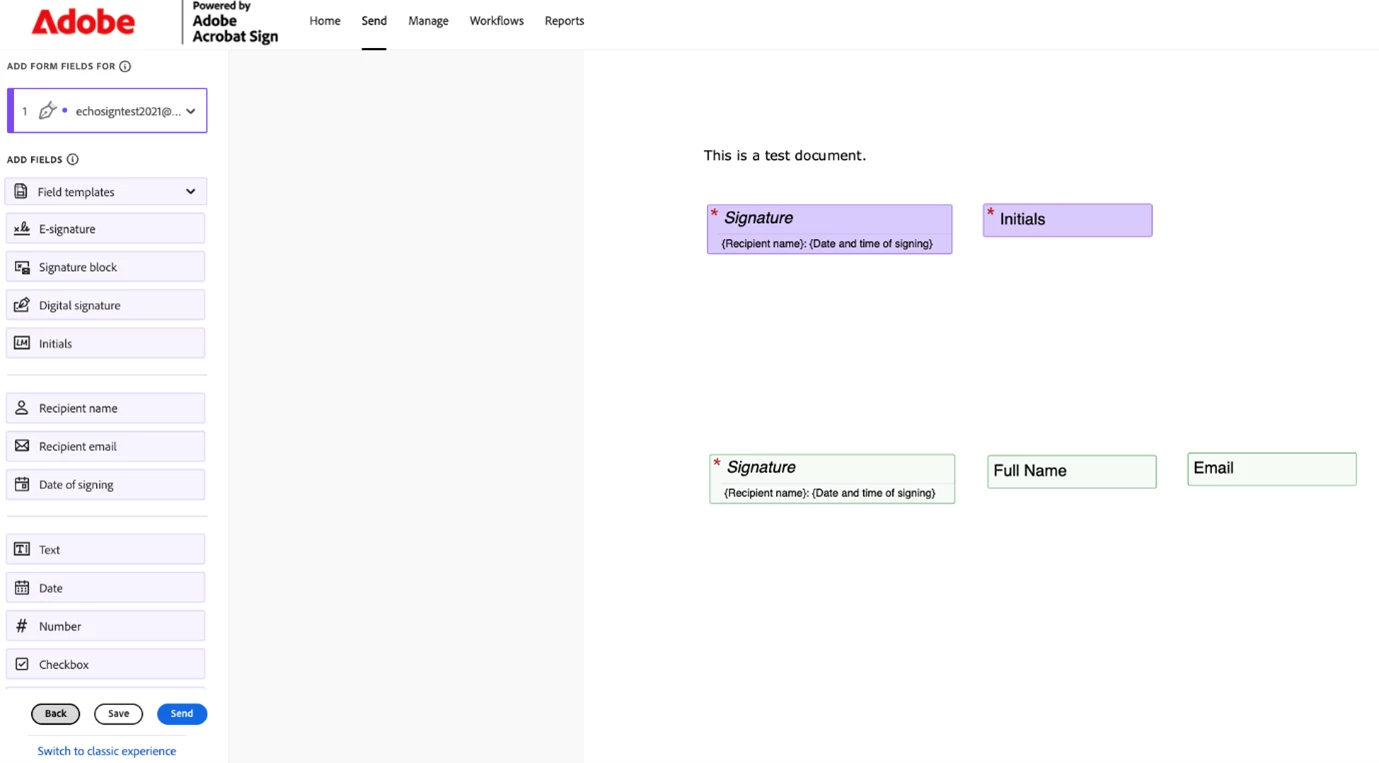
These capabilities provide additional flexibility, allowing agreements to evolve dynamically during the authoring phase without disrupting the workflow or requiring users to start from scratch.
Why It Matters
Adaptability:
Agreements often change during the authoring phase due to shifting priorities, new stakeholders joining the process, or organizational restructuring. Dynamic Participation ensures workflows remain agile and responsive, eliminating the need to restart the entire agreement creation process when changes occur.
Efficiency:
By enabling comprehensive participant and CC management directly within the authoring phase, users can avoid delays and ensure agreements are fully configured and ready for signature faster. No more juggling between drafts or maintaining multiple versions.
Collaboration:
Dynamic workflows foster better teamwork, allowing multiple stakeholders to contribute to agreements without rigid constraints. Team members can review participant lists, suggest changes, and ensure all the right people are included before sending.
Quality Control:
Having the ability to refine and perfect the participant list before sending reduces errors, prevents agreements from being sent to incorrect recipients, and ensures compliance with internal approval processes.
Increased Workflow Flexibility:
Businesses are leveraging the feature to accommodate last-minute changes without restarting the agreement process. Legal teams can adjust recipient lists as contract negotiations evolve, and sales teams can add or remove stakeholders as deal structures change.
Enhanced Collaboration:
Teams are actively modifying participant attributes and reordering recipients to ensure agreements reflect real-time priorities. The ability to customize private messages for each recipient has improved communication and reduced confusion.
Streamlined Processes:
Removing unnecessary participants and CCs has reduced complexity and improved signing efficiency. Organizations report faster completion times as agreements are sent only to those who truly need to review or sign.
Reduced Errors:
The flexibility to review and modify participant lists before sending has significantly decreased instances of agreements being sent to wrong recipients or with incorrect authentication requirements.
PHASE 2: DYNAMIC PARTICIPATIONS FOR IN-FLIGHT AGREEMENTS
Building on the success of Phase 1, Dynamic Participation for In-Flight Agreements extends this powerful flexibility to agreements that have already been sent for signature. This represents a significant advancement in agreement management, addressing one of the most requested capabilities from our user community.
What Are In-Flight Agreements?
In-flight agreements are agreements that have been sent to recipients and are currently in the signing process. These agreements are actively moving through your organization's workflow, with some recipients potentially having already signed while others are still pending.
What’s New
Phase 2 introduces the ability to modify recipient lists for agreements that are already in progress:
1) Remove Recipients From Active Agreements:
- The agreement creator can remove recipients from in-flight agreements, even after the signing process has begun
- Recipients can only be removed if they have not yet signed the agreement
- This ensures flexibility while maintaining the integrity of signatures already collected
- All removal events are logged in the audit report with complete details (email address, name) about the recipients that were removed from the agreement
2) Intelligent Workflow:
When the creator modifies an in-flight agreement using Dynamic Participation, a sophisticated workflow is triggered:
a) Agreement Transitions to "In Revision" State:
- The agreement enters a protected “in revision” state during the modification process
- During this state, the agreement is temporarily locked to prevent conflicts
b) Signing and Modification Restrictions:
- Recipients cannot sign the agreement while it is in the “in revision” state
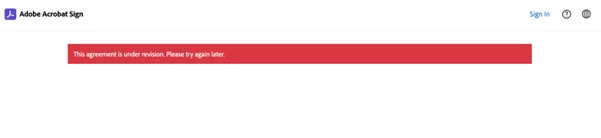
- No other modifications can be made simultaneously, ensuring data integrity
3. Automatic Notifications:
- Once the creator completes the modifications, removed recipients who were previously exposed to the agreement are automatically notified
- Notifications clearly communicate that they have been removed and are no longer part of the agreement
- This maintains transparency and professional communication throughout the process
4. Agreement Reactivation:
- After modifications are completed, the agreement exits the in_revision state
- Remaining recipients can continue with the signing process seamlessly
- Workflow resumes from where it left off, with the updated participant list
This feature can also be used in your API workflow mainly by calling Acrobat Sign REST API version 6 endpoints to (A) change the agreement state to IN_REVISION and (B) to update the agreement by removing some recipients.
Why It Matters
Real-World Business Agility:
Business conditions change rapidly. An employee may leave the organization mid-approval, a department may be restructured, or a stakeholder may no longer need to be involved in an agreement. Phase 2 ensures your agreements can adapt to these real-world scenarios without requiring cancellation and recreation.
Cost and Time Savings:
Removing the need to cancel and recreate agreements saves significant time and administrative effort. Signatures already collected remain valid, eliminating the need to re-engage recipients who have already completed their part.
Compliance and Control:
Organizations can maintain better control over who has access to agreements, ensuring compliance with changing business policies or legal requirements even after agreements are initiated.
Enhanced User Experience:
The in_revision state provides a clear, professional experience for all parties involved. Recipients understand when an agreement is being modified and receive clear communication about any changes to their status.
Reduced Cancelations:
By enabling modifications to the participant list for agreements in-flight, Dynamic Participations helps organizations avoid the need to cancel and recreate agreements. This capability preserves the work already completed, maintains momentum in the signing process, and eliminates the frustration and administrative overhead associated with restarting agreements from scratch.
Use Cases for In-Flight Modifications
Organizational Changes:
- An approver leaves the company mid-process
- A department restructure eliminates a required signatory
- A stakeholder's role changes, removing their signing responsibility
- A recipient was added by mistake
Process Optimization:
- Discovering a recipient was added in error
- Realizing certain approvals are no longer required
- Streamlining the signing chain to accelerate completion
Legal and Compliance:
- Responding to privacy requests to remove individuals from agreements
- Adjusting participant lists to meet updated regulatory requirements
- Managing confidentiality by removing recipients who no longer need access
CONCLUSION
Dynamic Participations represents Adobe's commitment to continuous innovation and user-centric design. By providing additional flexibility in managing agreement participants—both before and after sending—we're enabling organizations to work smarter, respond faster, and maintain complete control over their document workflows.
For more information, tutorials, and detailed documentation, visit the Adobe Acrobat Sign Help Center.
 AdChoices