



Sign on the Spot with any device: Adobe Acrobat Sign In Person Signing

TL;DR
In-Person Signing lets a designated host collect a legally binding signature face-to-face on a single shared device, with no email or printing required. It is now available in Acrobat Sign Solutions and Acrobat Sign for Government (not included with Acrobat Standard or Pro on its own). An admin turns it on once at the account or group level, then any sender can add the In-Person Signer role to an agreement. It works online or offline, and every step is captured in a secure audit trail.
Printing, scanning and endless email exchanges shouldn’t stand in the way of the business just for a signature. With the improved In-Person Signing feature from Adobe Acrobat Sign, documents can now be signed instantly, making the process faster and more seamless than ever with any device.
Whether you are closing a deal, onboarding a client or finalising contracts, In-Person Signing helps keep business moving without interruptions.
Less paperwork. Fewer steps. Better Signing Experience.
✍️ What is In-Person Signing in Acrobat Sign?
It is a host-guided way to collect a signature when the signer is standing right in front of you. Instead of sending the document by email, the host opens it in a browser on a shared tablet, laptop, or phone and walks the signer through it directly. It is built for moments when the signer does not have easy access to email or a personal device, at a front desk, during onboarding, or out in the field.
📌 Who can use it
- Included with Acrobat Sign Solutions and Acrobat Sign for Government.
- Not available with Acrobat Standard or Acrobat Pro on their own.
- The host must be an internal user on the account, and an admin has to enable the feature first.
- Not yet supported in bulk send workflows or web forms.
⚡ Key benefits and features
- Instant signatures, no waiting on an email to land
- Works offline, submissions sync once the device reconnects
- Flexible signing, type, draw, or upload a signature
- Full audit trail, every action recorded with encryption
🛠️ How to enable In-Person Signing
In‑Person Signing is controlled at the account or group level and is typically disabled by default. Activating In-Person Signing is a quick and straightforward process.
To enable the In‑Person Signing Services: Configure in-person signing in Acrobat Sign
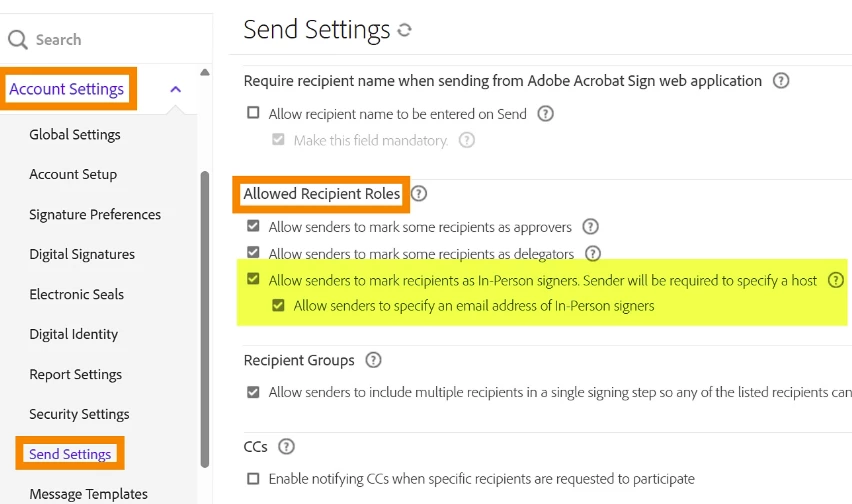
Once set up, your document is ready for immediate face-to-face signing. This setting adds the In-Person Signer role to the list of recipient roles available during agreement creation.
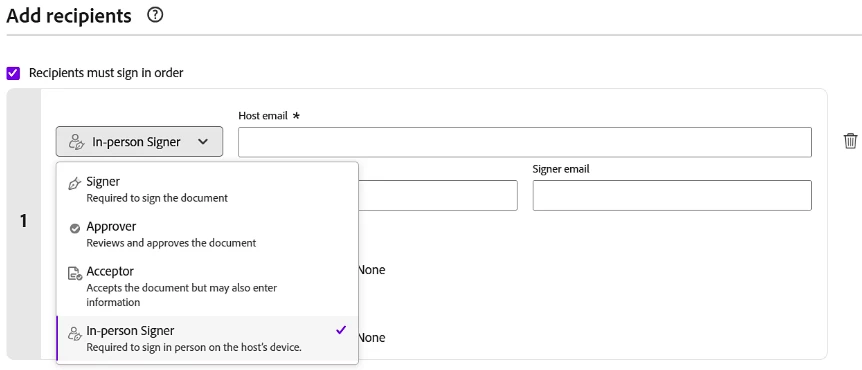
When a sender selects In-Person Signer for a recipient, the recipient record changes to support hosted signing. The sender must provide:
- The host’s email address.
- The signer’s name.
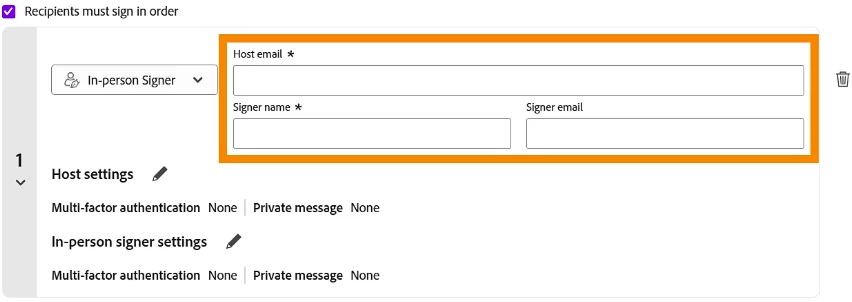
Note: Group-level settings override account-level settings.
🤝 How to host an in-person signing session
- In‑person signing in Adobe Acrobat Sign enables a secure, host‑controlled signing experience where the host manages the entire session on a shared device, ensuring the signer can review and complete the agreement without direct access to it.
- To begin, the agreement must include an In-Person Signer, and you must be assigned as the host. Any required authentication steps must be completed to ensure a controlled, compliant, and guided signing process from start to finish.
For a step-by-step workflow, go through: Host an in-person signing session in Acrobat Sign
✅ Tips for a smooth signing experience
- Ensure that you verify identity before handing over the device
- Ensure your device is fully charged if you plan to sign multiple documents offline.
- Keep Adobe Sign updated to access the latest features and security patches.
- Use secure authentication for the host when needed
- Clear browser/device sessions between signers
- For a polished experience, pre-fill fields before presenting the document to the recipient.
- Remind recipients to review all fields carefully, as digital signatures are legally binding.
Adobe Sign’s In-Person Signing transforms how businesses handle agreements. It’s fast, secure, and intuitive, eliminating the friction of traditional signing methods. Whether you’re a startup founder, HR professional, or sales representative, this tool empowers you to collect signatures efficiently and professionally—anytime, anywhere.
Start signing smarter and experience the future of document management with Adobe Sign’s In-Person Signing today.
💬 We want to hear from you! Have you used In-Person Signing to close a deal or onboard a client? Which workflows do you think it will speed up sales contracts, patient intake, field service forms, event waivers? Drop your first impressions, questions, or feature requests in the comments below.


 AdChoices