

AlanGilbertson
Community Expert
Community Expert
May 14, 2026

Cross-Product Creative Challenge #13: Beauty Magazine Ad
  • May 14, 2026
  • 30 replies
  • 857 views

Welcome to a new Cross-Product Creative Challenge! Thanks to everyone who participated in the movie poster challenge with such great creations. This time we’re switching from action movies to fashion.

(Note: This is not a prompt challenge. There are other challenges for that.)


The Challenge:


Design a high-fashion magazine ad for wealthy, non-alien animals—any creature will do, so long as it lives on Earth. Start in Firefly, Boards, Express, or Photoshop, but DO NOT stop at a prompt. There are quality details (lighting, contrast, composition) and content details you will have to get right.

Guidelines:


A prompt is not enough. Layer your assets and refine your composition. Treat Firefly and partner models as collaborators. Use prompts to generate assets you can put together in an ad. Think like an art director. What’s the story here? Who is the audience and what is the marketing message?

It’s a Cross-Product Challenge! Use Photoshop, Illustrator, Substance, Adobe Express, Fresco—whatever tools will help you build the scene.

Share your process:


Tell us how you created it. What tools did you use? How did you refine your idea? What choices did you make?

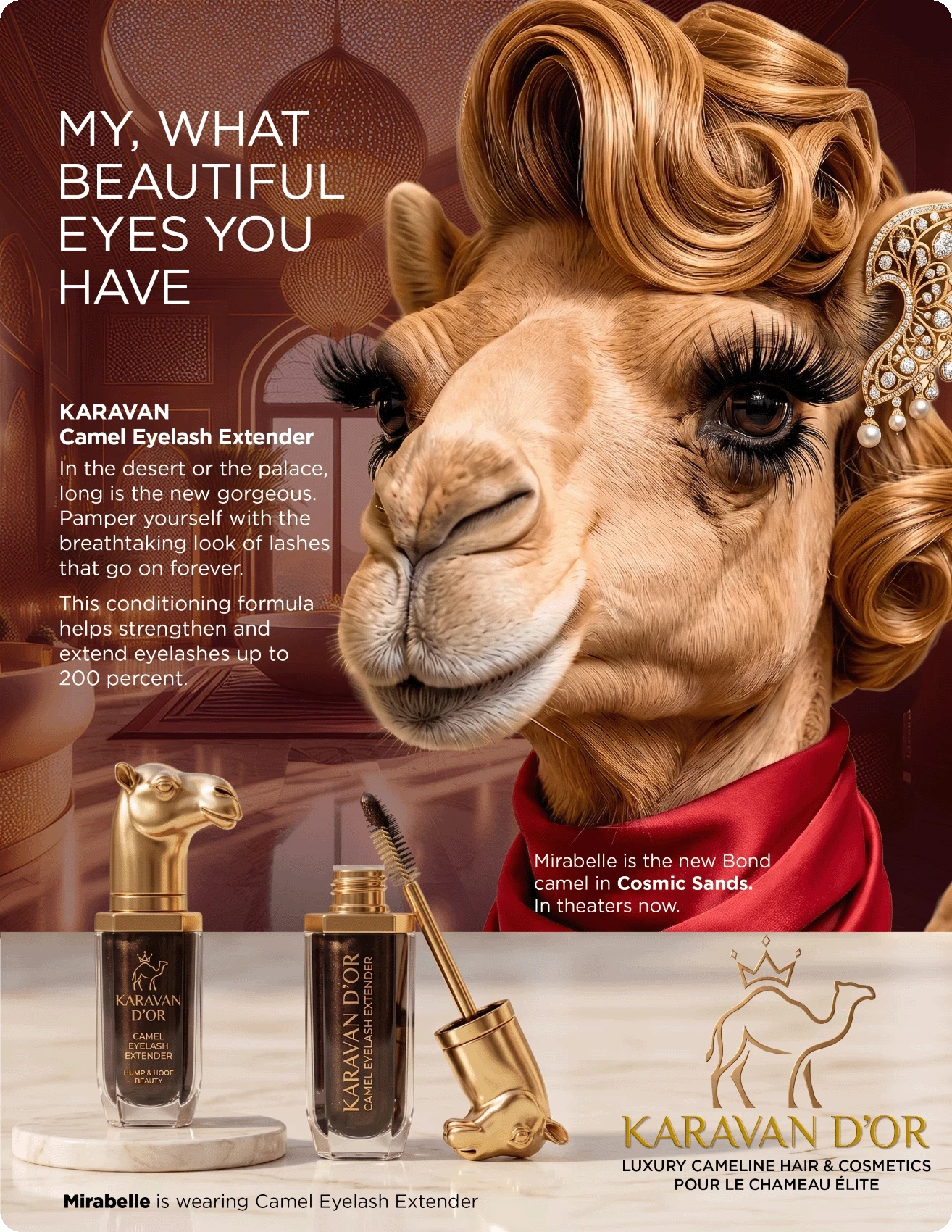
This one started life as an idea: What would it be like if camels had a beauty industry, fashion magazines, cosmetic brands? The starting point was to ask Nano Banana Pro, “Create a name and logo for a luxury hair and cosmetic brand for ultra-rich camels.” It came up with the brand name, a starting point for a logo, and some ideas for specific cosmetics. Mirabelle started as a Firefly 5 prompt: “A high-end magazine glamor photograph of an anthropomorphized young female camel with immaculately groomed hair and cosmetics, long eyelashes, in a luxurious beauty salon for camels.”

The ad copy and overall look are modeled on old cosmetic ads featuring different movie stars, particularly a Revlon mascara ad with Emma Stone. 

Mirabelle went through several iterations to get the look, the hair, and (for this ad) the eyelashes right. The eyelash extender is one of several cosmetic items I made in collaboration with Nano Banana that will get their own ads.

In Photoshop, I made an image large enough for a magazine page at 300 ppi and generated an exotic “Arabian palace” spa for a background. “Select Subject” pulled Mirabelle out of her original image on Firefly Boards. Photoshop is also where the product image and the logo were refined.

Final assembly and layout is in InDesign, where the background image gets a color tint eyedroppered from the silk scarf, and the product is layered by using “Object Layer Options” on two instances of the product Photoshop file.

I’m encouraging everyone to approach this like you would a real client project. Composition, colors, copy, image quality should be appropriate for a high-end publication. Even if you don’t do this kind of work for a living, or very often, it’s great practice in getting the different tools to work together. Above all, have fun with it!


    30 replies

    floramc
    Community Expert
    Community Expert
    June 14, 2026

    My image is a firefly + express work.


    Mainly edited the background and filled up in express, while popping the text a bit

    The prompt was very basic


    Mike_Gondek10189183
    Community Expert
    Community Expert
    June 12, 2026

    Used Grok. “Create a beauty magazine cover entitled Happy Sloths with a sloth with lipstick.”


    AlanGilbertson
    Community Expert
    Community Expert
    June 15, 2026

    This isn’t a prompt challenge, as the blue “Guidelines” panel tries to make clear. Also, the challenge is to design “a high-end fashion magazine ad” rather than a magazine cover. (That said, the number of “magazine cover” responses to this challenge reminds of all the times I’ve given Firefly or Nano Banana a prompt and had it insist on doing something else.) The point of the cross-product creative challenge is in the name: incorporate AI into a realistic workflow with other tools. You would never send flawed text and low resolution to press.

    Lelia+Garcia
    Participant
    June 10, 2026

    Thank you! I finished the project in Adobe Express. I used it to add the typography, remove and isolate the blue sapphire graphic and the white swan icon, and then position them on the appropriate layers. I adjusted their size, placement, and overall balance to complete the final design.

    KShinabery212
    Community Expert
    Community Expert
    June 10, 2026

    I decided to think about a strange animal and a Tarsier popped into my head. And I was like ok let’s get really creative with this. They have big eyes… why not create perfume drops for your eyes. Which sounds like something strange the fashion-world would come up with. So I came up with a French name…. and then just said perfume for your eyes in french. I wish I had unlimited space in Firefly for prompts. I do in Google Gemini and ChatGPT. So I was limited with what I could do. But with some fun I came up with this image.


    Let's connect on LinkedIn. https://www.linkedin.com/in/kshinabery/
    AlanGilbertson
    Community Expert
    Community Expert
    June 10, 2026

    Great idea! What was your process, and which apps did you use besides GenAI? (This is not a genAI challenge.)

    Lelia+Garcia
    Participant
    June 10, 2026

    Creative Process – Glamour Magazine Ad Challenge

    My concept was to create a luxury fashion magazine cover featuring an anthropomorphic swan as a high-end glamour icon. Inspired by the elegance of couture editorials and luxury jewelry campaigns, I imagined a character named Zapphie, a sophisticated swan attending a prestigious gala night.

    The project began in Adobe Firefly, where I generated the main character: a graceful swan with human-like proportions, wearing an elaborate sapphire-blue evening gown embroidered with silver details. To reinforce the luxury theme, I added a sapphire tiara, matching jewelry, elegant makeup, and a refined hairstyle. The color palette was centered around deep royal blues, white feathers, gold architectural accents, and sparkling crystal highlights.

    Next, I developed the setting: a grand palace interior with sweeping staircases, chandeliers, marble surfaces, and a crowd of elegantly dressed  guests. The environment was designed to resemble the arrival scene at an exclusive high-society event, emphasizing prestige, wealth, and sophistication.

    I refined the composition to follow the visual hierarchy of a fashion magazine cover. The character occupies the central focus, while the sweeping staircase naturally guides the viewer’s eye through the scene. Warm lighting and chandelier reflections were used to create depth, contrast, and a luxurious atmosphere.

    For the branding, I created the fictional magazine title “GLAMOUR” and developed the luxury fashion brand “SWAN SWAROVSKI.” The sapphire-inspired logo and typography were placed strategically to resemble a premium editorial advertisement. The headline copy was written to support the narrative of the character making a grand entrance at a gala event.

    Finally, I adjusted composition, typography placement, lighting balance, and overall visual polish to achieve a magazine-quality advertisement. My goal was to blend fantasy, fashion, luxury branding, and storytelling into a single image that feels both aspirational and commercially believable.

    AlanGilbertson
    Community Expert
    Community Expert
    June 10, 2026

    Delightful! You began in Firefly. Where did you end up? Photoshop, or Express?

    Lelia+Garcia
    Participant
    June 10, 2026

    Delightful! You began in Firefly. Where did you end up? Photoshop, or Express?

    Thank you! I finished the project in Adobe Express. I used it to add the typography, remove and isolate the blue sapphire graphic and the white swan icon, and then position them on the appropriate layers. I adjusted their size, placement, and overall balance to complete the final design.

    OussK
    Community Expert
    Community Expert
    June 10, 2026

    Step 1 - Concept Ideation (Collaborative) The client/creative brings the core idea - an animal, a vibe, or a play on words. I take that seed and develop the full creative concept: the anthropomorphic character, the brand name and pun-driven tagline system, the scent/product story, the color palette, the environment, and the overall tone. The goal is a cohesive luxury campaign that feels premium but lands the joke.

    Step 2 - Prompt Engineering I write a detailed, structured generation prompt covering subject, wardrobe, expression, environment, lighting, mood, composition, layout zones for typography, product design, and rendering style. The prompt is built to be production-ready - specific enough to control the output, flexible enough to iterate.

    Step 3 - Base Image Generation (ChatGPT / Adobe Firefly) The prompt is run through the chosen generative engine to produce the hero visual - the anthropomorphic character in costume, in environment, with correct lighting and mood. Multiple variations are generated and the strongest base plate is selected. Firefly is favored where commercial-safe, license-clean output matters.

    Step 4 - Refinement & Compositing (Photoshop) The selected base image is brought into Photoshop for fine-tuning

    AlanGilbertson
    Community Expert
    Community Expert
    June 10, 2026

    Love the concept. Love the humor! Thanks for the detailed description of the process. Did you leave all the typography to the AI?

    Community Expert
    June 6, 2026


    These images were created using a combination of Adobe Firefly and Adobe Photoshop.

    • I started by using Adobe Firefly to generate multiple concepts for a luxury-fashion version of the Teenage Mutant Ninja Turtles universe, called Wild Couture.
    • Through several generations, I refined the characters, outfits, poses, and environments until they matched the high-end editorial fashion look I wanted.
    • I experimented with different animals, couture clothing, pizza-inspired fashion details, luxury interiors, and magazine-cover compositions.
    • Once I had strong Firefly generations, I brought the images into Photoshop for editing and refinement.
    • In Photoshop, I combined the best elements from multiple generations, adjusted colors and lighting, improved details, and enhanced the overall luxury aesthetic.
    • I added magazine-style typography, headlines, logos, and fashion-editorial layouts to create the final covers and advertisements.
    • Additional adjustments were made using masks, adjustment layers, retouching tools, and color grading to ensure a polished and cohesive visual style.
    • The final result is Wild Couture, a glamorous reimagining of the Teenage Mutant Ninja Turtles world where pizza becomes high fashion and animals become luxury couture icons.
    AlanGilbertson
    Community Expert
    Community Expert
    June 6, 2026

    Awesome, Nick! They look good enough to eat. Not exactly an ad, but completely delicious!

    JR Boulay
    Community Expert
    Community Expert
    June 1, 2026

    J’adore l’or


    Acrobate du PDF, InDesigner et Photoshopographe
    JR Boulay
    Community Expert
    Community Expert
    June 1, 2026

    J'adore l'or = I love gold


    Making off:
    - Find the original "Dior j'adore" posters online.
    - Ask Firefly several times to generate a side view of a giraffe with its head in a three-quarter profile. Assemble the results in Photoshop to keep only the best parts.
    - Ask Gemini 3 and 3.1 several times to place Dior’s famous "femme-girafe" necklace around the giraffe’s neck (the most laborious part). Assemble the results in Photoshop to achieve a coherent result.
    - Copy and paste "J’adore Dior" into Illustrator to modify the word "Dior" and the font.
    - Give up after about fifteen minutes, unable to achieve true colour consistency in gradients.
    - Ask Gemini to replace the word "Dior" with "l'or" (actually, it’s so much simpler that I should have started there).
    - Remove Charlize from the poster using the Remove tool.
    - Assemble everything in Photoshop using "Adjust layer" and a few adjustment layers.


    Acrobate du PDF, InDesigner et Photoshopographe
    AlanGilbertson
    Community Expert
    Community Expert
    June 2, 2026

    Love it, JR. Love them both, actually. I’m not sure which I like better, but the brief was for an animal, not an alien, so… 😁

    didiermazier
    Community Expert
    Community Expert
    June 1, 2026

    Sorry guys… Only Photoshop


    JR Boulay
    Community Expert
    Community Expert
    June 1, 2026

    Les grands esprits se rencontrent ! 😉

    (Mais je ne vois pas l’animal)

    Acrobate du PDF, InDesigner et Photoshopographe
    Kathrin Federer
    Community Expert
    Community Expert
    June 1, 2026

    Prompt: 

    Create a premium advertising poster for a fictional luxury men’s fragrance campaign based on a deer-themed perfume ad called STAGGER.

    Use the uploaded images as style inspiration only. The references show humorous animal-based fake luxury posters with bold editorial layouts, punchy headlines, premium product photography, and absurd high-fashion comedy. Do not copy any one poster directly. Instead, create one original poster that feels equally polished, witty, and visually striking.

    Main idea:
    A majestic male deer / stag is the hero of the campaign. He should look elegant, overconfident, slightly dramatic, and absurdly desirable. Make him the main subject, posed like a luxury fragrance model in a moody dark forest-meets-editorial setting. He can be slightly anthropomorphic in attitude and styling, but should still clearly read as a stag. Give him a suave, high-end fashion presence — for example a dark tailored coat, subtle velvet texture, or refined luxury styling. His antlers should look powerful and beautiful.

    Scene and composition:
    Premium fashion-poster layout, visually balanced, sleek, and magazine-worthy. Dark cinematic background with a misty forest or shadowy editorial environment, subtle light beams, rich deep greens, charcoal, black, and warm amber highlights. The stag dominates the upper/middle section. In the lower right, place a realistic luxurious perfume bottle as the product hero. The bottle should be original and elegant, with a premium glass design, amber-brown fragrance liquid, a metallic cap, and a refined label reading “STAGGER” and “EAU DE PARFUM”. Add a small antler emblem or crest on the bottle for brand identity.

    Typography and copy:
    Include clean, readable ad typography integrated beautifully into the poster. Make the text stylish and intentional, mixing bold headline and refined supporting copy.

    Use the following English copy:

    Main headline, large and prominent:
    “OH DEER.”

    Secondary headline:
    “HE’S NOT TOXIC. HE’S JUST MUSKY.”

    Supporting line:
    “A scent so irresistible, the forest files a complaint.”

    Product name block:
    “STAGGER”

    Subline near the bottle:
    “Rich woods. Smoked amber. A hint of poor decisions.”

    Bottom tagline:
    “Leave them weak in the knees and lost in the trees.”

    Optional small descriptor:
    “Luxury Eau de Parfum”

    Tone:
    Ultra funny through dry wordplay, but presented with total seriousness like a real high-end perfume campaign. The humor should come from the contrast between the regal seductive stag and the absurdly polished ad language.

    Visual quality:
    Hyper-detailed, highly polished, premium lighting, realistic fur and glass, elegant shadows, magazine-level finish, luxury campaign aesthetic, sharp text rendering, and a cohesive sophisticated composition. Make it feel like a believable luxury ad poster that also makes people laugh.

    Format: Vertical 4:5 

    -------------

    I tweaked it then a bit in my home base Photoshop.


    Let's connect: kathrinfederer.ch/links
    Community Expert
    June 1, 2026

    I like this. I would buy it.