



August 10, 2026

Cross-Product Creative Challenge #15: Product Catalog with a Twist

  • August 10, 2026
  • 26 replies
  • 350 views


Welcome to a new Cross-Product Creative Challenge! Thanks to everyone who participated in the luxury magazine challenge. This time, Alan and I are making a catalog with a twist: Design a catalog ad for wealthy, non-alien animals—any creature will do, so long as it lives on Earth.
 

The Challenge [Read all of it!]:

Design a catalog for a website, a paper catalog, trade catalog or parts book. Choose something that is not exactly from this world. Your audience could be something from your magazine luxury cover.

The standard aspect ratio for digital e-commerce product catalogs and social media feeds is 1:1 (square), while vertical formats like 4:5 or 9:16 are used for mobile-first feeds and stories. For print, traditional catalogs use standard paper proportions close to; so, use one these aspect ratios

Start in Firefly,  Boards, Adobe Express or Photoshop, DO NOT stop at a prompt. This is a crossproduct challenge. Use Firefly and then bring it into other Adobe Apps to create something.

Pay attention to the quality details (lighting, contrast, composition) and content details (titles, product description, buttons, logo) you will have to get right.
 

Guidelines:

  • A prompt is not enough. Layer your assets and refine your composition. Treat Firefly as a collaborator, not a shortcut. Use prompts to generate products. Try out partner models.
  • Think like an editor. What products are there? Who is your audience? What products would appeal to your audience?
  • It’s a Cross-Product Challenge! Don't do it all in Firefly or AI generation. Use Photoshop, Illustrator, Substance, Adobe Express, InDesign—whatever tools that will help you build the catalog.
  • Share your process. Tell us how you created it. What tools did you use? How did you refine your idea? What choices did you make?

This catalog starts with the Jelly Heritage Couch, Jellish Arm Chair, and Jell Countryside Arm Chair that were generated in Firefly. Took these images into PS to colour correct using Camera Raw Filter and then removed the background. Refined the selection with the Pentool. 

In Illustrator, created the jellyfish logo, the jellyfish checkout box, the jellyfish like button, and the search magnify glass. Put these items into the library.

I went into Adobe Fonts and chose the fonts.

Used Vector images for social posts.

Brought all these items into Adobe InDesign to layout the content and create consistent graphic styles, paragraph styles, and CMYK swatch colours for consistency in colour. I used only 4 colours. The website header and scroll box were added to create a website look and feel.

    26 replies

    Participating Frequently
    August 22, 2026

    Over the top amazing… I’d buy one… :) great work and thanks for sharing… Eddie

    Trevor.Dennis
    Community Expert
    Community Expert
    August 22, 2026

    OK, I hope I’ve got a handle on this.  I present to you the Aurora Explorer AE-7 Promotional Poster.

    I took two goes at this as I was not happy with the first, so I found the image of the spaceship on a white background, and used it as a base for everything else.  Some Gemini 3.1.  I tried Flux Pro thinking it might be good with text, but it was nowhere near as good as Gemini.  A fair bit of fine tuning with Photoshop.  The big revelation for me was Claude which I used for the Trouble Shooting guide.  I’d never used it before so typed the first line and hit return, and it gave me five pages!  I edited it down to four pages, but couldn’t bring myself to cut it more than that.

    Lots of fun Nate, but could you get it pinned like Dave’s SFTW threads to hopefully get more people to see it and join in?  

    Trevor.Dennis
    Community Expert
    Community Expert
    August 22, 2026

    It seems we can’t zoom in beyond the initial window size with the new forum.  To see these long thin images full res. Click to expand. Right click and Open in New Tab.  In the new tab you can zoom in with mouse wheel etc.

    PS I’m hoping the terms and conditions don’t get me into trouble. ;-)

    [EDIT]  After seeing other people’s layouts, I decided to split it into four landscape images to better fill the screen and overcome the zoom-in issue.

    Oh.N8Community ExpertAuthor
    August 22, 2026

    Wow!!! ​@Trevor.Dennis Definitely out of this world experience happening. Bit of Galatica fell to a major transport ship or cruiser of the galaxies. 

    Claude is great for this type of stuff. Here is what I need, the specifications, and the general outline and requirements.

    Be interesting to use a few scripts in InDesign or Illustrator for a different workflow.

    Thank you for sharing and participating

    Nate 

    Participating Frequently
    August 21, 2026

    Nate… How wonderful to receive this message from you. Especially that you see into my visionary concept and the far away vibe… thank you… I am truly honored and excited that you would share your thoughts in such a way and just know that you’ve made my day… My pleasure to participate and have fun in our community… Cheers… Eddie

    Oh.N8Community ExpertAuthor
    August 23, 2026

    Hey ​@Eddie Tapp Make sure to check out the other Community Challenges: Illustrator, Lightroom and PS.

    Participating Frequently
    August 20, 2026

    Firefly + Photoshop — From Cosmic Fashion to the Future of Shopping

    The catalog cover began with multiple experiments in Firefly, each producing a different look, background, and model. My vision was to create something with a fashion flair set in a cosmic world.

    After exploring several directions, I settled on two versions and brought them into Photoshop, where I generated the cover typography and logo treatments in three formats: 1:1, 4:5, and 9:16. In the end, I decided the 9:16 version was the most fun to work with.

    My final model was then removed from her original background using Select Subject in Photoshop. I was amazed at how cleanly it separated her from such a busy, complex cosmic environment.

    For the new background, I used a Firefly prompt to create an environmental scene that felt fashionable, futuristic, celestial, and romantic. I wanted a conservative approach to the model’s dynamic and stunning beauty—a kind of visual segue from high fashion into the emerging world of flying cars and the future.

    From there, I moved into creating the product pages. Using prompts and the cover imagery as a source, I generated individual product images on white backgrounds: binoculars, Phone, sunglasses etc.. Each product became part of the visual language of this imaginary catalog.

    What if clicking on one of these futuristic products took you directly to a deeper description, pricing, and an “Add to Cart” button? Of course, all of that would be entirely appropriate for the shopping experience of this futuristic day.

    The cover text was a Photoshop experiment. The encompassing “C” was generated from the original word/text and then stretched across the remaining letters on two separate layers. I used masks to hide portions of the extended text and then grouped everything into a folder with an additional mask for a see-through blending effect.

    Of course, all of that would be entirely appropriate for the shopping experience of the day.

    That’s what makes experimenting with Firefly and Photoshop so much fun. It isn’t simply about generating an image—it’s about imagining an entire visual experience that may not even exist yet.


    Oh.N8Community ExpertAuthor
    August 21, 2026

    This is out of this world! ​@Eddie Tapp 
    The colours, the hues, and the subtlety of it all. Gives a Men in Black vibe with the NOVA or Orbit jewelry. 

    Thank you for sharing the starting images as well. This really helps see how you brought the composition together. 

    The cover is very impressive and well thought out. Definite love the Celestia Logo and the subtle tilt: a galaxy far far away vibe…

    Your choice of products has a bit of everything. Definitely would make a night out incredible and night worth remembering. Could definitely see a person using the Syra on top of a balcony to watch an space opera or to spy on whose coming through the ballroom doors.

    Thanks for sharing and participating.
    Nate
     

    tonks_the_auror
    Community Expert
    Community Expert
    August 18, 2026

    The Tea Beneath the Sea print catalog:

    Firefly, Photoshop, Illustrator, InDesign.

    I had a lot of fun with this. I found the octopus for the main image on Pixabay, then did some work in Photoshop, editing the background, adjusting the saturation, and adding the tea cup.

    I used Firefly to generate the teapot, the cups, the sugar bowl, the milk jug, and the two octopi on the back cover.  I did some work on all of these in Photoshop--removing backgrounds, adjusting perspective, etc.

    Firefly really amazed me when it produced "OctoJeeves." The prompt was: "Rube Goldberg: elaborate machine with belts, pulleys, and levers to dispense 8 sugar cubes from a central hopper into 8 separate cups. I refined the prompt a bit so it would pour tea, then took the result into Photoshop, removed the background and made some minor refinements.

    After the elements were created, I turned to Illustrator to create the octopus line art for the logo. I started with a .png from Pixabay, then used Illustrator to create a vector.

    Then it was time for InDesign, which is (as David Blatner says) my happy place. I chose Freight Text Pro from Adobe fonts.
    I created the cover, one interior spread, and a back cover, importing the assets and adding the text (which I had a lot of fun writing)!

    Hope you like it!


    Oh.N8Community ExpertAuthor
    August 18, 2026

    Hey ​@tonks_the_auror 
    Eight arm efficiency… hahaha
    Could you share a larger image? It’s a bit hard to read (for me).

    Wow! I love the whole concept and idea behind it. I am starting to find my happy place in InDesign. InDesign is a recent tool that has been added to the tool belt. Well, it is more the architectural construct and planning.

    Yes, FF and partner models can create some fantastic stuff. Super glad that you pointed out that as a user we still need to go in and clean up the images in PS or some other app. 

    Illustrator is a perfect spot for creating vector logos. Now, w generative AI we can get a logo concept quickly. Still needs work and clean up. 

    That logo is very impressive. 

    Cheers

    Nate

    tonks_the_auror
    Community Expert
    Community Expert
    August 18, 2026

    Thanks, Nate!


    @mj
    Community Expert
    Community Expert
    August 15, 2026

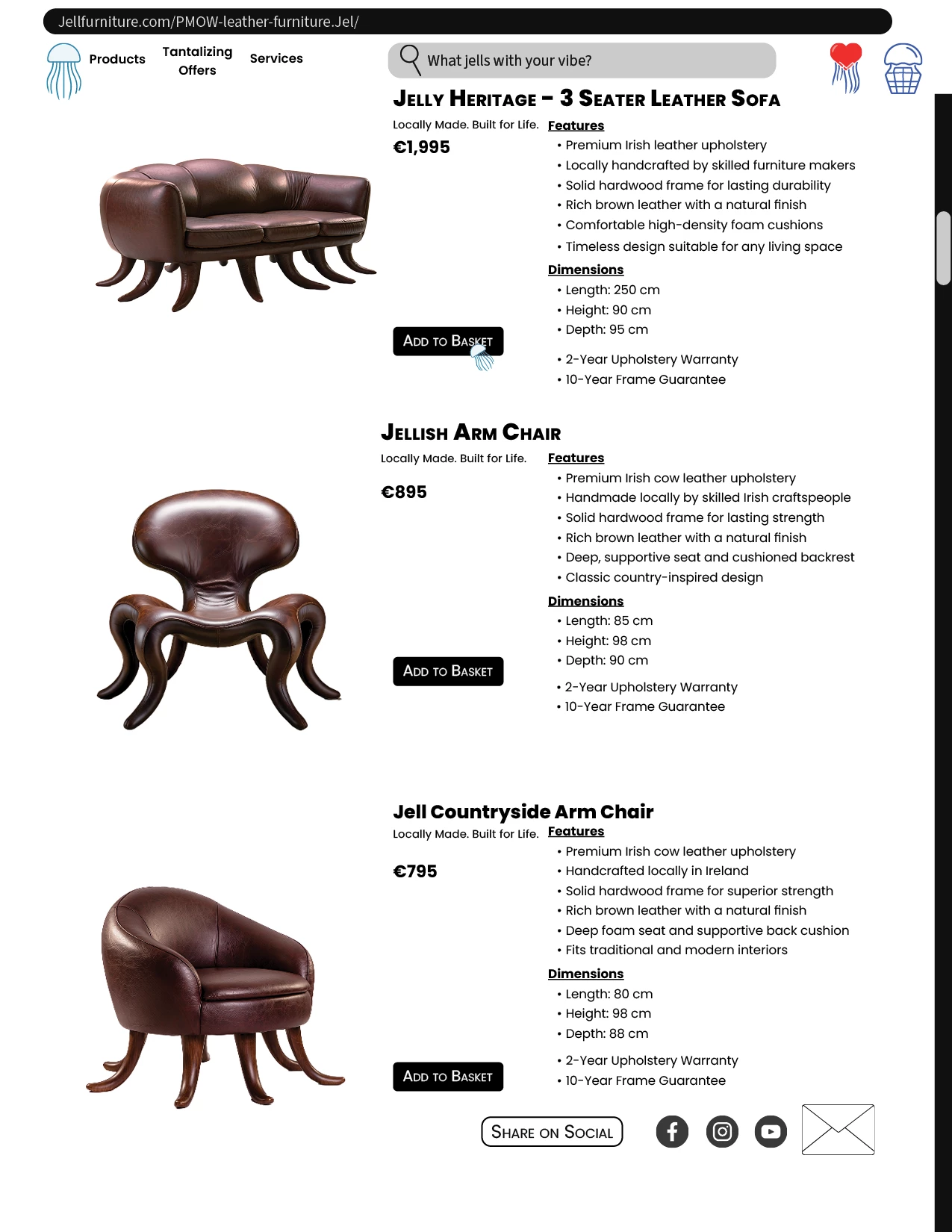
    The Jellish Rellish catalogue was developed using Adobe Firefly and Adobe Creative Cloud, combining generative AI, image editing, vector illustration and editorial design. The project began in Firefly, where the hero product imagery—including the Jelly Lounge Chair, Jelly Bean Stool, Wiggle Sofa, Jelly Vase, Gummy Bear Sculpture, Bubble Bowl, lighting and drinkware—was generated. These images were brought into Adobe Photoshop for colour correction using Camera Raw Filter, background removal and selection refinement using the Pen Tool. Adobe Illustrator was then used to create supporting vector assets, including the jelly-inspired logo, decorative badges, interface elements, social media icons and search graphics, which were stored in Creative Cloud Libraries for consistent reuse.

    The final assets were brought into Adobe InDesign, where the catalogue was structured using grids, paragraph styles, graphic styles and consistent typographic hierarchy. Adobe Fonts was used to select typography that complemented the playful, nostalgic character of the brand. A restricted four-colour CMYK palette was established to maintain consistency across the publication, while website-inspired elements such as headers, navigation labels, search functionality and scroll boxes helped bridge the visual language between print and digital experiences. The final outcome demonstrates an integrated Creative Cloud workflow, combining Firefly, Photoshop, Illustrator, Adobe Fonts, Creative Cloud Libraries and InDesign to create a cohesive visual identity and editorial catalogue.

    Fun and squishy!

    Oh.N8Community ExpertAuthor
    August 15, 2026

    @@mj Wow!!! simply squishy. You definitely took this to a whole new level of creating seasonal layouts and concepts. Thank you for sharing your workflow. 

    Where did you get the font? That font is squishly fabulous and fun. 

    Love those extra bits like the bar code, the social media links, and the actual catalog book. Very impressive and cool. 


    Which 4 colours did you choose? How did you go about choosing your colours? 
    InDesign is soooo powerful for creating this type of content. 

    Any tips or suggestions for Paragraph or graphic styles for those looking to get into InDesign and not sure were to begin?

    The chairs and furniture are almost something I want eat. wonder what flavours they would be: purple grape, orange: zesty orange, mmm or we could totally inverse the flavours: purple for banana, orange for strawberry…

    Thanks for sharing.
    Nate

    daniellei4510
    Community Expert
    Community Expert
    August 14, 2026

    AI and Photoshop for the layout.


    Adobe Community Expert | I have miles to go before I sleep, but I'm all done on this end.
    Oh.N8Community ExpertAuthor
    August 14, 2026

    @daniellei4510 Shellies Selling Sea Shells by the Sea Shore, I see.
    This is very cute. I love the Shell Shack idea. Great summer project: you will shelling out a lot for those chairs and designs. 

    How come you went with the tortoise motif? What is the white tortoise? What about the other concepts?

    The Title font is exseaptional! Seaside vibe w a fantasy twist: love it! Definitely put a twist on things.

    fun and creative. 
    cheers

    Nate

    daniellei4510
    Community Expert
    Community Expert
    August 14, 2026

    I dunno. Just thought back to my days as a kid when it was legal to sell painted turtles. :)

    Adobe Community Expert | I have miles to go before I sleep, but I'm all done on this end.
    Anna Natter
    Participating Frequently
    August 11, 2026

    For some reason my image upload is not working. Anyway, I had quite some fun with this project but I’m not sure this is the right interpretation of this challenge. :D Anyway here we go, I created this with Firefly, Photoshop, and Illustrator. 

    3D Designer / Multidisciplinary Creative / Creative Technologist
    Oh.N8Community ExpertAuthor
    August 11, 2026

    @Anna Natter That is Catastronomic!!! Love the concept and the layout. With all the space travel happening we ll see our 1st Purrtain soon. 


    You may want to look into InDesign to assist w layout and such. InDesign is great for making paragraph styles and layout easy. The Text kind of gets lost in the background. With Accessibility becoming important and in certain parts of the world like Europe, we need to make sure everything is Accessible. 

    I am fond of the Aureus myself. The majestic confident look.  

    The podium is brilliant. C-Team reporting for duty.  The matching suit colours with the furry is very cool. Gotta make sure that there are no lasers to distract our crew members.

    ​​​​​​​Cheers

    Nate