



Firefly: Assemble a Short Video From Your Clips (Beta Workspace) 🎬

Making short videos just got easier. Firefly's new workspace to assemble a short video (beta) puts your generated or imported clips in one simple, single-track workspace. No stacks of layers. No complex timeline.
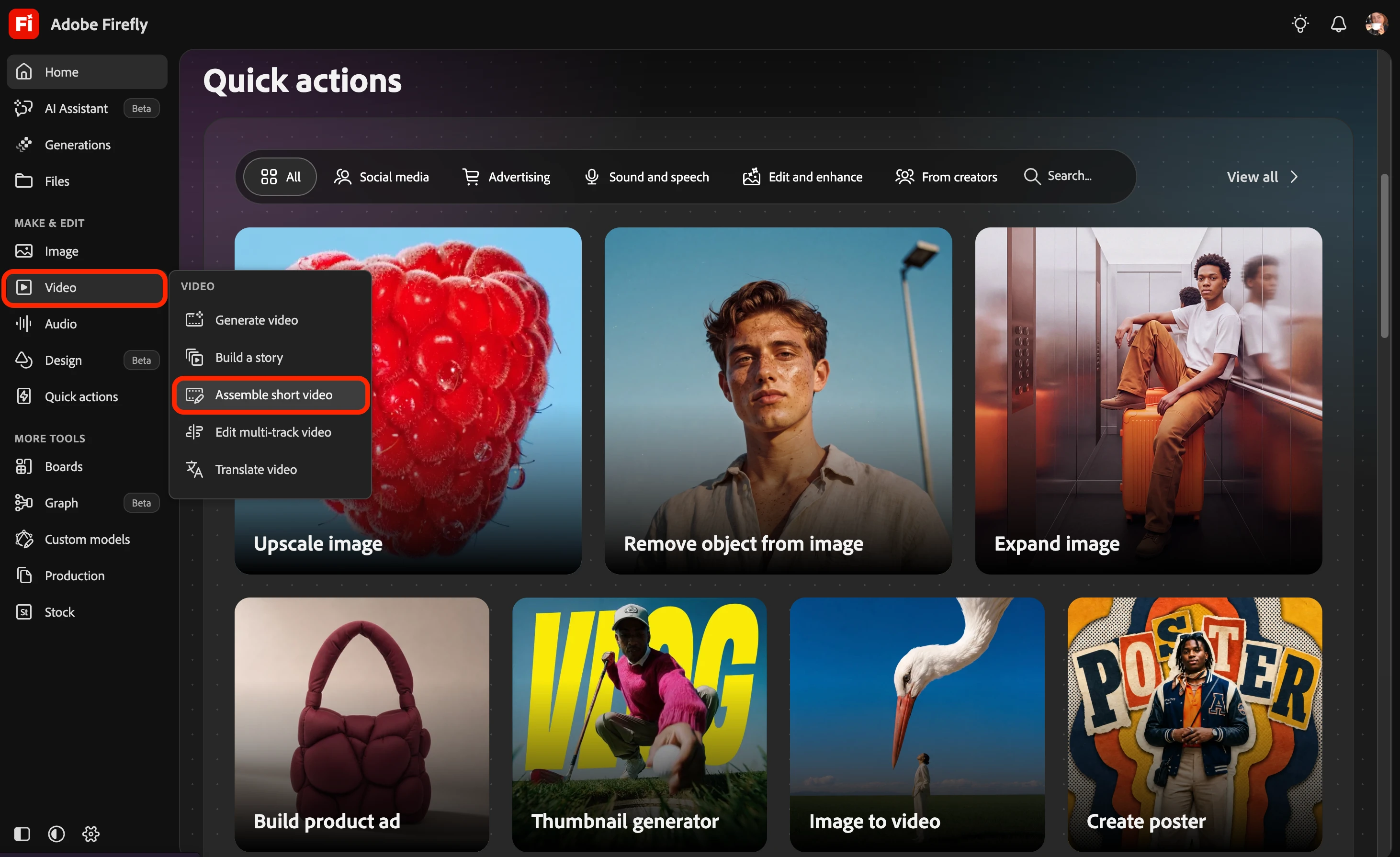
Open the workspace
Pick the route that fits where you are:
• From the Firefly homepage: in the left navigation bar, go to Video > Assemble short video.
• After a Quick Action workflow: generate a video with a supported Quick Action workflow, then select Edit video.
• After AI Assistant: generate a video with an omni model, then select Video assembler (beta).
You can also use Firefly's generative features right inside the editor.
What you can do here
✂️ Trim, split, and rearrange clips
🔊 Adjust the volume of individual clips
✨ Regenerate selected clips with a text prompt
🖼️ Add a reference image to guide regeneration
🎞️ Compare different takes and choose your favorite
📐 Change the video aspect ratio
▶️ Preview and download your finished video
🛠️ Send your sequence to Timeline for more advanced editing
It's a quick way to turn your clips into a short video without juggling multiple layers or a complex timeline.
 AdChoices