


Kartika Rawat
Community Manager
Community Manager
April 15, 2026
Sticky

Try out the new Markup feature in your creations!
  • April 15, 2026
  • 9 replies
  • 161 views


Ready to try something new with Firefly? Let’s put your creativity to the test!


Try the new Markup feature in Firefly Image Generation and show us how you bring your ideas to life!


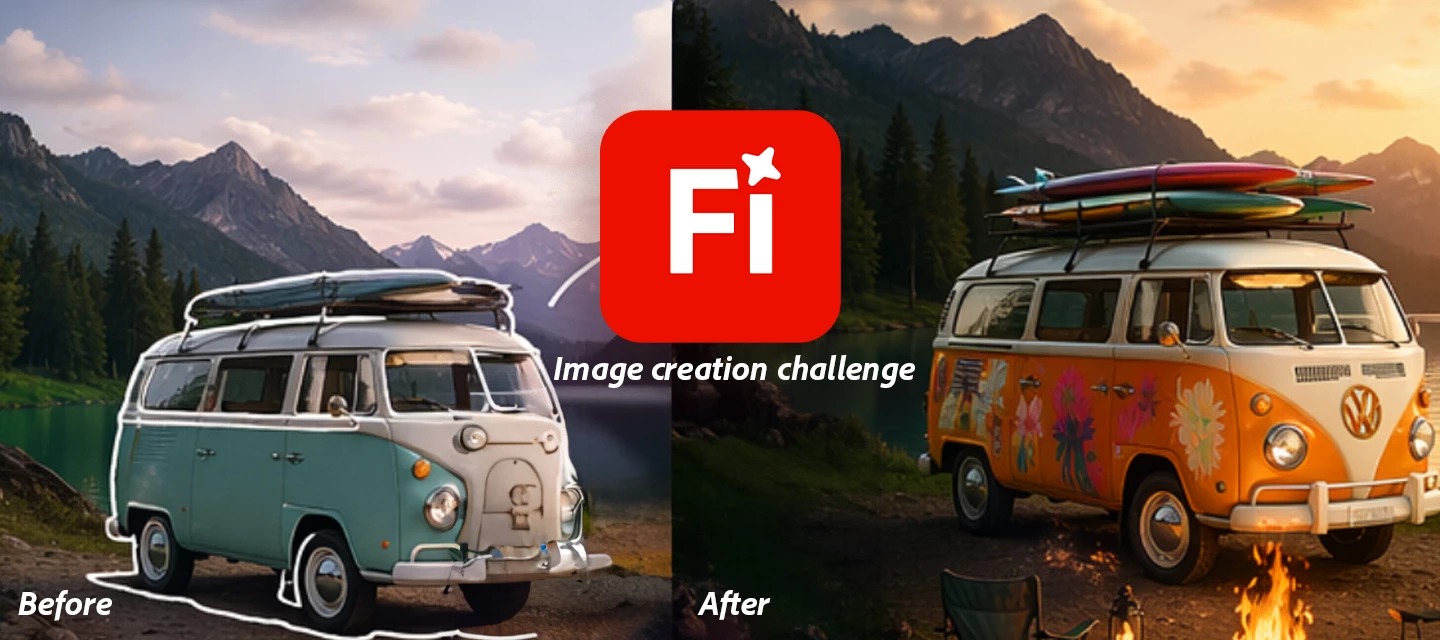
The Challenge: Use Markup to guide Firefly in transforming an image highlight, sketch, or mark specific areas and describe what you want to change.


If you need to know more about the feature. Check here


 The original image :


The final image after editing with Markup:



How to Participate:

  1. Upload or generate an image in Firefly
  2. Use the Markup to select areas you want to modify
  3. Add a prompt to transform those areas
  4. Share your before & after results with a short description.


What to Submit:

  • Your Images and description: Images of Markup editing 


Submission Deadline:

  • Please submit your creations by April 30, 2026, 12:00 AM PT (GMT+7).


Show us what you can do with Markup and push the boundaries of AI creativity!

Drop your creations and inspire the community!


Thanks, 

Kartika


If you found this post interesting, click 👍 Like.
Use ⭐ Subscribe to stay informed about future updates.
You may also share this post with others who might benefit from these enhancements.


    9 replies

    April 17, 2026
    Karl and friends Sticker collection
    Made a few sticker ideas and marked up a few items w stickers.


    April 17, 2026

    We had dolphins in the river a few months ago. Many people probably wanted to join the dolphins for a swim. 


    Prompt
    Person swimming with the dolphins.


    Cheers

    Nate

    GeekyGirlRex7295714
    Community Expert
    Community Expert
    April 17, 2026

    I took some pix of my hubs playing music on a patio. The picture didn’t include the entire guitar, and it also showed a white water bottle. Here is the original: 


    I made the picture wider and asked FireFly to include the entire guitar, swap the water bottle for a glass of red wine, and put my husband on a stage in a wine bar. Here’s what it came up with:


    I thought it came out great!


    Writer | Developer | Facilitator | Geek!
    Andrew Kavanagh
    Community Expert
    Community Expert
    April 16, 2026

    Before image - created in Adobe Firefly with Gemini Nano Banana 


    After Image using Markup. Prompt: Add a floating man and a woman in a meditation pose, add a glowing Sun emerging from the top right clouds.


    Andrew Kavanagh • Digital Artist • Adobe Tutor • Adobe Community Expert
    Peru Bob
    Community Expert
    Community Expert
    April 16, 2026

    Change the cat to a dog


    @mj
    Community Expert
    Community Expert
    April 16, 2026


    Gritty charcoal sketches with markup edtis


    Rollan Banez
    Community Expert
    Community Expert
    April 16, 2026

    An aesthetic portrait of a stylish man, do not change face, head and shoulder shot, face on the floor, in dramatic lighting. He is wearing an oversized red coat, with messy, voluminous hair partially covering his face. His pose is emotional and introspective, looking at the camera, Shadows from a window fall across the wall behind him, creating a moody and artistic atmosphere. The overall vibe is pastel vibes, emotional, and cinematic.


    Used Mark up feature on the eyeglasses, hair and sparkly red jacket

    Creative Community Leader / Educator - Empowering fellow educators with creativity and innovation
    daniellei4510
    Community Expert
    Community Expert
    April 16, 2026

    Oranges to apples. I used the brush to paint over the oranges I wanted changed.


    Adobe Community Expert | If you can't fix it, hide it; if you can't hide it, delete it.
    Sk. Arif Hossain
    Participating Frequently
    April 15, 2026

    Here is the submission for the challenge. Started with a Firefly image and then use edit feature add bird, tinker bell, magic ant and then expand it using firefly fill and expand feature!

    Sk. Arif Hossain