



3D Materials on Text & Shapes - Available now in After Effects Beta
Version 27.0.41 of After Effects Beta introduces support for 3D Materials on Text & Shapes.
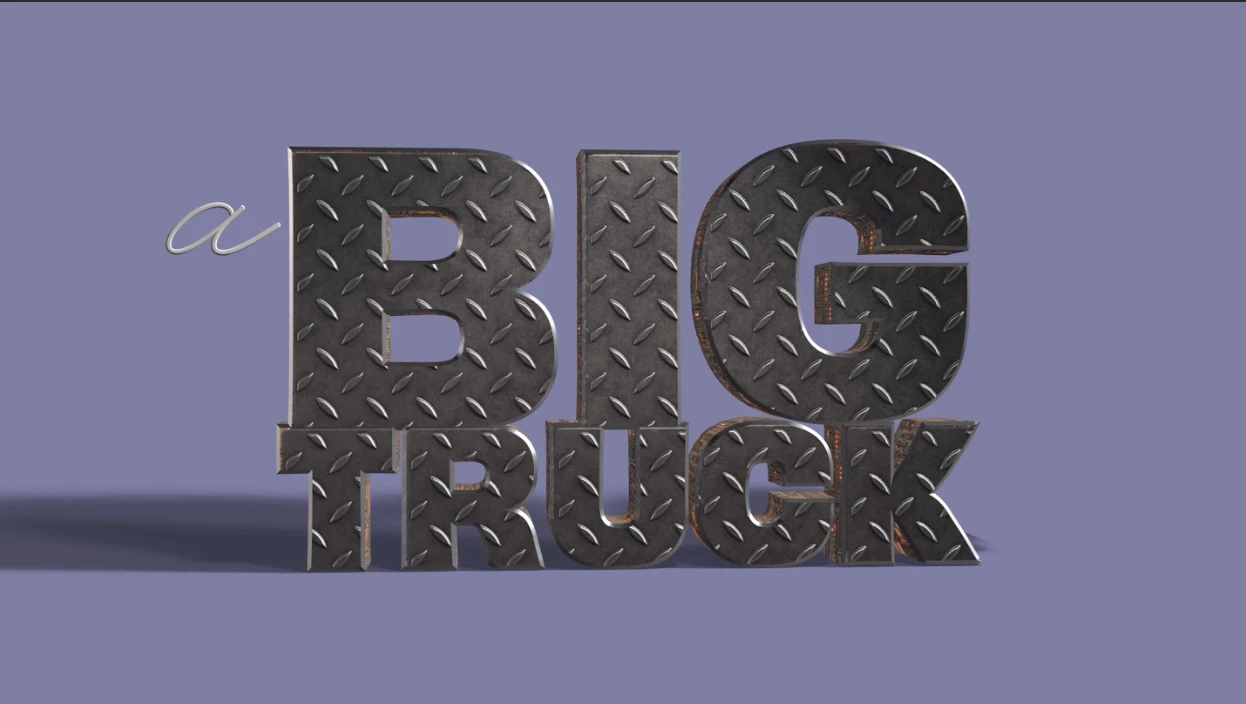
You can now apply Substance materials directly to 3D text and shape layers in Advanced 3D, replacing their default legacy materials with something photo-real or stylized — think wood, stone, brushed metal, or sci-fi surfaces. You can assign different materials to the front, bevel, side, and back, and bevel independently, following the same material assignment workflow you'd use on parametric meshes and 3D models. It works together with the Layers as Material Sources feature, so you can use animated pre-comps, solids, images, and video as materials on your 3D text and shapes too, not just Substance (SBSAR) materials.
Getting Started
Select a 3D text or shape layer, then open the Material Assignment dropdown in the Timeline or use the Properties panel to assign a Substance material (or a layer, if you also have Layers as Material Sources enabled). Use the per-face options to apply separate materials to the front, bevel, side, or back, or bevel, and adjust placement, scale, rotation, tiling, and randomize offset controls to fine-tune the look. Switching the renderer to Classic 3D or Cinema 4D will revert affected layers to their default legacy material, but switching back to Advanced 3D will restore the new materials.
We'd love your feedback on:
-
How intuitive it is to assign and manage per-face materials on text and shapes
-
Whether the material transform controls feel consistent with what you're used to on parametric meshes/models
-
How well materials interact with text animators and existing fill/stroke overrides
-
Performance when applying materials across many characters or complex shape layers
Known Issues and Feature Limitations
-
Copy/paste of material assignments and streams between layers can behave unexpectedly.
-
Multi-select support in the Properties panel is still being worked on. Multi-select in the Timeline should work fine, however.
-
Projects saved in 25.x may lose links to their assigned SBSARs when reopened in 27.x.
-
Some UI polish is still in progress, especially in the Properties panel.
-
Materials on 3D AV layers, compositions, and solids are out of scope for this release. If you need to apply a material to a flat 3D layer, use a plane – those other layer types can be applied to it as a material.
Please give this new functionality a try and let us know how it's working for you!
 AdChoices