










After Effects (Beta)
Recently active
Hi folks! 👋Version 27.1x52 of After Effects beta introduces support for Triplanar projection mode for 3D materials. You can now choose how a material or texture is projected onto a 3D layer, giving you more control over placement and helping you work around issues like visible UV seams. Triplanar projection blends a texture from three directions (top, front, and side) based on each surface’s orientation, rather than relying on the model’s UV map. It’s especially useful for objects with distorted, missing, or seam-prone UVs.Triplanar projection is also helpful in cases where materials appear to “pinch” at poles, like on a spherical mesh: Getting StartedUpdate to the latest After Effects beta from your Creative Cloud app. With a material or texture assigned to a 3D model, choose between Default UV and Triplanar projection in the Material Assignment section of the Timeline or Properties panel, then adjust placement, scale, and rotation as needed. For parametric mesh, 3D text or shape lay
Rolling out now in the After Effects (Beta), starting with CCD Beta build 27.1.0.049. Text shows up in almost every After Effects project, from titles and lower thirds to credits and kinetic type. After Effects handles text well across most of that work, but there is room for us to improve performance in the heaviest cases. When working in compositions with a large number of text layers using several different fonts, you will now see an improved experience while typing, editing, and manipulating text layer positions. What changed Improved text glyph caching: Editing and moving text is more responsive. Instead of regenerating a text layer’s glyphs on every keystroke or nudge, After Effects now caches those glyphs and reuses them when a layer is moved but not modified. This release also improves text layer handling in the Properties panel, along with other gains to text rendering efficiency. What you’ll noticeMoving text layers: Dragging and repositioning stays responsive, even in
Version 27.1x52 of After Effects beta introduces support for Point Light shadows in the Advanced 3D renderer. Point lights can now cast shadows in Advanced 3D, so you no longer need to switch to the Classic 3D or Cinema 4D renderer just to create shadows that radiate from a practical light source like a lamp. These new shadows should also be much faster than Environment light shadows, especially at low diffusion and quality settings. Getting StartedUpdate to the latest version of After Effects beta in your Creative Cloud app. Select a Point light in the Advanced 3D renderer and enable Casts Shadows in the Timeline, Properties panel or Light Settings dialog. Shadow darkness, diffusion, and color controls work the same way they do for Spot and Parallel lights.Shadow quality is controlled by the standard Quality slider in Renderer Options. Raise the quality to smooth out any noisy shadows. If your shadows appear pixelated or low resolution, bring the light closer to the objects in your sc
Hello everyone!The rumors are true: we’ve brought a native AI Assistant to After Effects and it’s now here in beta! Update to the latest beta build (7 or above), restart After Effects, and open the panel from the icon in the header bar or via “Window” > “Assistant.” Exhibit A: a disaster project file.First, what this is and isn't. The Assistant is not here to replace you as the artist. Our north star for the Assistant is for it to do the tedious work that takes away from the joy of creating (think expression troubleshooting, reorganizing a project you inherited from a contractor who didn't follow your team's project organization guide, manually checking the spelling in your text layers...)So while you can point the Assistant at a wide range of workflows and get varying success rates, we've deliberately made it best at two things right now: project organization and expressions.Ask it to explain, restructure, rename, and color-code your project: handy for anything that's gotten away f
In After Effects Beta 25.1 Build 36, we are pleased to announce Quick Set Anchor, a more efficient way to change the anchor point on your 2D layers to any of 9-commonly-used-points — all the corners and centers of your layer’s edges. And it's available both from the Properties Panel and anywhere else by keyboard shortcut! Quick Set Anchor can be launched by selecting a layer (or layers!) and clicking the new Anchor Point icon next to the Anchor Point property in the Properties Panel, creating a temporary pop-over Quick Set Anchor Dialog that allows you to click your preferred anchor point location, automatically close the dialog, and be on your way! Besides the Anchor Point button in the Properties Panel, you can also bring up the Quick Set Anchor Dialog by using the keyboard shortcut Shift + Tab to create the temporary pop-over right below your mouse, ready for you to click your anchor point of choice without taking your eyes away from your comp content. Press the shortcut. Cl
Steps to reproduce:On a layer, use the pen, ellipse, box, etc. tool to draw a mask. Result:The points of the mask appear, but the lines to join those points do not. The mask does behave as expected, apart from the lines not appearing in the comp window.Expected:Mask lines should appear as normal. System info Application: After Effects (Beta) v27.1.0.45 OS: Windows v10.0.26200, RAM: 127.91 GB, CPUs (logical): 32
Rolling out now in the After Effects Beta, starting with CCD Beta build 27.1.0.028.Layer controls are how you grab, move, and align your work, so they should keep up with you. We’ve been tuning how After Effects calculates and draws them, and the results are now available in beta. What’s newSmoother text and shape editingEnjoy more responsive layer controls and less lag as you drag to make adjustments. Mask outlines draw faster on Windows and macOS, and previews keep up better with your changes as you edit shapes.We tested these changes on heavy shape-layer and heavy mask outline comps by comparing builds with and without them. Layer controls drew noticeably faster in those projects, and the demo video above shows the difference. Where you may notice it You’re most likely to observe these improvements in comps that were already hard to work in with layer controls on: many shape layers, masks with detailed outlines, or a mix of shapes and text that you’re lining up by hand. In those pr
Rolling out now in the After Effects Beta, starting with CCD Beta build 27.1.045We are excited to announce that UXP (Unified Extensibility Platform) is now available for plugin development in After Effects (Beta)! This marks a significant milestone in our journey to modernize and enhance the extensibility framework for our third-party developer community. Why UXP?UXP is powered by a modern JavaScript engine. It offers the ability to use Spectrum UI components and a more streamlined workflow for developers, making it easier to create powerful and efficient plugins for After Effects. The officially supported version of UXP in After Effects (Beta) 27.1 (build - 27.1.0.045) is UXP 9.4. Actions for DevelopersStart Developing UXP Plugins: Begin your journey with UXP in After Effects Beta by downloading the UDT (UXP Developer Tool v2.4) build from Creative Cloud Desktop. Start with the Quick Starter Plugin: UDT includes an After Effects quick starter template, so you can scaffold a ready-to
MOGRTs are great, but exporting them can become very time-consuming if working with more than a couple. For example, when making a brand toolkit there can be a lot to export, and the time spent on saving, saving as part of the export, re-saving and repeating can very quickly add up. I’d like to request that an option be added to batch export comps selected in the Project Panel, with the location and options being set once for all that are about the be exported. Being able to dismiss all popups for things like the Media Duration warning and the Dynamic Link warning would also be very useful - more than once I’ve thought I was exporting a template, and come back to find it was sitting on a modal waiting for confirmation. Being able to choose to set comp name as MOGRT title would be another big quality of life upgrade - AEPtoMOGRT Pro on AEScripts does this well, but has been kind of broken for a long time and does not reliably export. TLDR - Batch export of MOGRTs would be a timesaver, w
I’m trying to create some glassy text in AE (Beta). I’ve imported a Substance material downloaded from Adobe (chromatic_glass_plain.sbsar) and applied it to my text, and also to a torus I’ve dropped in the comp as a test. I can edit the colour, roughness and all the other parameters, but there’s no mention of transparency or refraction. I also tried another glass material, but it produces no refraction. Does refraction exist in AE? (I’m on 27.1.0 Build 38).
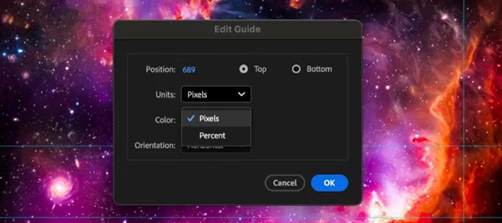
Guides are a foundational tool for responsive, reusable layouts and simplifying design decisions. We're bringing new features to After Effects guides that make them closer in line with Premiere Pro, so guides behave more consistently when you move between apps. Here's how to get the most out of the new functionality.What's New in After Effects GuidesPercentage‑based guides Position guides relative to the composition or view, not just absolute pixels, making them resilient to resolution and aspect‑ratio changes. Pinned guides Pin guides to the bottom or right edge (in addition to top/left) so layouts stay stable as dimensions change. Per‑guide color control Assign colors to individual guides for better visibility and organization. Improved guide editing Right‑click a guide to open the Edit Guide dialog, where you can adjust Position, Unit (pixels or percent), Pinning (origin or opposite edge), and Color. Guide import and export After Effects and Premiere Pro use the same .guides format,
Hello,I’m developing a third-party 3D renderer plug-in using the Artisan API and would like to support After Effects’ native Material Assignment and Substance materials.My main test environment is After Effects Beta 27.1x38 on Windows. I have also reviewed the public headers in the After Effects 27.0 SDK.I’m looking for guidance on the following issues:1. Accessing the current Substance parameter valuesThrough ExtendScript’s materialSource, I can retrieve the assigned Substance item and its SBSAR file path. However, I haven’t found a public API to retrieve the Substance-specific input values edited in After Effects, the selected graph, or the output resolution.This concerns the parameters exposed by the Substance material itself, rather than AE’s projection, scale, rotation, and other mapping controls. I also need to distinguish multiple material instances using the same SBSAR with different settings.Is there a supported API for reading this current state?2. Retrieving layer and precom
Rolling out now in the After Effects Beta, starting with CCD Beta build 27.0.044 Adobe Stock panel in After Effects (Beta)What is it?We're excited to share that the Adobe Stock panel is now available in After Effects (Beta). Search the full Adobe Stock library, preview assets, and bring them straight into your project without ever leaving After Effects. What's New?Until now, getting Stock content into an After Effects project meant using the Libraries panel with Adobe Stock selected as a sub-category and searching for the required assets or jumping out to your browser, downloading, and importing by hand. The new Stock panel with a better search experience now brings that whole loop inside the app. Find what you need, add it to your project, and it downloads and lands right in your Project panel, ready to use. You can also choose where downloaded assets are saved from the Project Settings in the new Scratch Disk tab, so they stay organized alongside the rest of your footage. Caveat: All
My monitor keeps turning off when playing previews, moving panels around, and toggling full screen. It only happens in After Effects, not Premiere, not Photoshop, not Bridge, and not Illustrator.System info: 1. CPU: Ryzen 9 9950x3D 2. GPU: RTX 5070; 621.01 drivers 3. RAM: 32 gigs of DDR5 6000 4. Mobo: MSI Tomahawk WIFI X870E 5. OS: Windows 11 Pro
Rolling out now in the After Effects Beta, starting with CCD Beta build 27.0.044.We have made two meaningful upgrades to the After Effects auto-save, now in Beta. Your backups now happen on a consistent schedule, and recovering after a crash takes one click instead of digging through a folder. What's updated:Never-saved work is covered: Auto-save now runs for untitled projects, so a project you haven't saved yet can still be recovered. We have also improved to have cleaner file names on auto-save. Auto-save on a consistent clock: Auto-save now fires on a fixed interval measured from your last auto-save and is not reset every time you save manually. One-click crash recovery: After a crash, After Effects will now offer to reopen your most recent auto-save. This helps in reducing the need to try navigating to the Auto-Save folder by hand. Recovered Projects protect your original: An opened auto-save now opens as an untitled “Recovered Project,” so your first Save creates a new file inste
HEVC video sources skipping frames, missing frames, jerky motionAfter updating to newest After Effects beta (27.1.0 Build 21) from one from last week (10/16 or so), suddenly HEVC sources that were working fine immediately before the update, are not working properly. The frames appear to stick, often updating only every other frame, and sometimes not updating for several frames in a row. I noticed this does not occur with any other type of video codecs that I’ve seen.Using Windows build. Clearing all caches multiple times. Hardware accelerated decoding was enabled. Disabled and restarted After Effects and cleared cache, same result. Occurs in brand new project with only one of the affected video sources as well.Works in After Effects 26.5.0 Build 89 (thanks for having the save copy as 26.x in the betas!!)
Etkiden sonra e eklemeden hic bişe yapmadan beklemeden bi süre sonra hata lar veriyo baya uzun bir hata var bide farklı hatalar var durdul yerde acınca 4 5 dakika sonra oluyour kısaca tamamlandı 3 4 dakika sonra otomatik çökme yiyorum
The usual behavior used to be that no matter where in the UI, you hit Numpad 0 and AE starts caching/playing back the timeline. Now when in active Effects Controls window it doesn't work. When in Comp, Project or any other window, it works fine.
When im in Creative Cloud, at the ''Apps'' tab i don't see the ''Beta'' tab. Does anyone know why? I'm located in the Netherlands tho, maybe thats it but idk. And at "Pre-Release'' i only see illustrator.
Rolling out now in the After Effects Beta, starting with CCD Beta build 27.0.049 After Effects now includes the Account Menu -- the same account panel you already use in Photoshop, Illustrator, InDesign, and Premiere Pro. Click your account icon in the toolbar or on the Home screen, and the Account Menu panel opens to display the information relevant to your account. If you move between Creative Cloud apps, the menu looks and behaves exactly as it does everywhere else and now the experience will be consistent across our suite of applications. Account Menu - Click on the account icon on the top right to access the flyout panel
Version 27.0x41 of After Effects Beta introduces support for Layers as Material Sources. You can now apply layers — animated pre-comps, solids, images, and videos — directly as 3D materials on parametric meshes, 3D models and 3D text and shapes when using the Advanced 3D renderer. No more round-tripping through other apps or baking out intermediate textures: animate your 2D content and your 3D scene together, in the same project. We’re also changing how materials are applied so that you don’t have to scroll through big lists of material assignment slots when you only want to tweak part of a model. Getting Started Select a parametric mesh, 3D model, 3D text, or 3D shape, then open the Material dropdown in the Timeline or Properties panel and choose any eligible layer to use it as the base color source. Once assigned, you can fine-tune the look using new intrinsic material streams — Opacity, Roughness, Metallic, Emission Color, Emission Intensity, and Ambient Response — all keyframeable
Version 27.0.41 of After Effects Beta introduces support for 3D Materials on Text & Shapes. You can now apply Substance materials directly to 3D text and shape layers in Advanced 3D, replacing their default legacy materials with something photo-real or stylized — think wood, stone, brushed metal, or sci-fi surfaces. You can assign different materials to the front, bevel, side, and back, and bevel independently, following the same material assignment workflow you'd use on parametric meshes and 3D models. It works together with the Layers as Material Sources feature, so you can use animated pre-comps, solids, images, and video as materials on your 3D text and shapes too, not just Substance (SBSAR) materials. Getting StartedSelect a 3D text or shape layer, then open the Material Assignment dropdown in the Timeline or use the Properties panel to assign a Substance material (or a layer, if you also have Layers as Material Sources enabled). Use the per-face options to apply separate mate
The AI Assistant in Adobe After Effects Beta is completely nonfunctional. Every prompt submitted results in the same error message, regardless of the complexity of the request or whether a project is open.Exact Error Message:"There was an issue processing your request. Please try again. If the issue persists, please start a new chat."Steps to Reproduce: Launch Adobe After Effects Beta on macOS. Open the AI Assistant (Beta) panel. Start a new chat. Enter a simple prompt. Submit the prompt. The AI Assistant displays the processing error instead of responding. Expected Behavior:The AI Assistant should process prompts and provide responses or perform supported actions within After Effects.Actual Behavior:The AI Assistant fails to process every prompt, including basic text prompts that do not require access to project files or compositions. The error occurs consistently, including with a completely new, blank project.Troubleshooting Already Completed: Confirmed that no After Effec
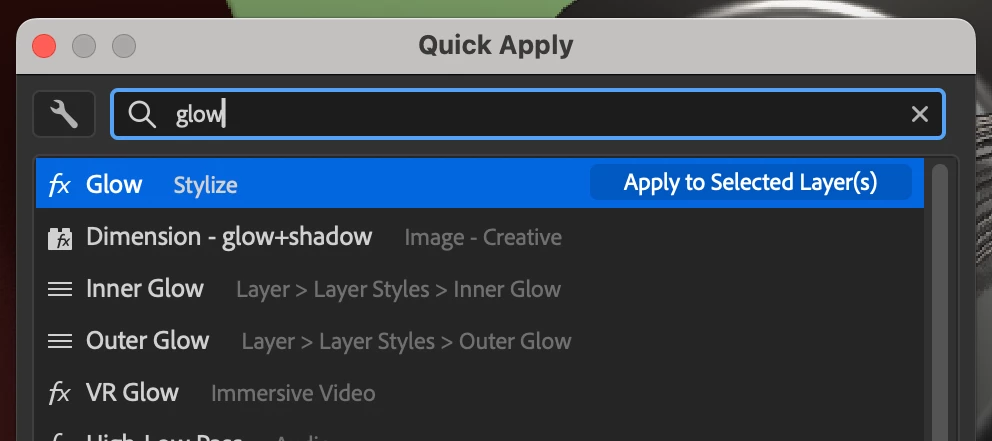
Quick Apply was released in After Effects 26.2. Ongoing improvements will be posted here as they are made available in the Beta builds.Hi all!We are very excited to unveil Quick Apply in After Effects (Beta) 26.2.0.30 or higher. Quick Apply is a search box that puts every effect, animation preset, and menu command right at your fingertips. Type a few characters, pick what you want, and apply or run it. It’s that simple.Effects — Search by name or category and apply to the selected layer, or create a new Solid or Adjustment layer with the effect already applied. Animation Presets — Search and apply text presets and other animation presets to the selected layer, or to a new layer or adjustment layer. Menu Commands — Search and run any top-level menu command, including access to blending modes, installed scripts, and preferences.Showing result for “glow” in Quick ApplyTo open the Quick Apply dialogEdit menu > Quick Apply Ctrl+Enter (Windows) / Cmd+Return (macOS) — the shortcut can also
Hey dev team, I see a silent update to OCIO has snuck it's way into the latest builds. It now supports and provides the built-in ACES 2.0 configs which is very welcome. With that I do want to point out again that I feel the implementation leaves many things to be desired.The LUT based 1.2 config is still present. The issue is that not only is this very legacy already and even ACES 1.x users should not use this config anymore, it's the default when you switch to OCIO color management because it's in the first spot of the list. The OCIO Configuration dropdown menu also does not remember last choice when swtiching between OCIO and Adobe managed so you switch to the thing that shouldn't exist in the software anymore every time. Also consider making ACES 2.0 Studio the default. Lastly this LUT based config also takes up 530MB of additional installation storage. Please I ask you again to remove this from the build. Users that need it for whatever reason can always source it themselves. The p
Already have an account? Login
Enter your E-mail address. We'll send you an e-mail with instructions to reset your password.