












새로운 Adobe 커뮤니티에 오신 것을 환영합니다.
Announcements
최근 활동
New in After Effects Beta 26.3x34: Modernized Effect Controls Panel After Effects has a long and storied history, and a lot of today’s UX still sits on a legacy framework. That foundation has made it harder than we’d like to fix bugs, ship new ideas, and keep panels feeling fast. We have been reimagining what’s under the hood for the Effect Controls Panel to make the experience easier to evolve, more reliable, and genuinely better to use. With that in mind, we have been working to modernize the underlying framework of the Effect Controls Panel. We are essentially rebuilding it from the ground up. This is the first stage of a larger project to modernize the UX framework of After Effects. What is changing? For now, the panel will look nearly identical to the existing version and retain all current behavior and functionality. However, this architectural shift allows us to deliver incremental improvements to the AE user experience moving forward. You may already notice a few subtle chang
Hello AE beta users! Version 26.3.058 of After Effects Beta introduces scripting APIs for Parametric 3D Meshes. These new APIs enable you to use scripting to create and customize the six types of parametric 3D meshes introduced in After Effects 26.0: cube, sphere, plane, torus, cone and cylinder. The new Parametric Mesh menu Whether you want to create precise data visualizations or just fill a comp with dozens of colorful cubes and spheres, scripting makes it easy. New APIs Check layer type Layer instanceof ParametricMeshLayer Description Enables the script author to check whether layer is a parametric 3D mesh layer. Type Boolean; read-only. Create mesh layer LayerCollection.addParametricMesh(name, parametricMeshType) Description Creates a new parametric 3D mesh layer. Parameters Parameter Type Description name String The name of the new layer parametricMeshType Parame
Mask tracking in After Effects just got a major upgrade, including up to a 5x speed improvement.Controls are more accessible so you can start tracking without hunting through panels, the tracker itself is significantly faster so you spend less time waiting for it to complete, and the results are also more accurate. Whether you're isolating a subject or refining a tricky shot, the updated mask tracker is here for you. How do I use it?In the Timeline Panel, select a footage layer. Click the Mask or Pen tools in the Toolbar. Draw the mask on the visual you want to track in your footage. Click the Track Forward button to start tracking forward. Use the Wrench button to change the tracking method. The first four tracking methods have been updated to a new algorithm that is up to 5x faster, with enhanced accuracy. Did I mention it is also really really fast? Of course, if you're used to the Tracker Panel, worry not, as we have also kept the controls there. Please, try the newly updated m
Sometimes you just need a copy of what’s in your Composition panel—a still of the current frame, ready to paste into chat, email, socials, etc. Exporting a frame works, but it’s more steps than it should be.We’re (finally) introducing Copy Frame to Clipboard: a one click option accessible from the Composition, Footage, or Layer panel to grab the currently rendered frame and put it on the system clipboard. How do I use it?Set the Current Time Indicator to the frame you want to copy and let it render. Click the Toolbar button in the Composition, Footage, and Layer panel toolbars. Or use the Keyboard shortcut when any of those panels are active. Defaults: Ctrl+Alt+Shift+F5 (Windows) and Cmd+Option+Shift+F5 (Mac). What Does Copy Frame to Clipboard Support?On Mac and Windows, a PNG will be placed on the clipboard (up to 16-bit when using 16bpc or 32bpc comps in After Effects). On Windows, a bitmap representation is also provided, so more apps can paste reliably. With regard to color, wha
Hello AE Beta users,We have a very fun new feature for you to try in After Effects beta 26.2x31: Parametric Meshes now support displacement of Substance 3D Materials. Displacement uses the material’s height data to push the mesh’s geometry into 3D space. It can add a subtle texture to increase realism and dimension or turn simple shapes into complex, detailed models. Substance 3D materials with displacement can take a simple 3D shape from this:to this!A complex 3D material of stained glass windows in a stone wall applied to a sliced 3D cylinder meshIn addition, Substance 3D materials that include emissive textures will now render correctly, creating the glow visible in the stained-glass windows above or this fracturing planet:Material with both displacement and emissive propertiesNote that Advanced 3D doesn't support true emission; the material will light up, but it won't cast light onto other objects. Getting StartedApply a Substance 3D material (SBSAR) that supports displacement to a
SVG content on the operating system clipboard copied from Illustrator and other applications can now be pasted into an After Effects project via the Edit -> Paste menu. The contents will be imported as native, editable shape layers that are ready to animate. Copying from IllustratorIllustrator support requires the Clipboard Handling preference "Include SVG Code" to be checked in the Illustrator application preferences. Pasting into After EffectsIf no Project is open in After Effects, when SVG content is on the clipboard, Edit -> Paste will create a new Project with a Composition containing a Layer with the SVG content.When pasting into an existing Project when no Composition is selected, a new Composition will be created within the current Project containing the pasted SVG content. With a Composition currently selected in After Effects, the SVG content will be added to a new layer within the selected Composition. Known limitationsSVG Text will need to be converted to curves bef
We've been having a lot of fun with a new effect we're calling Curl Noise, and we want you to try it.If you've ever wanted a noise effect that feels less like static grain and more like smoke, flowing water, or swirling ink— that's the space Curl Noise is aimed at. It generates smooth, animated 2D noise with a fluid, organic quality that's naturally well-suited to backgrounds, texture overlays, abstract motion, and anywhere you want movement that flows rather than flickers.The reason it feels different from other noise effects is in how the noise field is curled — the vectors that define the noise are rotated so they always flow tangentially, which is what gives the result that characteristic fluid quality. Crank up Swirl and it starts to coil and spiral. Push Turbulence Speed and it churns. Keep things subtle and it just... drifts. Here are some examples… Curl Noise with Default SettingsModify the Transform properties and add some swirlReduce the swirl, add in smoothness and a little
Your new Object Matte just got more interactive. With the new Live Update feature, your Quick Select and Selection Brush strokes are reflected in realtime as you paint, so you can see exactly what's being selected without waiting for a refresh. It makes the selection process smoother, faster, and far more intuitive — letting you refine your mattes with better precision and stay in your creative flow. This may look like a small update, but we think it makes a huge difference — and we'd love to hear what you think. Give Live Update a try and let us know how it fits into your workflow. If you run into any issues or have thoughts on how we can make it even better, please share your feedback — your input directly shapes where we take this next.
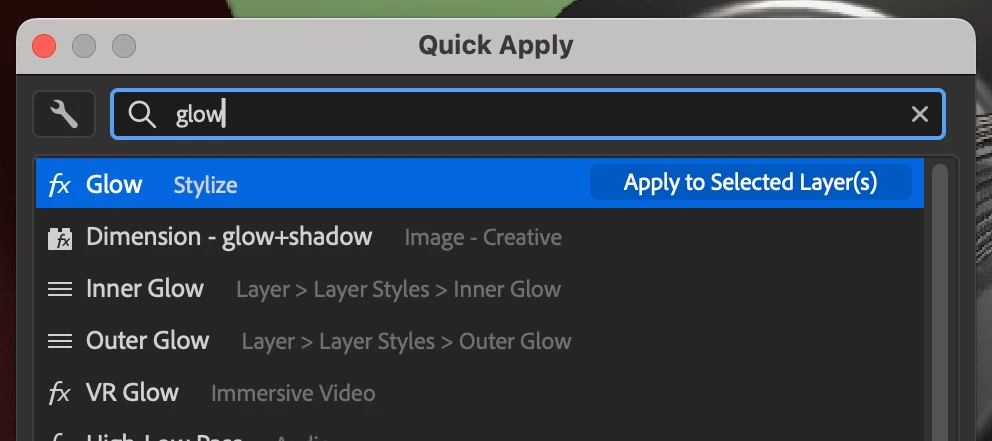
Quick Apply was released in After Effects 26.2. Ongoing improvements will be posted here as they are made available in the Beta builds.Hi all!We are very excited to unveil Quick Apply in After Effects (Beta) 26.2.0.30 or higher. Quick Apply is a search box that puts every effect, animation preset, and menu command right at your fingertips. Type a few characters, pick what you want, and apply or run it. It’s that simple.Effects — Search by name or category and apply to the selected layer, or create a new Solid or Adjustment layer with the effect already applied. Animation Presets — Search and apply text presets and other animation presets to the selected layer, or to a new layer or adjustment layer. Menu Commands — Search and run any top-level menu command, including access to blending modes, installed scripts, and preferences.Showing result for “glow” in Quick ApplyTo open the Quick Apply dialogEdit menu > Quick Apply Ctrl+Enter (Windows) / Cmd+Return (macOS) — the shortcut can also
Since we introduced Variable Font Animation in After Effects, a lot of you have been exploring weight, width, slant, and custom axes in the Timeline and Properties panel. One thing we heard clearly is that it’s still hard to spot which fonts in the menu are actually variable when you have a huge library.Today we’re shipping an update that adds a variable font filter right in the font popup, so you can narrow the list to variable fonts only and get to the right face faster. What it doesThe font popup now includes a filter control that, when enabled, shows only variable fonts. Turn it off anytime to return to the full list (same as your other filters and favorites behavior). Where to find itOpen the font control anywhere you already choose a typeface (for example, the Properties panel or Character panel font picker—the same font popup you use today). Use the new variable font filter so the list shows only fonts that expose variable axes. Choose your font as usual; disable the filter when
We’re excited to introduce Object Matte in the latest After Effects Public Beta (26.2 build 27) — a major evolution of the Roto Brush workflow.Object Matte shifts rotoscoping from a brush-only workflow to a hybrid approach that combines single-click AI subject selection with precision refinement and intelligent propagation over time. Built on the same AI technology powering Premiere Pro’s Object Mask workflow, Object Matte delivers faster, more intuitive results with significantly less manual effort. What’s New in Object Matte?The Object Matte suite includes four core tools designed for speed, control, and flexibility.Object Selection Quickly isolate objects in your footage with one-click or marquee-based selection (rectangle or lasso). This tool leverages advanced segmentation logic for accurate propagation across frames, reducing manual effort for complex scenes. You can access Object Selection by clicking the icon highlighted in blue. You can select an object in your comp by clickin
Today we’re introducing three significant updates to our vector workflows in After Effects beta version 26.0x8: You can now import SVG files as native AE shape layers. Logos, UI mockups, and other vector assets are ready to animate – no conversion required. Improved Illustrator Layer Conversion: Illustrator layers now retain gradient fills, gradient strokes, and transparency when converted to native shape layers. New Gradient Controls: We’ve added animatable Scale and Rotation properties for gradient fills and strokes, giving you more control over vector styling and animation. SVG Import Client sends you a dozen SVG logos to use in a project? What once required a tedious, multi-app process is now fast and easy: SVGs import as compositions of ready-to-use native shape layers, no conversion required. Gradient fills, strokes, and transparency are preserved and fully editable. There are a few limitations of SVG import: Because SVGs import directly as
Outstanding in our (Depth of) Field Hello beta users! Version 26.2.033 of After Effects Beta introduces support for in-engine Depth of Field in Advanced 3D.This is an entirely new method of creating Depth of Field that works with 3D models, parametric meshes, Substance 3D materials, 3D text and shape layers, and anything else you want to focus on in Advanced 3D. It even handles multiple levels of overlapping transparency, so you can do things like focus on a subject through a window: Even though we are viewing our characters through a foreground transparent layer that should be blurry, they are rendered in perfect focus.To enable depth of field in your scene, set your composition to the Advanced 3D renderer, add a Camera layer and check the Depth of Field box. By default, After Effects will approximate a physical camera. Depth of Field can add compelling realism to an AE scene. In this subtle example you can see the smooth animation from the foreground focus to the background across a
Get hyped for variable type! We're excited to announce support for Variable Font Animation in After Effects! Stretch, squash, jitter and transform your text with the combined power of After Effects text animators and variable font axes. You can now animate variable font properties like Weight, Width, Slant, and more directly in the Timeline using Text Animators, edit them interactively in the Properties Panel, and drive them through the Essential Graphics Panel + Mogrts, unlocking powerful new typographic animation possibilities. Imagine animating your text from whisper-thin to ultra-bold with buttery smooth transitions, all the characters at once or with a gradual fade from one weight to another. Or making each character dance with its own unique style. Or driving font dynamics with expressions that respond to your scene. Now stop imagining—because it’s all real. Any axis your variable font supports can be animated with the full power of After Effects’ Text Animators.That means full
We’re excited to announce that as of After Effect Beta 26.2x25, the blue text property values in your timeline (you know, the ones that you can drag on to change*) has a fun new capability, and we're calling it Proportional Scrubbing.You’ve probably selected a bunch of layers and then scrubbed on the Position X property to mass move them all left or right at the same time, or scrubbed on the Rotation property to rotate them the same amount. Now, with Proportional Scrubbing, you can select a bunch of properties across multiple layers and affect them differently — all at the same time.To use Proportional Scrubbing, simply select a bunch of layers in the order you want to affect them (from least to most) and hold Cmd+Opt on a Mac or Ctrl+Alt on a PC while you scrub the blue text values of any of your selected layers.Instead of just applying the same value change to all layers, the first layer you selected's property value won't change at all, the last layer's property value will change t
Hello compositors and fans of transparent backgrounds! The After Effects team is excited to introduce a brand-new plug-in: a native Unmult effect. We know... it's about time. Starting in After Effects Beta version 26.0.08, you’ll find Unmult under the Effect > Keying menu or in the Effects & Presets panel > Keying category. How Does it Work? Unmult removes solid black or white backgrounds from a layer to restore the original transparency from when your footage was captured. For example, if you want to composite this fire element over a grill while people enjoy a barbecue in the background, Unmult converts the black areas to transparency and restores the original colors in semi-transparent regions. Instead of black fringing around the fire, you’ll see vibrant reds, yellows, and oranges. Effect Parameters Some Unmult effects you may have used have one or two parameters, while others have none. These plug-ins work best with
Edit: Aug 17, 2025 — Quick Offset is now released in the official release of After Effects 25.4 Great news for After Effects users! Starting with version 25.4. build 50 of After Effects Beta, we're excited to introduce Quick Offset - an efficiency feature that makes staggering your layers and keyframes in your timeline much easier. What's New Quick Offset makes it easy to move each layer in your selection — and keyframes across multiple layers — with just a simple keyboard-modified drag. Just select several layers — or keyframes on different layers — and hold down CMD+OPT on Mac / CTRL+ ALT on PC while you drag your selection in the timeline to watch as your layers (or keyframes) distribute themselves across the timeline under your mouse cursor. Creating cascading and overlapping animations was much more work than it needed to be, Quick Offset makes it much simpler now. What it does: Layer offsetting: Select multiple layers in the order you want to
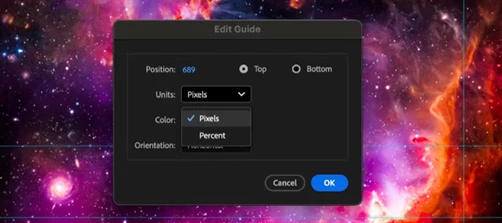
We're excited to share an update to the After Effects Preferences, starting with After Effects Beta 26.0x40. We've reorganized and refreshed the preferences to make it easier to find the settings you need, when you need them. What's New The preferences have been thoughtfully reorganized into logical groups that reflect your workflow: Project & Workflow Startup & Repair - Configure how After Effects launches and handles project recovery Project - Manage workspace preferences, Dynamic Link settings, new project templates, solids folders, and auto-save options Composition - Fine-tune composition behavior, layer creation settings, double-click actions, mask preferences, and more Previews - Control preview quality, caching, and playback settings User Interface Appearance - Customize themes, UI scaling, colors, hardware acceleration, and visual display options Grids & Guides - Configure grid spacing, guide snapping, and safe margins Label
Hello, motionkind! Now in After Effects (Beta) build 26.0x40 and later, we are introducing two improvements for expressions & scripting. Quickly find the keyframe or marker before or after a given time, without writing lengthy, repetitive logic. Read the current text and the full list of dropdown menu items, so you no longer need to keep duplicate strings in your expressions just to show the text from a dropdown menu. previousKey() and nextKey() in JavaScript expressions This Beta build introduces new expression methods to quickly get the keyframes or markers before or after any given time: Property.previousKey(time): Returns the keyframe or marker at or before time. If none exist before time, returns the first keyframe or marker. Property.nextKey(time): Returns the keyframe or marker after time. If time is after the last, returns the last keyframe or marker. These new methods are only available in the JavaScript
Hello After Effects users! We have a cornucopia of new features entering public beta today in version 26.0x8, and we’re excited to share what’s on the way: 3D workflow enhancements Parametric Meshes Parametric Meshes are the 3D version of shape layers. Create spheres, cubes, cones & more; customize and animate their size, shape and appearance. Easily make meshes look plastic or metallic by adjusting simple, physically-based material properties, or assign a Substance 3D material to take things to the next level. Substance 3D Materials Build beautiful 3D scenes rich in shape and texture natively within After Effects. Substance 3D Materials (.sbsar files) are dynamic, adjustable materials capable of giving 3D models and parametric meshes almost any look, from photo-real to highly stylized. Get access to thousands of free materials through Substance Community Assets. Learn More Expanded vector support Import SVG files as native shape l
The Shapes of Things to Come After Effects beta users, time to start building! We are excited to introduce two new 3D features that work well individually but even better together: Parametric Meshes and Substance 3D Materials. With their powers combined, you can now design beautiful 3D scenes rich in shape and texture natively within After Effects. AE’s growing toolbox of useful 3D features now includes an assortment of Parametric 3D Meshes, which is a fancy technical description for 3D shapes that you can use as building blocks for your compositions. These meshes include a Cube, a Sphere, a Plane, a Torus (mmm, donut), a Cone and a Cylinder, all of which can be customized to create a wide variety of looks. Combining Parametric Meshes with Substance 3D Materials (aka SBSARs) can give your 3D meshes and models an exciting new look. SBSARs are dynamic, adjustable materials that can look like almost anything, natural or man-made—constructio
We’re thrilled to introduce Lossless Compressed Playback, now available in After Effects beta (starting with version 26.0x8). This new feature takes composition playback to the next level — letting you preview longer durations while using significantly less disk space. How? After Effects now compresses cached frames without any loss in visual quality. What’s New With Lossless Compressed Playback, After Effects automatically stores cached frames in a compressed, lossless format on disk. This means you can: Preview much longer segments of your timeline. Store more frames within your allocated disk cache limit. Compression happens automatically in the background — saving disk space without changing your workflow or image quality. Getting Started On by default: The feature is enabled automatically for all Beta users. To view or modify the setting, go to Preferences → Media & Disk Cache, and check
Starting with After Effects Beta build 26.0x8, we are introducing 3 new built-in audio effects, the first time in more than 20 years that new audio effects have been added to After Effects. Gate - Your Audio Noise Door The Gate effect silences audio that falls below a certain volume threshold. It's perfect for cleaning up noisy recordings, removing background hiss, or creating dramatic audio cuts. Key Parameters: Threshold (dB): Range -60dB to 0dB (default: -60dB). Audio below this level gets muted. Set it just above your background noise level. Attack (ms): Range 0-1000ms (default: 10ms). How quickly the gate opens when audio exceeds the threshold. Fast attack = immediate opening, slow attack = gradual fade-in. Hold (ms): Range 0-2500ms (default: 40ms). How long the gate stays open after audio drops below threshold. Prevents rapid on/off switching. Release (ms): Range 5-4000ms (default: 220ms). How quickly the gate closes once the hold time expires. Fast release
We are excited to announce the public beta release of Windows on ARM emulation support in After Effects 25.4 build 34! This marks the first time After Effects supports the Windows on ARM platform. In order to ensure After Effects works in emulation, please first download and install the most recent Qualcomm Adreno GPU driver for Snapdragon X Platform here: https://softwarecenter.qualcomm.com/catalog/item/Windows_Graphics_Driver?osArch=ARM64&osType=Windows&version=250304031.0.96.0After downloading the driver, unzip and run the .msi installer. After the installation completes, run After Effects (Beta). If you receive a warning about the driver version, you will need to follow these steps to manually select the new driver. Close After Effects (Beta). Open the Device Manager in Windows. Twirl Open "Display Adapters" to show the Qualcomm® Adreno™ GPU. Right-click the GPU and select "Update driver". Click "Browse my computer for drivers". Click "Let me pick from a list of ava
이미 계정이 있으신가요? 로그인
Enter your E-mail address. We'll send you an e-mail with instructions to reset your password.
죄송합니다, 다운로드하려는 파일의 안전성을 확인하고 있습니다. 몇 분 뒤에 다시 시도해 주세요.
죄송합니다, 바이러스 스캐너가 이 파일이 안전하지 않다고 감지했습니다.