

Community Manager
February 19, 2026
News

New in Beta: Object Matte in After Effects

  • February 19, 2026
  • 5 replies
  • 2300 views

We’re excited to introduce Object Matte in the latest After Effects Public Beta (26.2 build 27) — a major evolution of the Roto Brush workflow.

Object Matte shifts rotoscoping from a brush-only workflow to a hybrid approach that combines single-click AI subject selection with precision refinement and intelligent propagation over time. Built on the same AI technology powering Premiere Pro’s Object Mask workflow, Object Matte delivers faster, more intuitive results with significantly less manual effort.
 

What’s New in Object Matte?

The Object Matte suite includes four core tools designed for speed, control, and flexibility.

  • Object Selection
    Quickly isolate objects in your footage with one-click or marquee-based selection (rectangle or lasso). This tool leverages advanced segmentation logic for accurate propagation across frames, reducing manual effort for complex scenes.

 

You can access Object Selection by clicking the icon highlighted in blue. You can select an object in your comp by clicking, or by using the marquee selection options displayed on the right.
  • Quick Selection (formerly Roto Brush)
    Our classic Roto Brush has been reimagined as Quick Selection, optimized for faster, more intuitive workflows. It’s perfect for users who want brush-driven control with improved responsiveness and UI feedback.
  • Selection Brush
    For fine-tuned adjustments, Selection Brush allows additive and subtractive strokes with enhanced cursor feedback. Modifier keys make switching between selection modes seamless, similar to Photoshop and Mocha workflows.
  • Refine Edge
    Maintain natural edges and intricate details like hair with the Refine Edge tool.
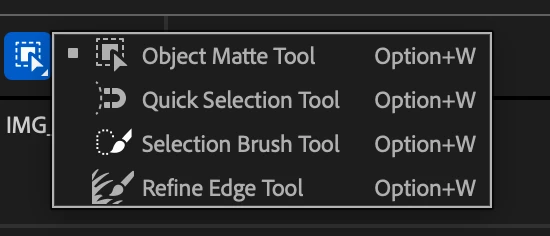
Our classic Roto Brush tool has a new icon and name: Quick Selection. You can make fine-tuned adjustments to your matte using the Selection Brush tool, and maintain natural edges and details (like hair!) with Refine Edge.


Let us know how this is working for you; we're also interested to learn what additional functionalities you may want. Thanks for continuing to be a part of the After Effects community!

    5 replies

    QuietRobot
    Known Participant
    February 23, 2026

    @Catie Bass shouldn't these dropdown menus have rounded corners in After Effects? To be in line with Spectrum Design.

    Karlo Franco
    Participant
    February 22, 2026

    This is a nice update, this will help us reel editors in doing background removal using Ae, also I like to suggest to put presets animated captions in both Ae and Pr like the one on firecut, capcut or filmora.. this will make all social media editors like me happy!🙂 Thanks!

    Shebbe
    Community Expert
    Community Expert
    February 20, 2026

    Very nice.


    My initial feedback would be that there is a lack of interoperability with Premiere where Premiere’s object mask does not translate over to AE if a clip is copy pasted to it. I would assume this to be technically feasible since it's the same kind of data?


    Will the object matte eventually be expanded to ‘full masking’ capability? In the sense that edge detail will also be calculated along with it? Especially for Premiere which does not have the refine edge tools this would be really helpful.


    I recently came across VideoMaMa where Adobe Research seems to be involved with. Maybe that is something that could eventually be integrated?

    Community Manager
    February 20, 2026

    Thanks for the feedback! I can confirm that we’ve been in talks with Premiere on the future of Object Mask/Matte interoperability, but don’t have anything to share at the moment.

    Inspiring
    February 20, 2026

    Good Stuff!!! 

    Additional Functionalities  :-)

    • Ability to create separate mattes based on semantic/text input and/or brush - so, I’ve created a separation of a human body and I now want a dedicated/separate matte of just the right arm or just the wheels on a moving car - or just the bag someone is carrying or their shoes

       provide pre-processing guidance based on user input on what they want to separate. Object Matte then pre-processes at 5x-10x realtime to provide guidance on which frame to start and if this is possible then might as well go straight to Auto Mode as an option. Oh yea, let’s have Modes - Auto Mode (add background processing option) and Guided/Assisted Mode. 

      And output a Depth Matte too. Then, add Gaussian Splat output with a full-featured compositing solution to truly capture and use the technology’s full capabilities. 

      - an aside … that magnet icon is awkward cos MochaPro has a magnetic tool and it predates this Quick Selection, unless the behavior is similar, it’s best to use another icon. 

      TIA
       
    Community Manager
    February 20, 2026

    Thanks for the feedback! 😀

    Inspiring
    February 21, 2026

    Heya Catie, you know what else will be useful … provide 3 test footage for users to work on. The reports you receive will give a better idea on UI-UX than users working on x-number of different footage - these are good too but having a standardized base/footage from which to garner feedback/reports should provide interesting data to work with; especially in UI-UX. 

    k.singh
    Participant
    February 19, 2026

    Perfect, waiting for this feature so long, now no need to use mocha, thank you team.