




Now in Beta: Support for editable text from Illustrator files
Version 27.0x33 of After Effects Beta introduces support for editable text from Illustrator files.
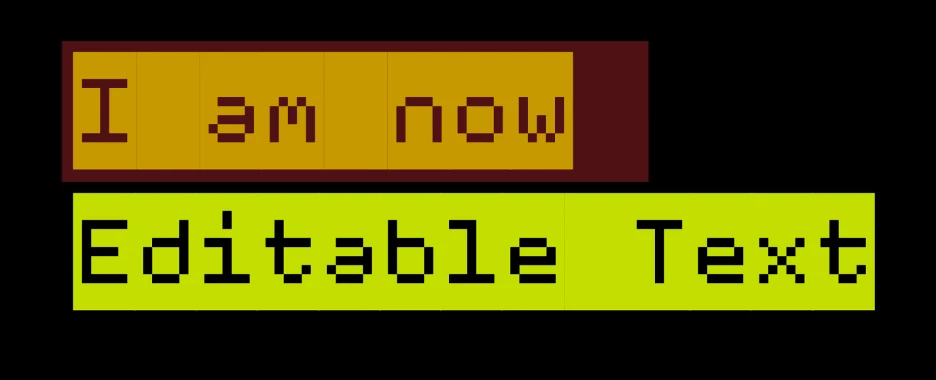
Previously, converting an Illustrator layer to native shapes would turn all its vector content into shape layers and text would be lost unless it had been converted to curves. Now, text stays text: when you use Create Shapes and Text from Vector Layer on an Illustrator footage layer, text objects come into your comp as fully editable After Effects text layers instead of outlines. Font, size, fill, position, styles (like bold and italic), strokes, and variable font settings all carry over, so you can keep editing in After Effects instead of being locked into static shapes.
Getting Started
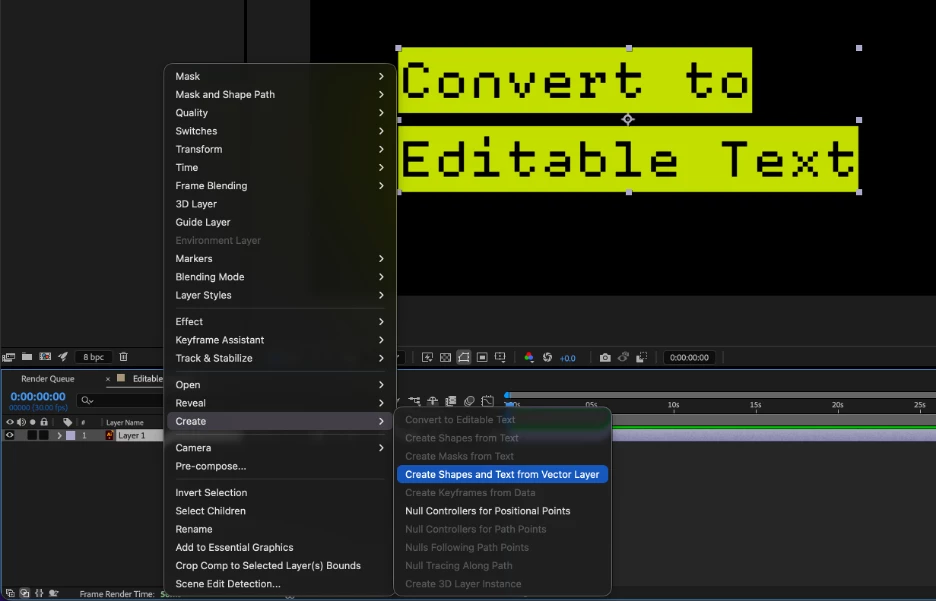
Select an imported Illustrator layer in the Timeline, then choose Layer > Create > Create Shapes and Text from Vector Layer. Any text in the source file will be converted into its own editable text layer (rather than a shape layer), matching the font, size, fill, and position from the original file as closely as possible. Shapes in the same file still convert to shape layers as before, and, if a file contains both, you'll get a mix of text and shape layers.
We'd love your feedback on:
- How well converted text matches the original Illustrator styling (font, fill, size, position, bold/italic, strokes, variable font axes)
- Whether text layers are split up the way you'd expect when a file has multiple text objects or paragraphs
- Any fonts, styles, or layouts that don't convert as expected
- General feel of the workflow compared to the old shapes-only conversion
Known Issues and Feature Limitations
- Stroke-only text will still convert as paths. This is a technical limitation.
- In some cases, position will be retained but be numerically different because the anchor point may be in a different location.
Please give this new functionality a try and let us know how it's working for you!
 AdChoices