CMass
Community Manager
Community Manager
June 17, 2025

📸 Lightroom Desktop 8.4 & Lightroom Mobile 10.4
  • June 17, 2025
  • 8 replies
  • 2073 views


Lightroom Desktop 8.4 & Lightroom Mobile 10.4: Distraction Removal, AI Enhancements, and more!
New AI-powered tools are making photo editing easier and more powerful than ever. We are excited to announce the new Distraction Removal tool across the Lightroom ecosystem, enhancements to AI editing workflows, support for the latest devices, and more ways to get stunning results fast!

 

Try it in the Desktop App

Download the latest version and dive into the new features offered in Adobe Lightroom. 

To update Lightroom Desktop to 8.4, click "Update" in the Creative Cloud desktop app next to Lightroom. More detailed instructions for updating.

Here's what's new in Lightroom Desktop and Mobile:

Reflection Removal on Desktop

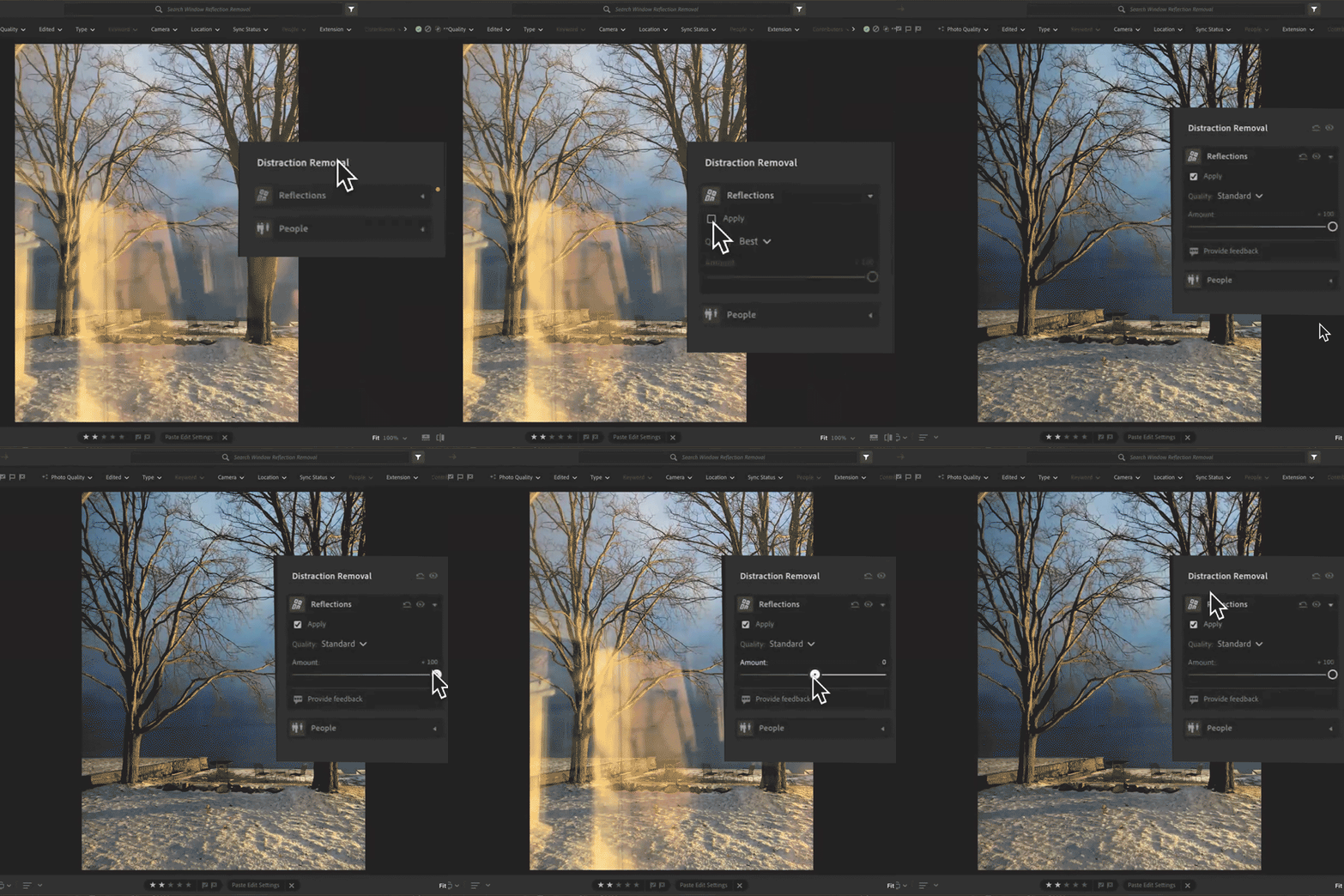
Shooting through a window or glass door? Use Reflections Removal to eliminate glare and surface reflections from your image, leaving behind a clean, crisp final photo. You can even adjust the Quality setting to control your final resolution—great for balancing speed and precision.


Learn how you can remove reflections on your photos by using the new Reflections Removal Tool here.


People Removal

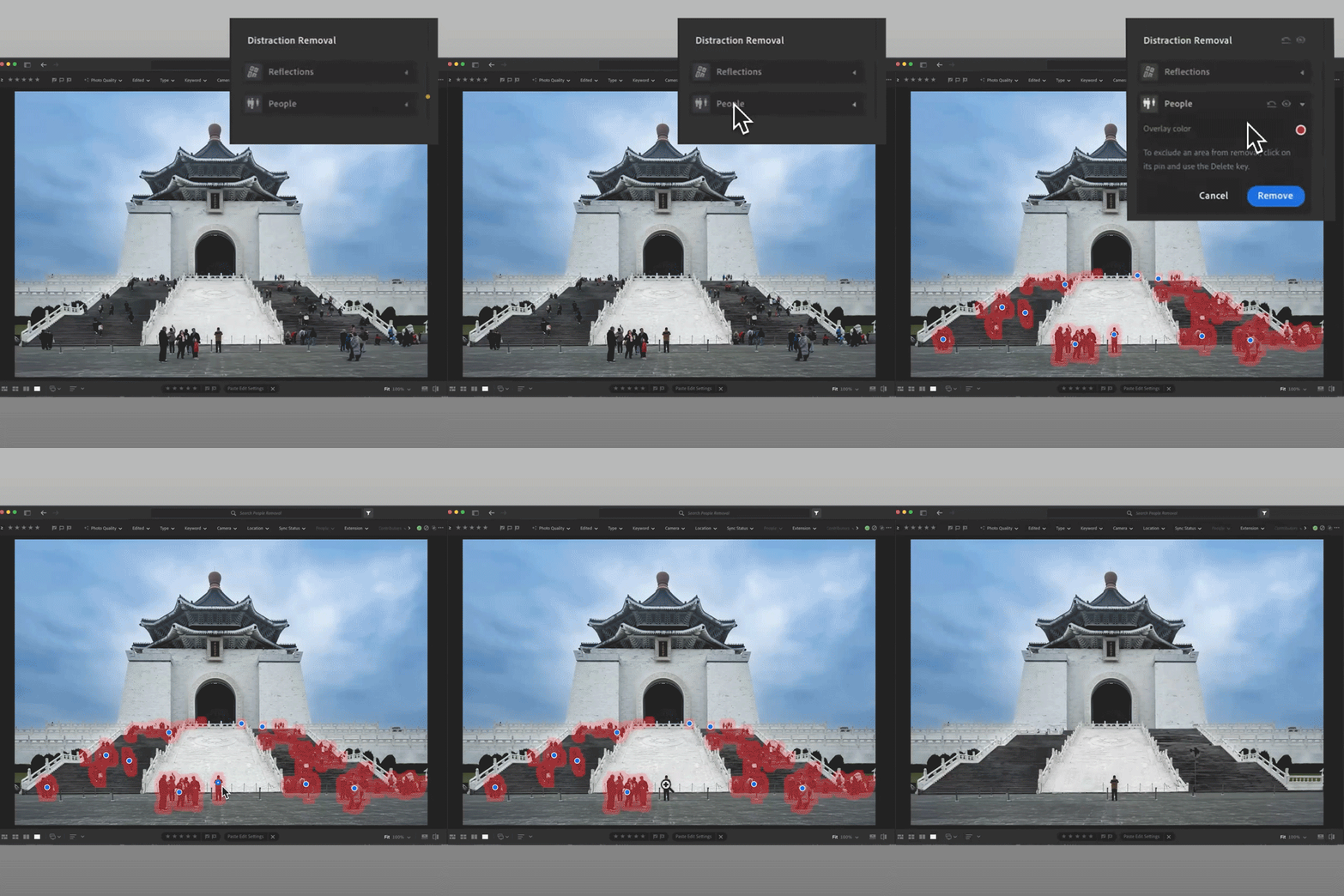
Crowded backgrounds? The new People Removal feature automatically detects and removes extra or unwanted people from your shot. Whether you're on the desktop or mobile app, it's easy to clean up your photo so your main subject shines.


Learn how to remove distracting people in a photo with the AI-powered Distracting People Removal tool here.


View and Update AI Edit Settings

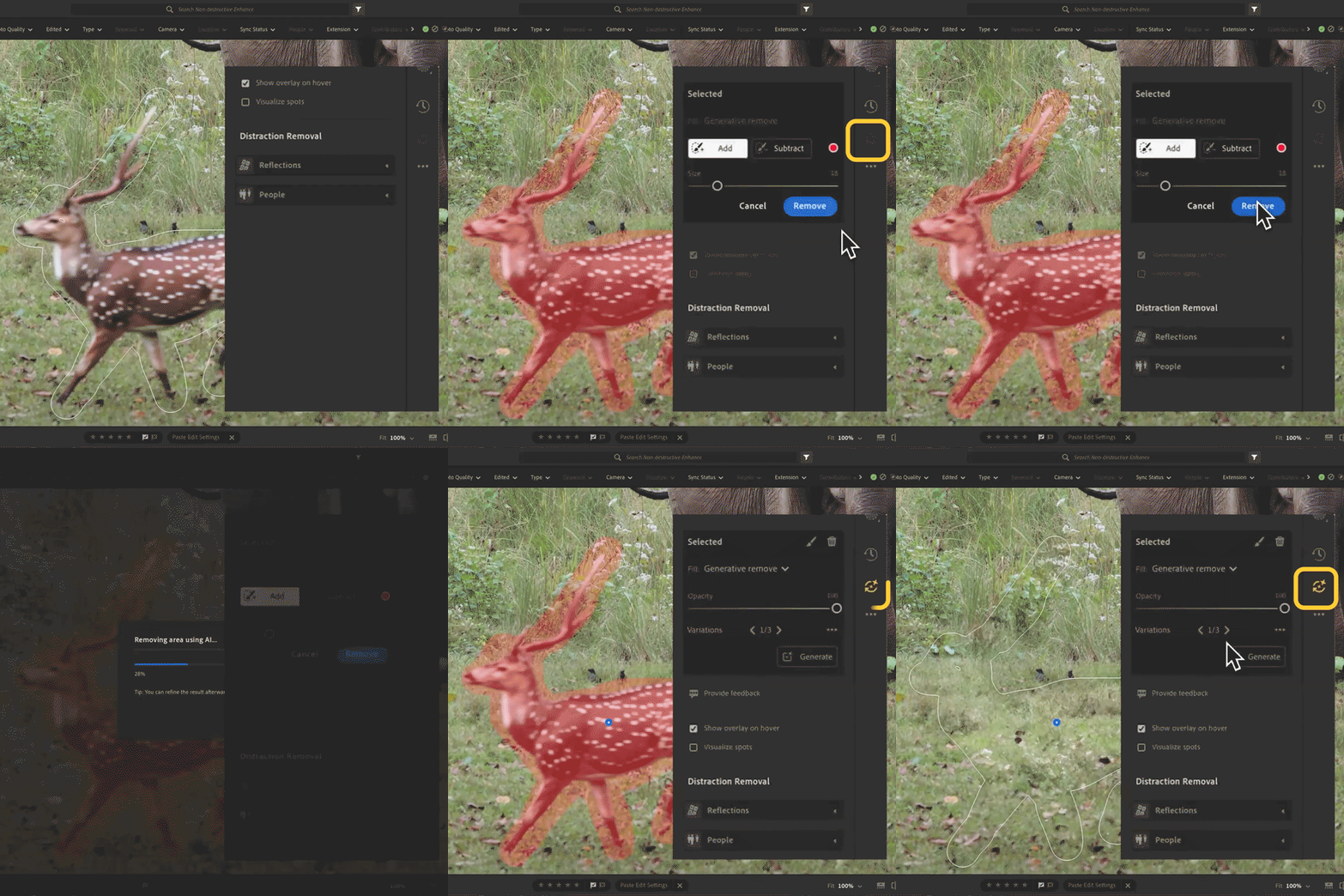
Stay in control of your edits. Now, when you apply AI-powered tools like Denoise, Remove, or Lens Blur, an AI Edit Status icon will show up. If anything changes that might affect your results, the icon turns yellow so you'll know it's time to reapply or tweak your settings. It's an easy way to keep your edits looking their best with no guesswork needed.


 Learn more about the AI Status Icon here


What's new on Lightroom iOS and Android 10.4:

Scene Enhance on Lightroom Mobile

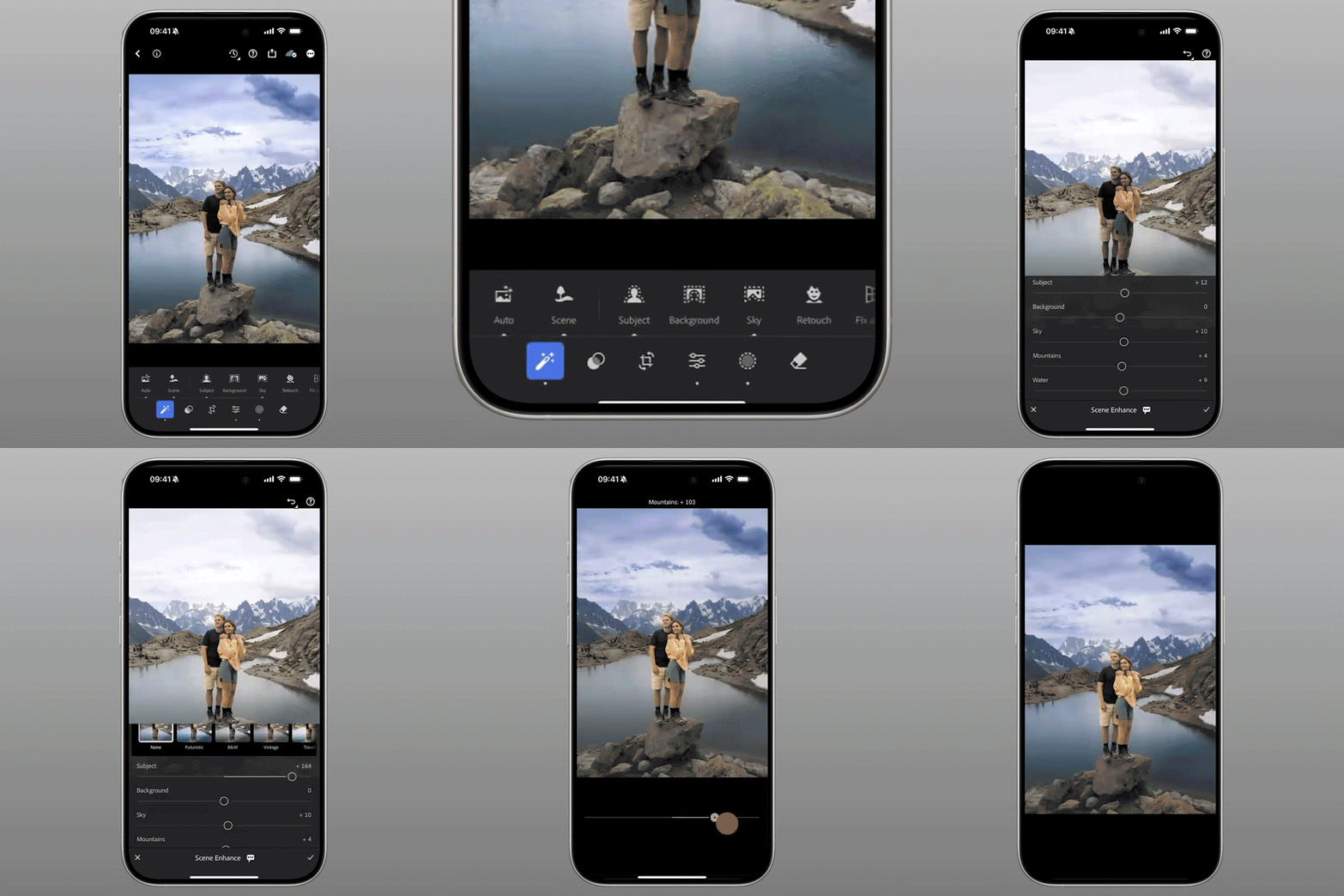
Turn your landscapes into showstoppers! Scene Enhance helps balance elements like skies, water, and mountains, bringing out the natural beauty in your photo. Just tap the Actions panel and select Scene to start enhancing with a single click.


You can access Scene Enhance in Lightroom for mobile iOS and Android.


Camera & Lens Support + Enhancements:

Lightroom 8.4 & 10.4 also include newly supported cameras and lenses, plus some exciting improvements:

  • Desktop: Access Denoise, Raw Defaults, and Super Resolution directly under the Detail panel.

  • Export to PNG formats.

  • On Mobile: Share multiple images as an album, swipe through photos faster in Loupe view, and switch between original and reduced resolution when using AI tools.

  • New color picker tool for selecting border colors directly from your image

  • Android 15 support and more ways to engage on shared content

Check out the full list of supported cameras and lens profiles.

Are you ready to get started? Update Lightroom to the latest version and explore the new tools for faster, smarter editing. Let us know what you think below or share your before/after results in the comments. 


On Desktop: Open your Creative Cloud desktop app and click "Update" next to Lightroom Desktop.

On Mobile: Head to the App Store or Google Play, and download the latest version of Lightroom Mobile.

More detailed instructions for updating.


We’d love to hear from you!

Try out the new Lightroom Desktop 8.4, and let us know your thoughts. Feel free to reach out if you have any questions or need more tips!

If this was helpful, please click the Upvote icon in the top left corner of this post. Your feedback helps us improve the experience. Thank you!


We’d love to see what you’ve created and hear about your experience or feedback! Click 'Reply' below.

Click 'Follow' below to bookmark this post for easy reference.

For other questions, feel free to start a new post in the community.

    8 replies

    Participant
    July 19, 2025

    Participant
    July 9, 2025

    My macbook pro with M1 and system 15.4 Sequoia  crashes on lightroom 8.4. Is there a way back?

    Participant
    June 24, 2025

    I've been using Lightroom with a mobile plan subscription on iOS 18.5 (Iphone SE 2020) and since the 10.4 update and even after 10.4.1 the Quick Actions button no longer appears anymore.

    Any fix?


    Adobe Lightroom 10.4.1

    iOS 18.5

    LeMarkD
    Participating Frequently
    June 23, 2025

    The new AI Denoise interface is absolute garbage, literally unusable for bulk editing! I tried copy/pasting the Denoise to all the photos and the first time it froze the program, the second time it pasted to all of them but didn't actually apply/process the Denoise on a single photo! I had to roll back to 8.3 to get work done because 8.4 is literally UNUSABLE GARBAGE.

    Participant
    June 22, 2025

    The new AI Deniose process doesn't save time at all. Prior version, I could delete, scroll, or prep other photos while denoise was running which was a big time saver when working through hundreds of photos. Current version locks the whole app up until the process is finished, so I sit and twiddle my thumbs now. I do like not having the preview; however, the selected 'amount' of denoise has to be set on every photo unlike the previous version which stayed as set on the previous photo. Now, it always is 50%, and since my prefered setting is 100%, it requires repeated efforts. I suspect there are others having the same issue, and I look forward to these problems being fix. 

    Participant
    June 21, 2025

    Since updating to Lightroom 8.4, photos taken in portrait orientation (Sony A7 IV, ARM RAW) are incorrectly displayed in landscape orientation in the photo grid. Rotating the image from portrait to landscape and back doesn’t fix the issue. Additionally, when filtering for landscape photos, portrait shots are also included.

    Below is a screenshot illustrating the issue. The photo of the single tree was taken in portrait orientation but is being treated as a landscape image in the grid view. In contrast, the two portrait photos above are crops from a landscape-oriented image — and they display correctly.

    Is anyone else experiencing this frustrating problem?

    Participant
    June 26, 2025

    Same here. All images imported after the 8.4 update are imported and shown in landscape orientation even if they are shot in portrait orientation.

    I noticed that when browsing the images on a local folder are shown correctly, therefore something is happening during the cloud upload.

    I tried to delete and import again the images, but the problem persists.

    Participant
    June 19, 2025

    Prior this update, I could select multiple images, then right-click "enhance image" and used it like a batch processing to denoise multiple images overnight. Now I can't find this anymore. Is there still a way to batch process denoise?


    nikunj.m
    Community Manager
    Community Manager
    June 19, 2025

    Hi, thanks for reaching out! Please check out the conversation here: https://adobe.ly/4kSjiom


    Thanks,
    Nikunj

    Participant
    June 19, 2025

    Hello Nikunj,


    So before the 8.4 update it was this:

    1. Click all the files you wanted Denoising
    2. Right Click > Enhance > Denoise
    3. You choose the amount, and you could actually see the effect on it
    4. Denoise


    After 8.4 update:

    1.  Make a preset which defines the amount of denoise percentage (No way of viewing how that looks on the photo now)
    2. Wait for it to process, if change you have to do it per photo again, or create a preset per percentage of denoise


    Doesn't this sound ridiculous if I say it like this? I'm all for improvements, but this ain't one, it makes everyone's life more complicated for no apparent reason.

    Participating Frequently
    June 19, 2025

    The new AI Denoise interface and process is not good. I hope you learn a lesson from iTunes/Apple Music and leave "good, simple, and intuititve" alone.