



amy durocher
Community Manager
Community Manager
March 12, 2026

Rotate Object is now available in Beta!
  • March 12, 2026
  • 16 replies
  • 10471 views
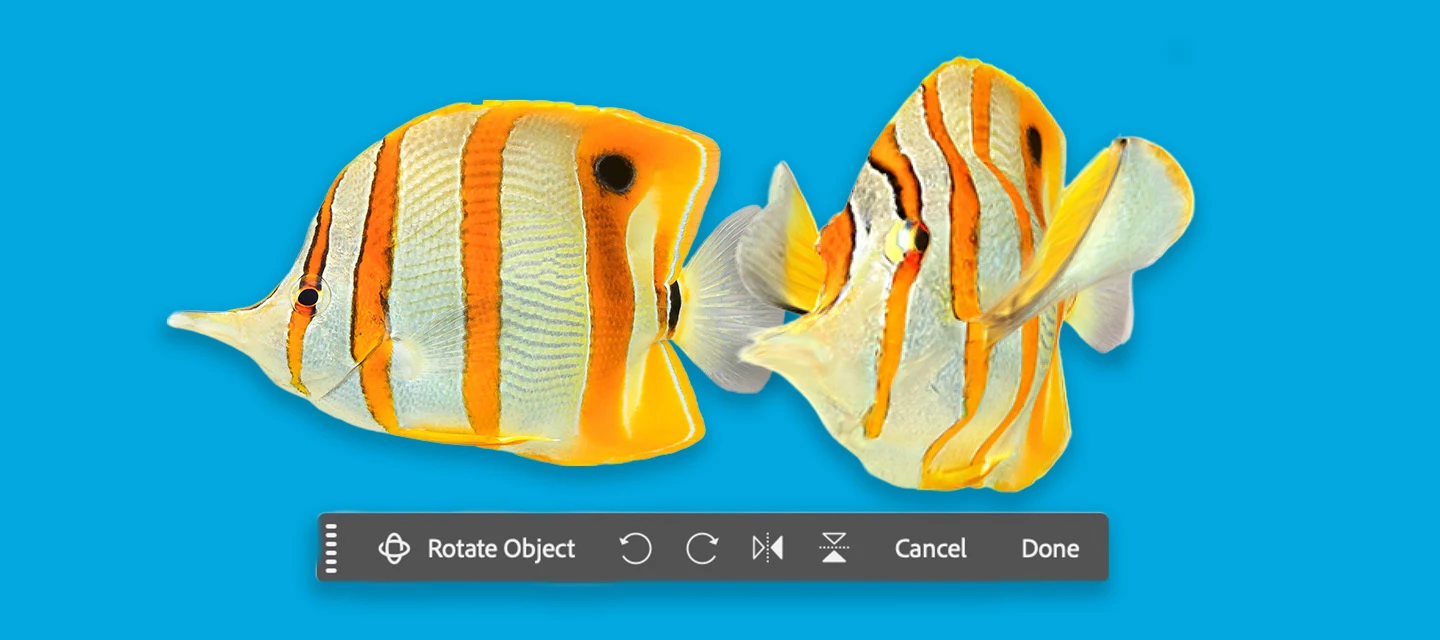
Generative Rotate Feature with Fish

Rotate Object lets you quickly transform 2D objects into rotatable 3D images, allowing rotation (spin, tilt, dolly) from any viewpoint to match perspective and depth. (Version: 27.5.0 20260311.m.3453)
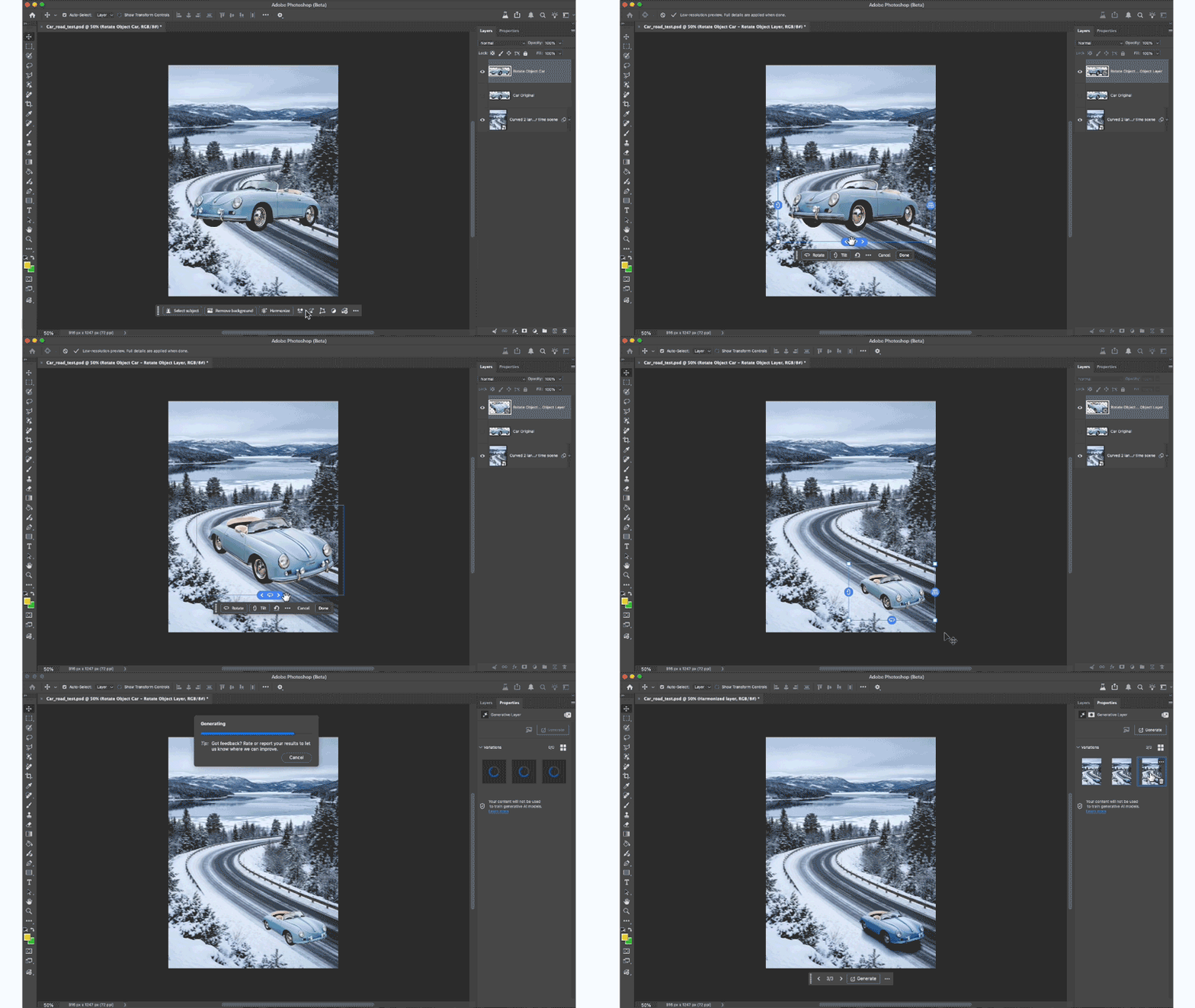
HOW TO TEST:

1. Open or place an image 

2. Select a pixel layer that contains an object. PRO TIP: You may want to duplicate the layer → as the layer will be converted to a Rotate Object Layer

  • Cmd + T to enter transform mode or Edit > Rotate Object
  • Click the Rotate object button in the context bar - note this feature is 20 Generative Credits, the first 3 tries do not deduct generative credits.

3. After the 3D conversion is complete, the initial rotated object will be a low-res PREVIEW. The layer was converted to a Rotate object layer.


DIFFERENT WAYS TO ROTATE AN OBJECT:
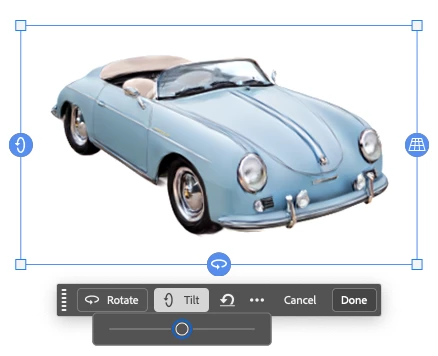
 

  • Contextual Task Bar: click to use the Rotate and Tilt sliders.

  • Click and drag the blue on-canvas controls around the object.

  • Right-click on the object and drag (on-canvas for unconstrained rotation).

  • Properties panel: enter specific values while in rotation mode.

4. After the rotation is complete, select the Done button, and the object is UPSCALED with details.

PRO TIP: Select Harmonize to blend the rotated object with the background.

5. You can select “Edit rotation” to change the rotation - select done to accept changes. (20 credits ONLY deducted on the FIRST rotation).

 

HOW TO PROVIDE FEEDBACK:

1. Click on the Beaker Icon in the upper right of the Photoshop application:

2. Find "Rotate Object" in the left panel, and provide YES, Rotate Object is ready to be released to the non-Beta Photoshop (full) release or NO, Rotate Object is not ready to be released to the Photoshop full release. Leave a comment if you have one...

3. Or you can leave a comment in this Beta Forum post.

    16 replies

    Participating Frequently
    March 20, 2026

    Love this feature but it’s not working for me. I’ve got an 8  bit rgb pic of a duck (I tried several other simple images too) that i separated from the background. every time i try the feature it returns an error that says “we’ve encountered an issue and can’t complete your request at this time.” what is causing this error? the only thing I can think of is I’m on an education account for a k-12 school (I’m a teacher) but that doesn’t make sense to me, since there’s no objectionable content in rotating an image. 

    Participating Frequently
    March 19, 2026

    This is an interesting concept, is there a plan to add additional reference images to ensure shape/graphics on products are maintained?

    Michael23262464s3rp
    Participant
    March 17, 2026

    As long as it alters the object itself and adds or omits details, its use makes only limited sense.

    Owen Grove
    Participant
    March 16, 2026

    A couple questions for clarification:

    1. Are there canvas size restrictions/limits? I had an issue with a canvas of 1800x1000 at 8bit and the “rotate object” option showed up but was grayed out. When I changed the canvas to 1000x667, I was able to rotate the object.
    2. Does it just cost 20 credits to turn an object into a “rotate object layer” and any following “edit rotation” + upscaling is free for that object?
    3.The first 3 rotate object layers a user makes are free and then all rotations going forward cost 20 credits?
    4. Does it only work in 8-bit like some users have noted?
    5. Is there any preferred type of format/canvas settings users should be aware of for this feature to work?

    onazole
    Known Participant
    March 16, 2026

    At low resolution, the rotation isn't properly visible, and if it's not right after confirmation, I've lost 20 credits.

    Participant
    March 16, 2026

    This new Object Rotation feature appears correctly in the interface, but it remains permanently greyed out for me, even with an isolated pixel layer, in 8-bit mode, on a transparent background, and in free transform mode… Is there anything else I should do?

    amy durocher
    Community Manager
    Community Manager
    March 17, 2026

    Here are other parameters for using Rotate Object:

    • Rotate Object only works on 8-bit images. It does not work on 16 and 32-bit images.  

    • Internet connection is required to use Rotate Object 

    • RGB color mode is the only supported color mode (Rotate Object doesn’t work for CMYK, Grayscale, Duo/Tri/Quad Tone, Index, Multichannel, and Bitmap modes).  

    • Rotate Object also does not work on Shape and Type layers, Frame, Adjustment, Video, and Fill layers. Although you can convert Type and Shape layers to Smart Objects and use Rotate Object.

    • Users need to have visible, unlocked, opacity higher than 50%, and a layer that contains pixels. 

    Participating Frequently
    March 15, 2026

    No, the new Rorate tool is not ready for release. It requires first, >Image>BitDepth>8, then after a simple “Z” axis rotation ~ 30  deg. the image fails to “Restore”, leaving behind a crude, low resolution. unacceptable image.

    CONVERSTONE
    Participant
    March 15, 2026

    i am using adobe team. downloaded beta after seeing by youtube today. I have tried to do the object rotate but failed message poped up after scan. i have tried several times more but failed. then updated Nvidia 10 march updates and tried again but still failed. The message i am receiving as below;


    Participant
    March 15, 2026

    Same here. We have Educational plan at school and same error here.

    amy durocher
    Community Manager
    Community Manager
    March 17, 2026

    Are you K12 or Higher Ed accounts? Unfortunately, the feature is blocked for K12 accounts (as are third party models such as Nano Banana and FLUX).


    If you are Higher Ed EDU accounts it could be your Admin has blocked the feature via the Admin Console. There is a NEW option in the Admin Console to control third party models to certain users. 

    Woodrow To
    Participant
    March 15, 2026

    Which AI model is powering this rotation functionalitiy? Is it Firefly Image Model 5?🤔

    amy durocher
    Community Manager
    Community Manager
    March 17, 2026

    Yes, this is an AI powered features (2to3DImage and Upscale). We are not leveraging Firefly Image 5.

    Participant
    March 13, 2026

    This is really impressive!  Is there going to be any way to export the object as an actual 3D model?

    amy durocher
    Community Manager
    Community Manager
    March 17, 2026

    We are definitely considering, we have had lots of requests for this!

    Known Participant
    March 17, 2026

    The other way ´round would also be helpful:
    Import a 3D model (maybe from Dimensions etc.) and then rotate it with the new tool.