



amy durocher
Community Manager
Community Manager
March 12, 2026

Rotate Object is now available in Beta!
  • March 12, 2026
  • 16 replies
  • 10466 views
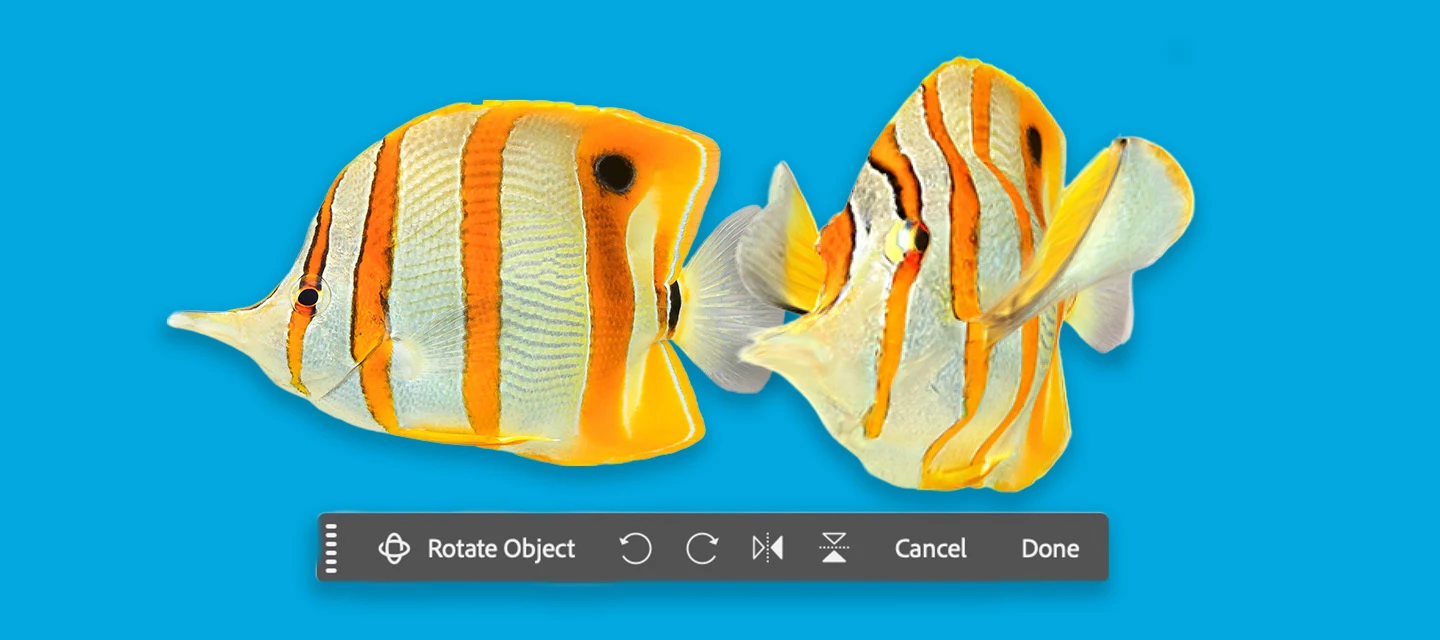
Generative Rotate Feature with Fish

Rotate Object lets you quickly transform 2D objects into rotatable 3D images, allowing rotation (spin, tilt, dolly) from any viewpoint to match perspective and depth. (Version: 27.5.0 20260311.m.3453)
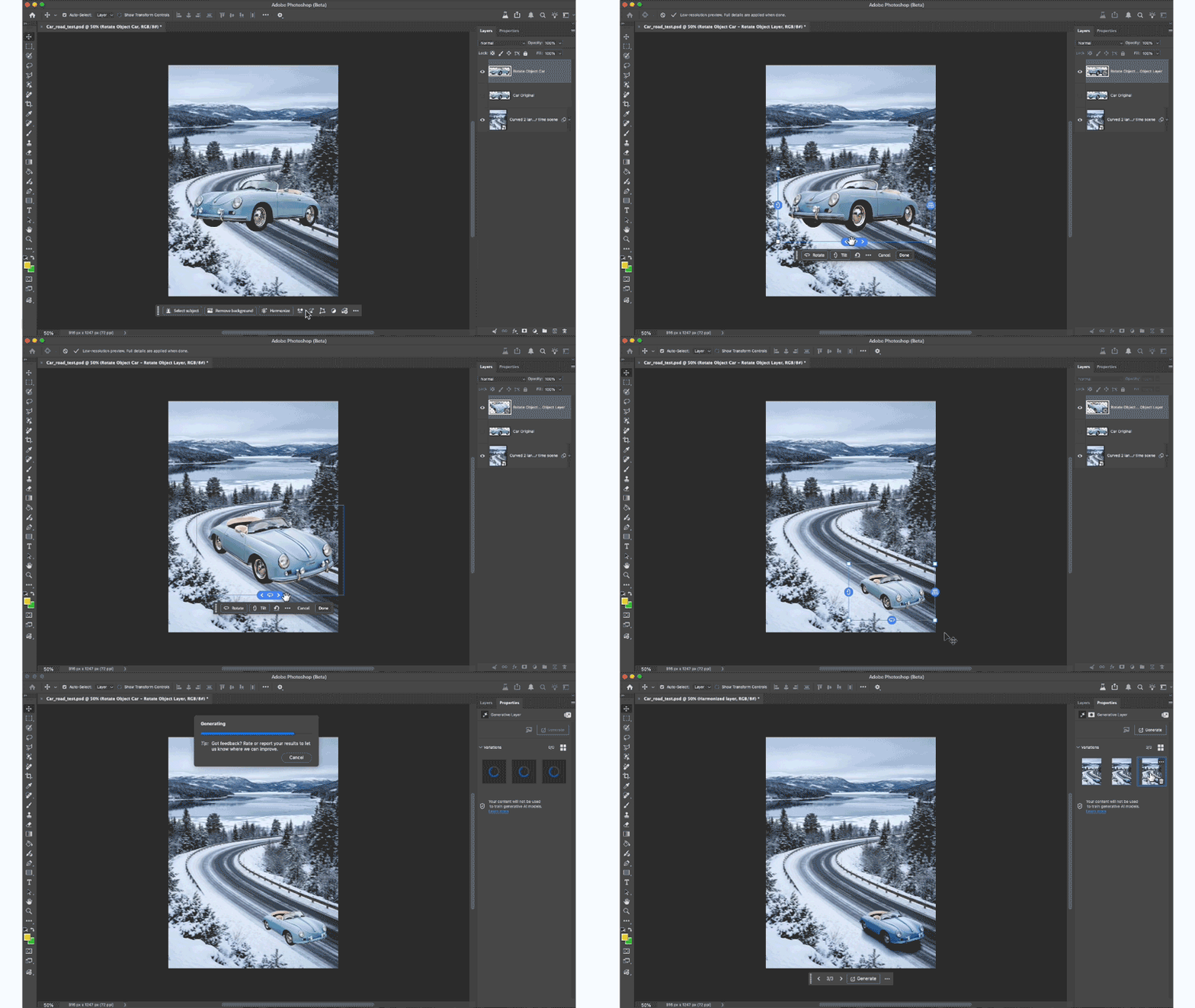
HOW TO TEST:

1. Open or place an image 

2. Select a pixel layer that contains an object. PRO TIP: You may want to duplicate the layer → as the layer will be converted to a Rotate Object Layer

  • Cmd + T to enter transform mode or Edit > Rotate Object
  • Click the Rotate object button in the context bar - note this feature is 20 Generative Credits, the first 3 tries do not deduct generative credits.

3. After the 3D conversion is complete, the initial rotated object will be a low-res PREVIEW. The layer was converted to a Rotate object layer.


DIFFERENT WAYS TO ROTATE AN OBJECT:
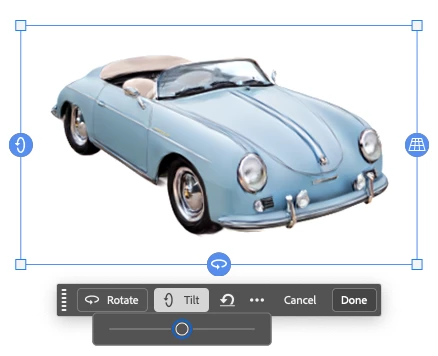
 

  • Contextual Task Bar: click to use the Rotate and Tilt sliders.

  • Click and drag the blue on-canvas controls around the object.

  • Right-click on the object and drag (on-canvas for unconstrained rotation).

  • Properties panel: enter specific values while in rotation mode.

4. After the rotation is complete, select the Done button, and the object is UPSCALED with details.

PRO TIP: Select Harmonize to blend the rotated object with the background.

5. You can select “Edit rotation” to change the rotation - select done to accept changes. (20 credits ONLY deducted on the FIRST rotation).

 

HOW TO PROVIDE FEEDBACK:

1. Click on the Beaker Icon in the upper right of the Photoshop application:

2. Find "Rotate Object" in the left panel, and provide YES, Rotate Object is ready to be released to the non-Beta Photoshop (full) release or NO, Rotate Object is not ready to be released to the Photoshop full release. Leave a comment if you have one...

3. Or you can leave a comment in this Beta Forum post.

    16 replies

    bankney06
    Participant
    March 13, 2026

    Cant get this to work. I click the rotate object button. it “finds subject in the image.” Then when its “preparing rotatable object” after like 2 seconds the loading bar just disappears and nothing happens. The bar hasnt gotten over like 20%. It doesnt freeze, the loading bar just disappears. happens to any image. Reinstalled PS Beta, Updated my Mac OS, Cleared mem space. Any help??

    amy durocher
    Community Manager
    Community Manager
    March 14, 2026

    Can you provide more info, I can try to help troubleshoot: if you go to Photoshop > Help > System Info, copy all the text and email it to: durocher@adobe.com. If you have the file you are trying to run Rotate Object on that would be helpful too (or if if it fails on ALL files - is valuable info)

    bankney06
    Participant
    March 16, 2026

    Just sent the email. It happens on every object. Also tried to include a screen recording in the email. Please let me know any thoughts

    willjay
    Participant
    March 13, 2026

    I'm unable to get the rotate tool to appear on my desktop computer when using the new Photoshop beta. However, I can get it to work on my laptop with the same beta version. Any ideas?


    Participating Frequently
    March 13, 2026

    I had the same issue. Make sure you are using the latest Nvidia drivers  (I use the studio drivers; updated March 10th) and PS Beta 27.5 Build 3453. However it only works for me in 8 bit mode right now, which is not as helpful as I would like

    amy durocher
    Community Manager
    Community Manager
    March 19, 2026

    We are working on the 8-bit limitation...stay tuned!

    Participant
    March 13, 2026

    Does this not work for “Adobe for teams”?
    Rotate object does not show, and not Nano Banana eg for Generate image either.
    RT

    Glenn 8675309
    Legend
    March 14, 2026

    Press CTRL+T to make the rotate option appear- A WORD OF CAUTION:  I did some simple rotates on two 2d images and burned thru 11 generative credits.

    DAG82
    Participant
    March 13, 2026

    Hi, this looks like an amazing feature. I am trying to use it just now. When I select my layer, cmd T(transform), the “rotate object” feature is greyed out. 

    Can you help?


    EDIT - Solved it. My file was a 16bit PSD. I switched to 8bit and it worked.


    Participant
    March 13, 2026

    It was working great yesterday, but today Rotate Object is greyed out. I have tried different images no luck. I wonder if it’s because of Beta Update today

    Participating Frequently
    March 14, 2026

    This one took me a while to figure out. Rotate object only works for me and numerous others on 8-bit. Like me you probably work a lot in 16 bit. Go to image>mode to change it

    creative_Aura6887
    Participant
    March 13, 2026

    I have full Creative Cloud and the latest Photoshop Beta, but 3d rotate isn’t showing when I select my cutout layer. Any idea what the issue might be?

    creative_Aura6887
    Participant
    March 13, 2026

    Ignore - apparently my Creative Cloud wasn’t updated. It’s working now.

    Carlos_Oliveras
    Known Participant
    March 13, 2026

    It’s awesome! I just made a video about this feature on my YouTube channel. I haven’t tested it extensively yet, but I think it works reasonably well, considering how crazy this is (generating 3D from 2D, and relatively fast).
    When you say “the first 3 tries do not deduct generative credits,” do you mean the first 3 tries for each image, or just the first 3 tries overall?
    Also, is this considered a premium feature? I have CC Pro, but what about users on other plans, such as the Photography plan?
    Thanks 👍

    amy durocher
    Community Manager
    Community Manager
    March 13, 2026

    Hi ​@Carlos_Oliveras! The “Standard” plans, like CC Standard, provide 3 (total) free tries of premium features like Rotate Object. I believe in the near future, standard plans will have access to premium features, users will need to buy credits to use premium feature (they wont’ be blocked)

    Glenn 8675309
    Legend
    March 14, 2026

    There is no place to “buy credits”- it requires yet another subscription, correct?