



Srishti Bali
Community Manager
Community Manager
September 17, 2026
Sticky

Edit your photos with a text prompt with Prompt to Edit in Photoshop 27.10 and above
  • September 17, 2026
  • 15 replies
  • 1040 views

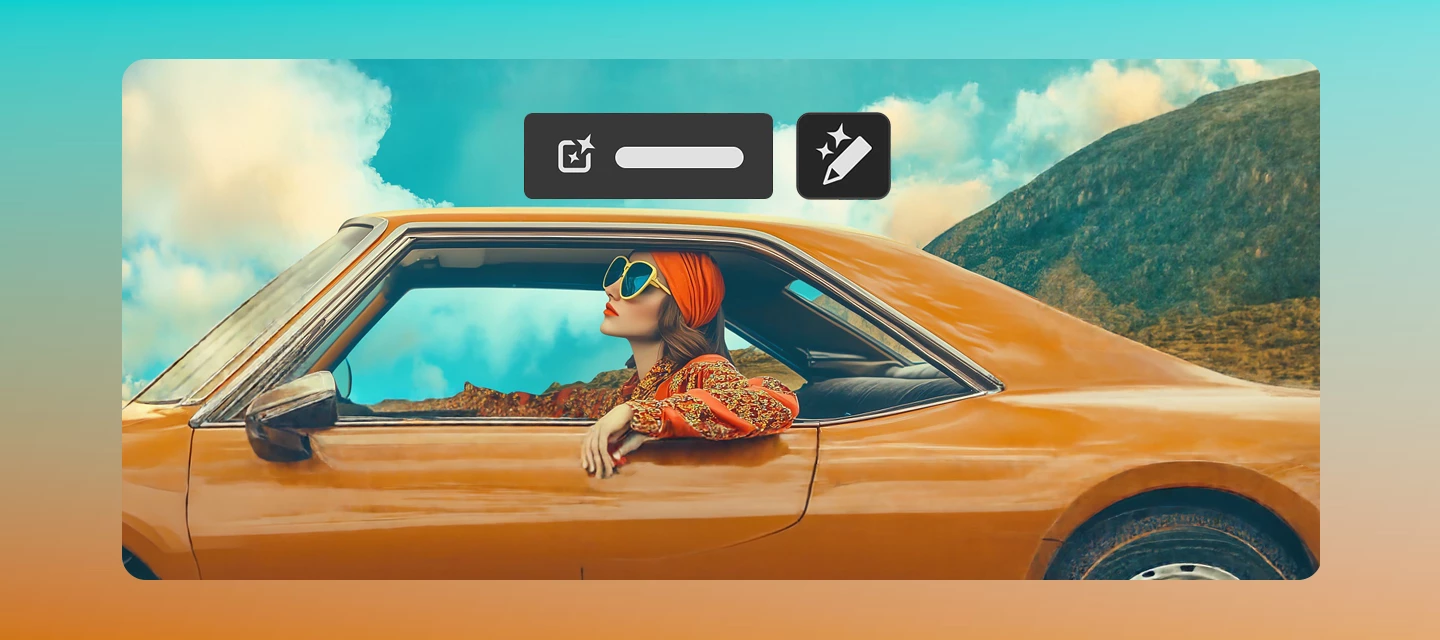
Ever wish you could change the mood, season, lighting, or even the action in a photo without diving into layers, masks, and complex edits? With Prompt to Edit in Adobe Photoshop, you can make powerful image-wide changes using simple natural language. Just tell Photoshop what you want to see, and AI helps bring it to life. 


What Is Prompt to Edit? 

Prompt to Edit lets you transform an entire image using a text prompt. Instead of manually adjusting multiple settings, you can describe the result you're after, and Photoshop generates variations for you to review and apply. 

Whether you're enhancing an existing photo or experimenting with creative concepts, Prompt to Edit makes image transformation faster and more intuitive. 


What Can You Do With It? 

Here are a few ways creators are already using Prompt to Edit: 

Change the atmosphere 

  • "Change the lighting to a warm sunset tone." 

  • "Create a cinematic evening mood." 

Transform the environment 

  • "Change the season to rainy, add rainfall and puddles." 

  • "Turn this sunny day into a snowy winter scene." 

Enhance image quality 

  • "Improve overall brightness and contrast." 

  • "Increase vibrancy while maintaining natural skin tones." 

Reimagine the scene 

  • "Change the pose to standing and dancing." 

  • "Create a more energetic action shot." 


How It Works 

Open an image in Photoshop and select the image layer you're working on. If you're using a generative layer, make sure the entire image is selected. Then select Prompt to Edit from the Contextual Task Bar or the Edit menu, enter a description of the changes you'd like to make, choose your preferred AI model, and generate variations to explore different creative directions. 

Learn more.


When Should You Use Prompt to Edit? 

Think of Prompt to Edit as the option for when the whole image needs a creative refresh, not just a small touch-up. 


How is this different from Generate Image and Generative fill?

  • Generate Image: Creates a completely new image from scratch based on a text prompt.
  • Prompt to Edit: Modifies an existing image (or a fully selected image) based on written instructions.
  • Generative Fill: Generates or edits content only within a specific selected area of an existing image.


Why Creators Will Love It 

Prompt to Edit removes much of the technical complexity that traditionally comes with large-scale image edits. It encourages experimentation, speeds up workflows, and allows creators to explore multiple visual directions in seconds. 

Instead of focusing on how to make the change, you can focus on what you want to create. 


Join the Conversation 

What’s the most creative Prompt to Edit transformation you've tried so far? Have you changed seasons, reimagined lighting, or completely transformed a scene? Share your favorite prompts and results with the community and inspire the next great Photoshop creation. 

    15 replies

    Participant
    October 2, 2026

    Sounded really promising but failed every time I tried it with a helpful message to check my network, which is fine.

    Participant
    September 30, 2026

    This is a really useful Photoshop feature. Being able to edit photos simply by describing the changes you want with a text prompt makes the editing process much faster and more intuitive.

    Participant
    September 30, 2026

    Prompt to Edit looks useful for quickly testing different visual directions without rebuilding the whole edit manually. I especially like the idea of changing lighting, colors, and the overall mood with a simple prompt. It could also be interesting to experiment with different text and letter styles in creative edits.

    avid_Euphoriaaa94
    Participant
    September 30, 2026

    very good thanks

    By Elovra Kessanixx
    Participating Frequently
    September 24, 2026

    Hey! 👋

    This is such a game changer honestly. The fact that you can just type "turn this sunny day into a snowy winter scene" and Photoshop handles it is wild — that used to take layers, masks, and like 30 minutes minimum.

    Already tried changing lighting to a warm sunset tone on a few portrait shots and the results were surprisingly natural looking. Not perfect every time but the variations it gives you to choose from make it really easy to land on something good.

    The distinction between Prompt to Edit, Generative Fill, and Generate Image is really helpful too — that's something a lot of people were confused about.

    Can't wait to experiment more with the pose and action prompts! 🔥

    Chris 486
    Community Expert
    Community Expert
    September 23, 2026

    This will be incredibly helpful for quick adjustments to my files that receive fun “feedback” buzzword like “make it pop more”.

    September 22, 2026

    This is super cool!

    Participant
    September 22, 2026

    This is such a useful feature, especially for those of us who don't want to manually dig through every adjustment layer. Being able to just describe what you want and let Photoshop handle the variations is a huge time saver.

    What I find most impressive is how it handles product images — changing backgrounds, lighting, and overall mood while keeping the product itself intact. That's something that used to take a lot of back-and-forth with masking and adjustments.

    One thing I'm curious about, though — how well does it handle text and logos within an image when making environment changes? Keeping those consistent while transforming the background could be a real game changer for design work.

    Overall, Prompt to Edit feels like the right middle ground between full Generative Fill (which creates from scratch) and manual editing. It gives you creative freedom without losing control over the original image.

    Excited to see how this evolves in future Photoshop updates! 🎨

    Participant
    September 23, 2026

    Totally agree! The way it keeps the subject intact while changing everything around it is impressive. And that's a great point about text and logos — if it can handle those consistently, it would be a massive win for brand and marketing work. Fingers crossed that's on the roadmap!

    Enchanting_Echocd36
    Participant
    September 21, 2026

    The biggest advantage for me is that Prompt to Edit makes experimentation much faster. Instead of spending time adjusting several layers just to test an idea, you can describe the overall change and compare different variations.

    I’d also be interested in how consistently it handles product images. For example, if you’re editing a smartphone photo, preserving the exact phone shape, camera layout, buttons, text, and branding while changing the background or lighting is really important. That kind of detail would make the feature much more useful for real-world content creation.

    Participant
    September 21, 2026

    Prompt to Edit makes complex image-wide changes much easier, especially for creators who want fast results without manual editing. One useful improvement would be adding more precise control over individual elements so the AI can make changes without affecting important parts of the original image.