




The wait is finally over: Customize your Save dialog file formats in Photoshop
You asked, we listened, and we're excited to share that one of the community's long-standing feature request is now available in Photoshop 27.10.
For years, many of you have asked for more control over the file formats shown in the Save As and Save a Copy dialogs, including the ability to hide formats you don't use and create a cleaner, more streamlined saving experience. Today, we're happy to say: it's here!
What's new?
You can now customize the file formats displayed in the Save As and Save a Copy dialogs.
Simply go to: Edit > Customize Save Dialog File Formats
From there, you can:
-
Enable or disable file formats
-
Move formats you don't need to the Disabled File Formats column
-
Restore the default list at any time
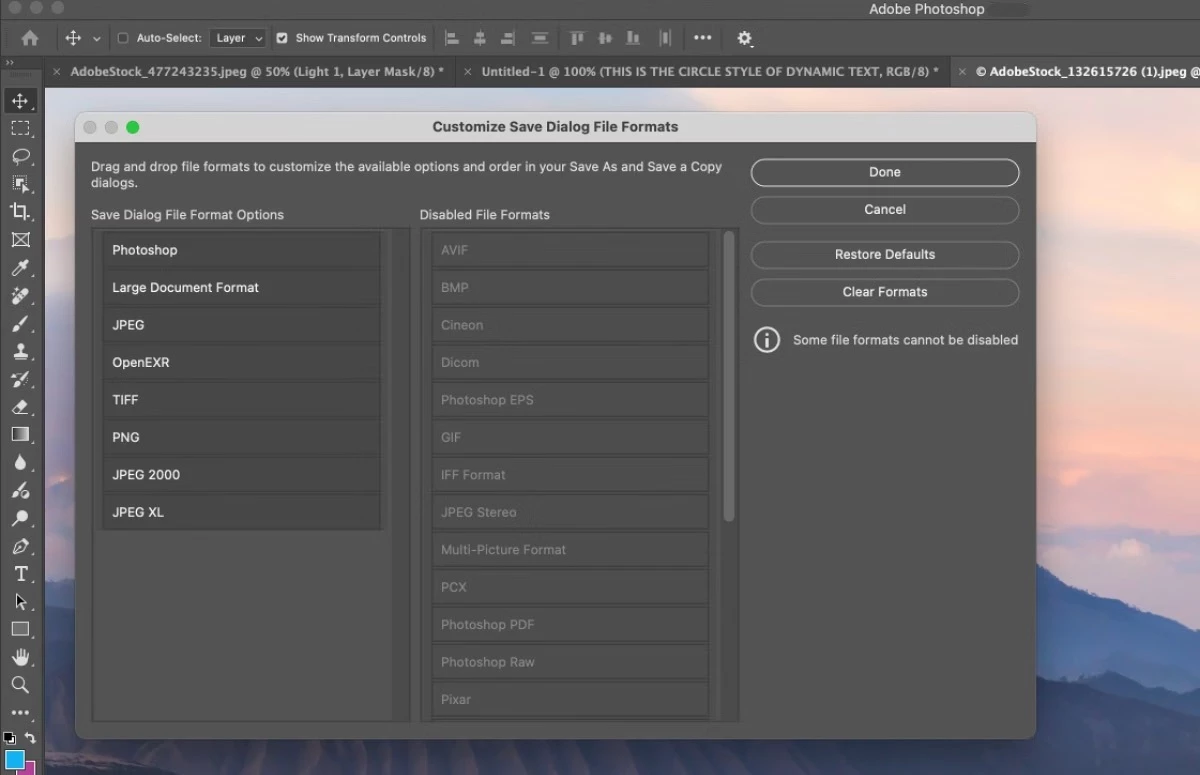
Whether you're a photographer who primarily exports JPEGs and TIFFs, or a designer working mostly with PSDs and PNGs, you can now tailor the save experience to match your workflow.
Why you'll love it
No more scrolling through long lists of formats you never use. This update helps reduce clutter, speeds up saving, and puts your most important file formats exactly where you want them.
Learn more: 📖 Learn more about customizing the file format list
Thank you!
This feature is a direct result of feedback from the Photoshop community. Thank you to everyone who shared ideas, voted on requests, and helped shape this experience.
Give it a try and let us know what you think. Which file formats are at the top of your customized list? We'd love to hear how you're using this new capability in your workflow.
 AdChoices