



Francis-Crossman17221443
Community Manager
Principal Product Manager
May 17, 2022
Question

DISCUSS: Auto ducking fade position slider

  • May 17, 2022
  • 6 replies
  • 2988 views

The new Fade Position slider lets you adjust the position of fades when applying Auto Ducking.
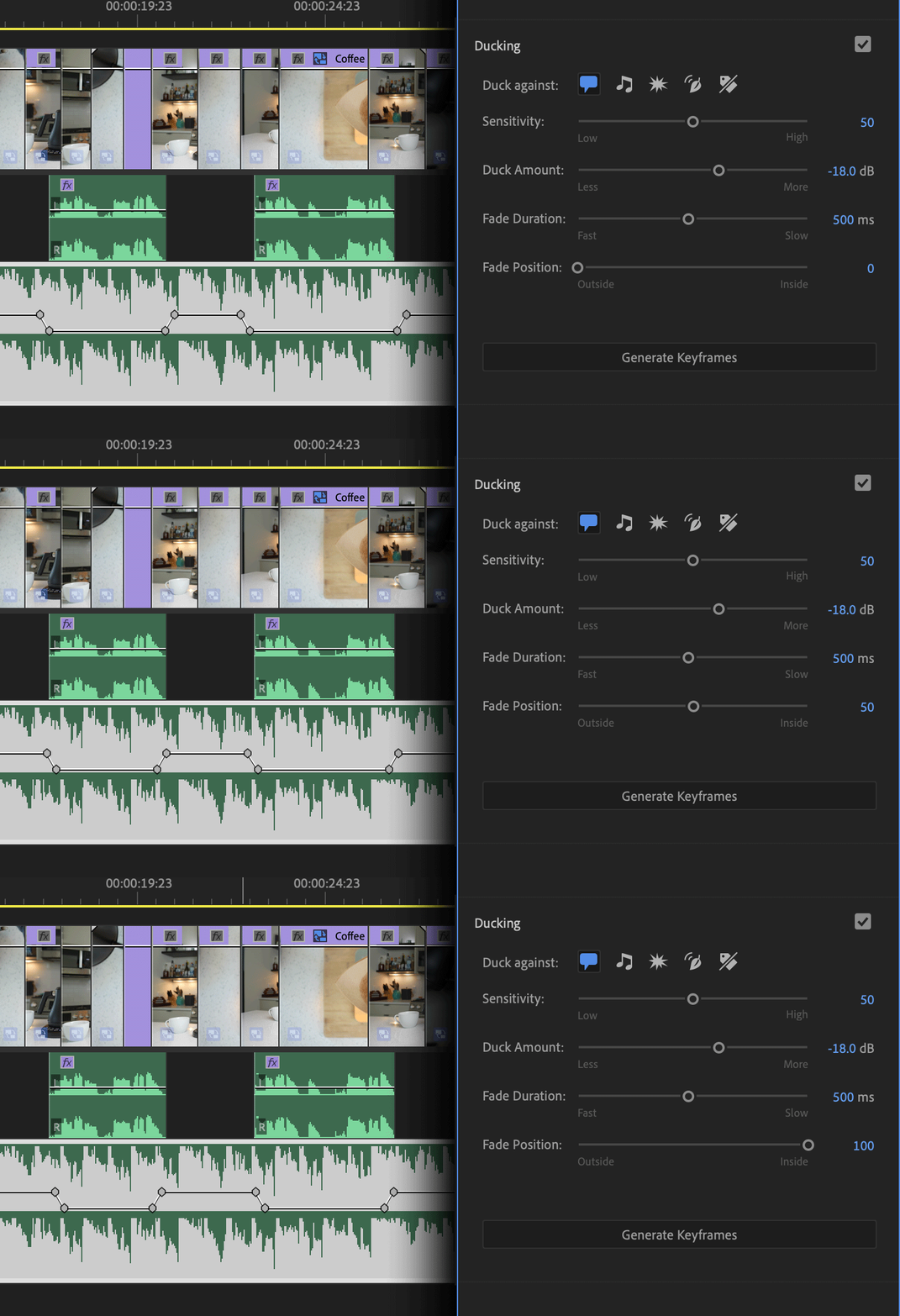
Ducking is a great feature of the Essential sound panel that allows you to automatically reduce the level of music when dialog is present (or any other combination of audio types).  This is a common task when balancing audio and it can take a long time when done by hand.  Auto ducking automates this process and does this for you very quickly.  But to make the fade sound really smooth it’s common to have the music fade overlap with the dialog a bit.  Now, this can be automated too.


With the Fade Position slider, you can choose where you want the background audio fade to land in relation to the dialog – outside the dialog, inside, or in the middle.


Of course, you can manually adjust the results of individual fades after performing Auto Ducking, but this way you can get closer to what you need faster.


We want to know what you think.  Please join the conversation below.

This topic has been closed for replies.

6 replies

Participant
August 23, 2022

Guys I don't have a fade position option 😞 I have Adobe Premiere 22.5 version, this is the nevest, right? So what did U do that U have it, this is some plugin?


R Neil Haugen
Legend
August 23, 2022

I believe that's only in the public beta at this time.


Which is a 2023/23.x series build.


Neil

Everyone's mileage always varies ...
Richard van den Boogaard
Community Expert
Community Expert
August 5, 2022


I would really love to see these type of fader styles that you can easily drag to your liking, also in this auto-ducking feature. Audition has had these for years and it just works so much nicer than adding individual keyframes.

R Neil Haugen
Legend
August 5, 2022

Oh, yes ... I want those quick-working & most excellent faders ...


Neil

Everyone's mileage always varies ...
Richard van den Boogaard
Community Expert
Community Expert
July 21, 2022

First, I would love to see Audition style faders inside PPro. Just on the timeline, not necessarily inside the Essential sound panel.


Second, the Auto-ducking feature should also have an option - whilst the duck occurs - to adjust the mid-tones that sit in the same range as human voices. So, not only the volume, but also the tonal range.


Think of it like you're stepping outside a club to have a normal conversation: the music continues, but it sounds not only less loud, but more bassy. In a lot of movies with a scene inside a club, this is exactly how they do it.


Could your team look into such an option?

R Neil Haugen
Legend
August 3, 2022

Yes, I want the fade curves and a frequency control maybe slider as per Jarle's & Richard's comments!


Neil

Everyone's mileage always varies ...
Richard van den Boogaard
Community Expert
Community Expert
June 7, 2022

Interesting development. But, while you're at it, can you please add a feature to influence the curve of the fade, like is present in Adobe Audition. Being able to instantly drag S-curves instead of only linear curves would be *SO* much appreciated!

Legend
June 7, 2022

I agree with Richard. A control for fade curve would be fantastic!

Legend
May 22, 2022

I simply LOVE this! The lack of this (I called it a "tightness" slider in my feature request) has been the main thing that kept me from using automatic Ducking. Now, finally, I can actually use it. Yay!

Community Expert
May 18, 2022

I have done a lot of manual music ducking (40 years a sound mixer) and I find it sounds the most natural when the fades can match the musical phrases. The remix function has the ability to analize the music, it would be nice if this could be carried over in some way to the auto ducking.