




DISCUSS: HDR Proxies in Premiere Pro
We are rolling out Color managed proxies for HDR clips. With this, proxies will now be created in the color space of the original media (for Rec. 709, Rec. 2100 HLG & PQ). For Log clips, Premiere will create Rec. 709 proxies without any color conversion. This way, users will get the same color correction and LUTs effect on the media as on the proxy.
Proxies can be created in Premiere Pro in 2 ways.
- By right clicking on media in Project Panel and choosing Proxy > Create Proxy
- During Ingest. File > Project Setting > Ingest settings
In the recent versions of Premiere pro when users would import HDR footage (Rec. 2100 HLG/ PQ or Log clips) and create proxies they would see color difference between the original media and proxies. This was because proxies did not respect the color space of the media and were not color managed themselves.
With the new update in Beta, this is fixed. H264 & QT Prores proxies are color managed and are created in the same color space as their original media. Keen users will also notice that when making proxies for HDR clips (Rec. 2100 HLG & PQ) the Low Resolution Proxy options are disabled as those formats don’t support HDR media.
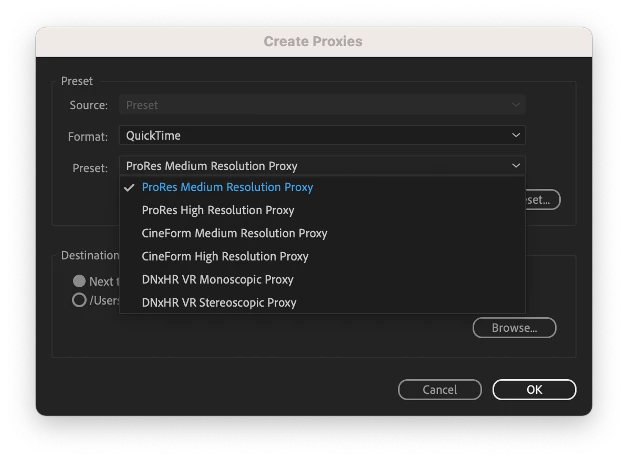
Low-res Proxies are disabled for HDR media
Note: During proxy creation at ingest, if user choses Low Resolution proxy, clips in HDR color space (Rec. 2100 HLG & PQ) will still create Medium Resolution proxy to support HDR content.
For users opening projects created in older versions, they will continue seeing the mismatch of colors between original media and proxies, and they will have to rebuild their proxies to have the latest changes reflect.
 AdChoices