



Question
Now in Beta: Cleaner, More Organized Menus Across Premiere Pro
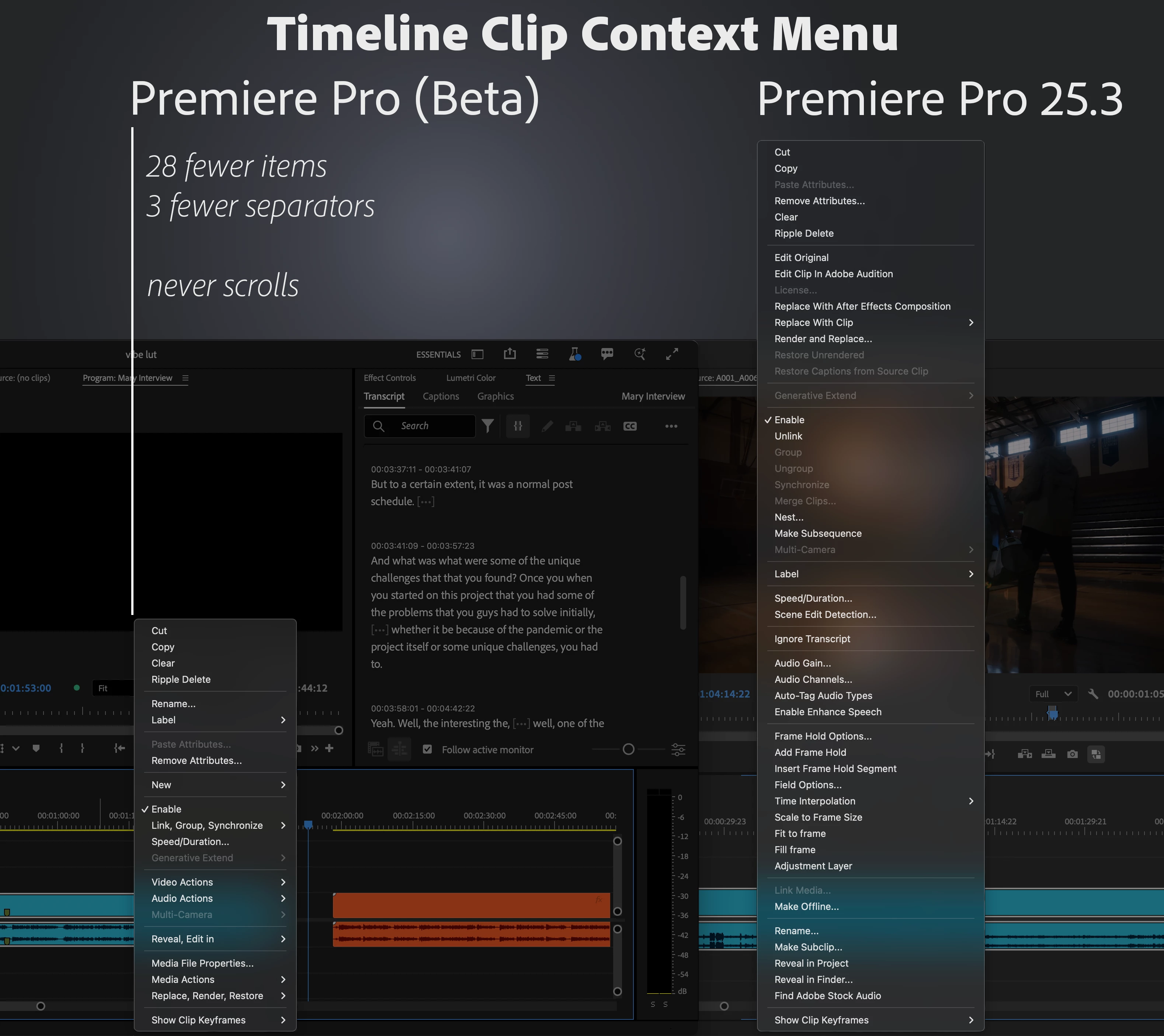
We’ve taken a fresh look at the application, panel, and context menus across Premiere Pro and developed a new organizational system to bring editors all the same functionality in a more concise and discoverable way. Even on a 13-inch laptop, you’ll never have to scroll a menu to get your work done.
Our approach to organizing the menus:
- Aggressively organize into submenus. Commands stay in the same menu as before, but the submenus mean the menu stays short and readable.
- Give useful names to the new submenus. Editors new to Premiere Pro can more quickly learn what the menu items do.
- Be consistent when similar items appear in different menus. Whether in the Project or Timeline panel, common items like “Label” or “Media File Properties” appear in the same parts of menus.
Across the application, menus that were updated average a 40% reduction in height, with some menus shrinking by half.
This is a big change to the feel of using Premiere Pro, and while we took time and care with these new menus, some parts may still need more work. Try them out while they’re in beta [version 25.6 build 39 or later] and let us know how they are working for you. Thank you!
 AdChoices